In modern eCommerce, delivering a seamless customer experience goes beyond just offering quality products and competitive pricing. One of the most critical yet often overlooked aspects is accurate address collection. Many businesses struggle with incorrect or incomplete delivery details, which leads to failed deliveries, increased operational costs, and dissatisfied customers.
To solve this problem, many store owners are now exploring map-based address selection with geolocation. This approach allows customers to select their exact delivery location using a visual map interface instead of relying solely on manual address input. While this feature is highly beneficial, implementing it within Shopify requires a clear understanding of the platform’s capabilities and limitations.
This article explains how map-based address selection works in Shopify, the best implementation approach, and the key considerations you need to keep in mind.
Understanding the Problem with Traditional Address Input
Most online stores use standard address fields where customers manually enter their delivery details. While this method works in many cases, it often creates problems such as:
- Incorrect or incomplete addresses
- Typing errors
- Missing landmarks
- Confusion for delivery personnel
These issues are more common in areas where addressing systems are not well structured. As a result, businesses face delivery delays, increased return rates, and customer complaints.
Why Map-Based Address Selection is a Better Approach
Map-based address selection solves these issues by allowing customers to visually choose their location.
Instead of typing an address, customers can:
- Search for their location on a map
- Drop a pin on the exact delivery spot
- Adjust the pin for greater accuracy
This method ensures that the delivery location is precise, reducing errors and improving overall efficiency.
The Key Insight: Where to Implement This Feature
One of the most important aspects of this solution is understanding where it can be implemented within Shopify.
The most practical and widely recommended approach is to integrate the map before the checkout stage, rather than trying to place it inside the checkout.
Why Checkout Integration is Limited
Shopify’s checkout system has restrictions, especially for stores that are not on advanced plans. These restrictions are designed to maintain stability and security but also limit customization.
Because of this:
- You cannot easily add custom interactive elements in checkout
- Embedding a map interface directly in checkout is not standard
- Customization options are limited
This makes it impractical to rely on checkout for capturing location data.
The Practical Solution: Pre-Checkout Integration
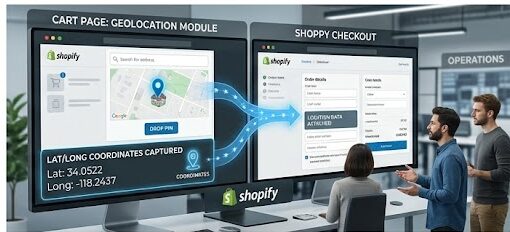
Instead of modifying checkout, the better approach is to collect location information earlier in the customer journey.
Ideal Placement Options:
- On the product page
- On the cart page
- In a popup before checkout
By capturing the location at these stages, you ensure that the data is available before the customer completes the purchase.
How the System Works
Let’s understand the complete flow in a simple step-by-step manner.
Step 1: Adding a Map Interface
A map interface is added to your store so customers can interact with it. This interface allows users to search for locations and visually navigate the map.
Step 2: Customer Selects Location
The customer interacts with the map by:
- Searching for their address
- Dropping a pin
- Adjusting the pin to match the exact delivery location
This step ensures that the location captured is highly accurate.
Step 3: Capturing Coordinates
Once the location is selected, the system captures the exact geographical coordinates:
- Latitude
- Longitude
These coordinates represent the precise delivery point.
Step 4: Saving the Data
The captured location data is stored within the cart or order data. This ensures that the information travels along with the order throughout the checkout process.
Step 5: Using the Data After Order Placement
Once the order is completed:
- The coordinates are available in the order details
- A location link can be generated
- Delivery teams can use this data for accurate navigation
This improves the efficiency of the delivery process and reduces errors.
Data Handling Strategy
Capturing location data is only useful if it can be stored and accessed effectively.
How the Data is Stored
The system stores the selected location in a way that:
- It remains attached to the order
- It can be accessed later for fulfillment
- It does not interfere with standard checkout flow
How the Data is Used
Once stored, the data can be used for:
- Delivery route optimization
- Customer address verification
- Future order references
This adds long-term value beyond a single transaction.
Benefits of Map-Based Address Selection
Implementing this feature provides several important advantages.
1. Improved Delivery Accuracy
Since customers select their exact location, there is less chance of delivery errors.
2. Reduced Failed Deliveries
Accurate location data reduces the chances of missed or incorrect deliveries.
3. Better Customer Experience
Customers feel more confident knowing their location is precisely captured.
4. Operational Efficiency
Delivery teams can navigate more easily, saving time and resources.
5. Fewer Support Issues
Clear location data reduces customer complaints and support requests.
Challenges to Consider
While the solution is effective, it also comes with certain challenges.
1. User Experience Design
The map interface must be simple and easy to use. If it is too complicated, customers may abandon the process.
2. Performance Impact
Maps can slow down page loading if not optimized properly.
3. User Errors
Some users may place the pin incorrectly. Providing clear instructions can help reduce this issue.
4. Privacy Concerns
Customers should be informed that their location data is being collected and used for delivery purposes.
Best Practices for Implementation
To ensure success, follow these best practices:
Keep the Interface Simple
Make the map easy to understand and interact with.
Provide Clear Instructions
Guide users on how to select their location correctly.
Allow Location Editing
Give customers the option to adjust their location before checkout.
Confirm Selection
Show a confirmation message once the location is selected.
Optimize for Mobile
Most users shop on mobile devices, so ensure the map works smoothly on smaller screens.
Strategic Importance of This Feature
Map-based address selection is not just a technical feature—it is a strategic improvement.
It is especially valuable for businesses that:
- Offer local or hyperlocal delivery
- Operate in regions with unclear address systems
- Require high delivery accuracy
By implementing this feature, businesses can gain a competitive advantage through better logistics and customer satisfaction.
Final Conclusion
Integrating map-based address selection in Shopify is both feasible and highly beneficial when implemented correctly. Due to checkout limitations, the most effective approach is to capture location data before checkout, using a map interface on the product or cart page.
This method ensures that accurate location data is collected without disrupting the standard checkout process. Once captured, the data can be stored with the order and used to improve delivery efficiency.
Final Thought
In eCommerce, small improvements can create significant impact. Accurate address collection is one such improvement that directly affects customer satisfaction and operational performance.
Map-based address selection is not just a feature—it is a smarter way to connect online orders with real-world delivery accuracy. 🚀