What Retailers Need to Know
Inventory management is one of the most important parts of running a retail business. For a small store, keeping track of products, suppliers, purchase orders, incoming stock, invoices, costs, and inventory counts can already be complicated. As the number of products and suppliers increases, these tasks become even more important because mistakes can directly affect cash flow, purchasing decisions, profitability, and customer satisfaction.
The discussion behind “Shopify kills inventory management” focuses on concerns from retailers following the removal or reduction of functionality associated with Stocky. For businesses that relied heavily on these inventory and purchasing workflows, the change created uncertainty about how they would continue managing stock efficiently.
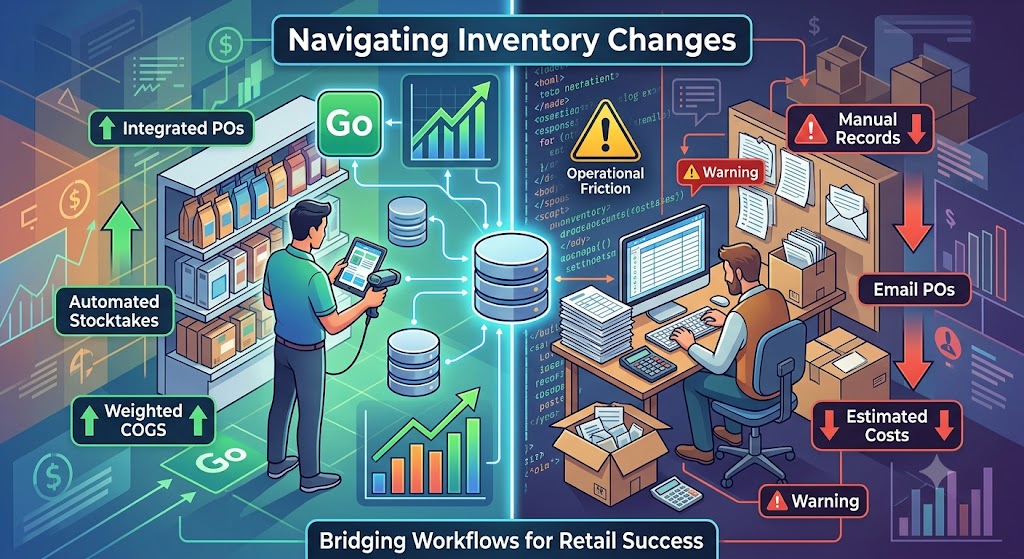
The central concern is not simply that one application is disappearing. The deeper issue is that retailers may lose several connected workflows they depend on every day. These include creating and managing purchase orders, performing stocktakes, tracking supplier invoices, calculating inventory costs, recording payment status, and maintaining accurate cost-of-goods information.
The discussion also demonstrates an important reality of modern ecommerce: inventory management is not the same for every retailer. A large warehouse operation may require sophisticated warehouse management, while a small independent retailer may primarily need a simple system for recording supplier deliveries, invoices, costs, and outstanding payments.
Why Inventory Management Matters
Inventory management is much more than knowing how many products are sitting on a shelf.
A retailer needs to know:
- What products are currently available?
- What products are running low?
- What has already been ordered?
- Which supplier is responsible for an incoming shipment?
- How much did each product cost?
- Which supplier invoices have been paid?
- Which invoices are still outstanding?
- How much inventory is actually worth?
- What is the average cost of products purchased at different prices?
Without reliable answers, purchasing becomes difficult.
A retailer might accidentally reorder products that are already on the way, fail to reorder popular products, or misunderstand the actual profit generated by a product.
The Importance of Purchase Orders
Purchase orders are an important part of many retail businesses.
A purchase order records what the retailer intends to purchase from a supplier.
It can contain:
- Supplier information
- Product names
- Product quantities
- Expected costs
- Purchase dates
- Delivery information
Purchase orders provide a record of purchasing decisions before products arrive.
For retailers dealing with multiple suppliers, this creates a structured process between ordering and receiving inventory.
The concern raised in the discussion is that losing convenient purchase-order functionality can force merchants to rely on spreadsheets, emails, supplier portals, or manual records.
That may be manageable for a very small operation, but it becomes increasingly difficult as product volume grows.
Stocktakes Are Another Critical Function
Stocktaking means physically counting inventory and comparing those numbers with the quantities recorded in the system.
For example, a retailer’s system may say that 35 units of a product are available.
After physically counting the shelves, the retailer may discover only 32.
That three-unit difference needs to be investigated.
Possible causes include:
- Damaged products
- Incorrect receiving
- Theft
- Data-entry mistakes
- Customer returns
- Unrecorded sales
- Supplier discrepancies
Regular stocktakes help maintain accurate inventory records.
Why Barcode-Based Counting Helps
Manually counting hundreds of products can be slow and error-prone.
Barcode-based counting allows employees to scan products during stocktakes and record quantities more efficiently.
This becomes especially useful for businesses with:
- Large product catalogs
- Multiple shelves
- Multiple storage locations
- Frequent inventory movement
When a retailer loses an efficient stock-counting workflow, they may need to introduce manual procedures or find another system that supports similar functionality.
Supplier Invoices Are More Than Bills
A supplier invoice records the financial side of an inventory purchase.
It may show:
- Product quantities
- Unit costs
- Discounts
- Shipping charges
- Taxes
- Payment terms
- Total amount owed
For inventory accounting, these details can affect the true cost of products.
For example, a retailer may purchase 100 units at one price and later purchase another 100 units at a different price.
The cost of inventory is therefore not always represented by a single original purchase price.
Understanding Weighted Cost
Weighted cost is particularly important for retailers whose purchase prices change over time.
Suppose a retailer buys 100 units for $10 each.
Later, the retailer purchases another 100 units for $14 each.
The business now has 200 units purchased at different costs.
A weighted average cost provides a more useful representation of inventory cost than simply using the latest purchase price.
In simplified terms, the average cost would be based on the total value of the purchases divided by the total number of units.
This matters because inventory cost affects reported profitability.
If the cost is inaccurate, the retailer may misunderstand margins.
Why Receiving Affects Cost of Goods Sold
Receiving inventory is closely connected to accounting.
When products arrive, the retailer needs to record:
- What arrived
- How many units arrived
- What the actual cost was
- Whether shipping affected the cost
- Whether discounts changed the final cost
This information can influence cost of goods sold, often abbreviated as COGS.
Accurate COGS calculations help retailers understand how much profit they are actually making.
Invoice Due Dates Matter
Retailers frequently purchase products on payment terms.
A supplier may allow the retailer to pay:
- Immediately
- Within 15 days
- Within 30 days
- Within 60 days
Tracking invoice due dates helps prevent late payments.
This is especially important for businesses working with many suppliers.
Without a clear system, unpaid invoices can easily be forgotten.
Paid and Unpaid Status
Knowing whether an invoice has been paid is another basic but important financial control.
A retailer may have dozens of supplier invoices at different stages.
A simple paid/unpaid system makes it easier to understand current obligations.
It also helps businesses manage cash flow.
A store may appear profitable but still face cash-flow problems if large supplier payments are approaching.
Credit Memos and Supplier Adjustments
Supplier relationships do not always involve straightforward purchases.
Sometimes products are:
- Returned
- Damaged
- Short-shipped
- Incorrectly invoiced
A supplier may issue a credit memo to compensate the retailer.
If those credits are not recorded properly, the retailer may pay more than it actually owes.
This is why purchasing and accounting workflows are closely connected.
Why Small Retailers Have Different Needs
One interesting part of the discussion is that small retailers may not operate like large wholesale organizations.
Some smaller businesses do not regularly create formal purchase orders.
Instead, they may purchase through:
- Supplier business portals
- Wholesale marketplaces
- Sales representatives
- Direct supplier relationships
In these cases, the supplier’s delivery and invoice become the primary record of the transaction.
This means an inventory system does not necessarily need to force every retailer into a complicated purchase-order process.
The best system should match the way the business actually purchases inventory.
Supplier Delivery as the Practical Unit of Work
For many small retailers, a single supplier delivery can represent an entire inventory event.
The retailer receives the shipment, checks the products, records quantities, reviews the invoice, and updates inventory costs.
This approach can be much more practical than maintaining a complex purchase-order workflow for every small order.
The discussion highlights this distinction because inventory software should support real-world retail operations rather than simply impose a particular process.
Why Losing Existing Workflows Creates Friction
When businesses build their processes around a particular system, removing functionality can create significant operational disruption.
Employees already know:
- Where to create orders
- Where to receive stock
- How to perform stocktakes
- How to review invoices
- How to calculate costs
Replacing that system requires more than installing another application.
The business may need to:
- Train employees
- Transfer information
- Rebuild workflows
- Reconfigure reports
- Reconcile historical data
That creates additional time and expense.
The Problem With Manual Workarounds
Spreadsheets can be useful for small businesses, but they become difficult to manage at scale.
A spreadsheet can track inventory, but it may not automatically connect:
- Sales
- Receiving
- Purchase orders
- Supplier invoices
- Stock adjustments
- Costs
Manual entry also creates opportunities for mistakes.
One incorrect quantity can affect multiple calculations.
Third-Party Solutions as a Replacement
The discussion mentions that merchants have explored several third-party inventory and warehouse solutions.
The important point is not necessarily which individual solution a retailer chooses.
The key consideration is whether the replacement supports the workflows the business actually needs.
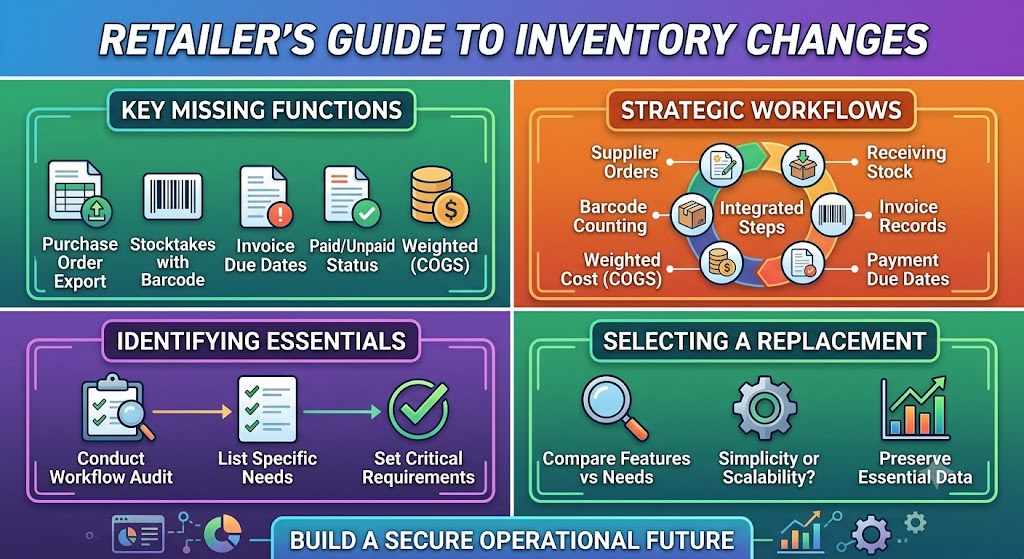
Before choosing a replacement, retailers should list their essential requirements.
For example:
- Purchase orders
- Stocktakes
- Barcode counting
- Supplier management
- Invoice tracking
- Due dates
- Paid/unpaid status
- Weighted inventory costs
- Shipping allocation
- Discounts
- Credit memos
A retailer should then compare available systems against that checklist.
Avoid Choosing Based Only on Features
A replacement may advertise hundreds of features but still be a poor fit.
The most important question is:
Does it support the retailer’s actual daily workflow?
For a small business, simplicity may be more valuable than dozens of advanced functions.
For a larger retailer, scalability and automation may matter more.
Inventory Management and Business Growth
Inventory systems become increasingly important as a business grows.
A retailer may start with 50 products and a single supplier.
Later, the business may have:
- Hundreds of products
- Multiple suppliers
- Several storage locations
- Frequent stock movements
- Multiple employees
A process that worked at the beginning may eventually become inefficient.
Businesses should therefore consider not only their current requirements but also how their inventory operations may evolve.
Why Accurate Inventory Data Matters
Inventory data affects many business decisions.
Retailers use it to decide:
- What to reorder
- What to discontinue
- Which products sell fastest
- How much cash is tied up in inventory
- Which products generate the best margins
Poor inventory data can lead to poor purchasing decisions.
Accurate inventory information therefore becomes a strategic business asset.
The Broader Lesson for Shopify Retailers
The discussion illustrates a broader lesson for retailers using ecommerce platforms.
An ecommerce platform may handle the customer-facing side of a business very well, but inventory management can involve much more complicated operational requirements.
Retailers should periodically review their entire technology stack and identify which systems are responsible for:
- Inventory
- Purchasing
- Accounting
- Warehousing
- Fulfillment
- Supplier management
They should also avoid depending completely on one system for critical operational processes without understanding alternative options.
Planning for Software Changes
Software products evolve.
Features can be changed, redesigned, replaced, or discontinued.
Businesses therefore benefit from documenting their own workflows independently.
For example, a retailer should know exactly how they:
- Place supplier orders.
- Receive inventory.
- Count products.
- Record invoices.
- Calculate costs.
- Track payments.
- Process adjustments.
Once the workflow is documented, moving to another system becomes easier.
What Retailers Should Do Next
A practical response to inventory-management changes is to start with a workflow audit.
Write down every inventory-related task performed during a normal week.
Then identify:
- Which tasks are essential?
- Which tasks are automated?
- Which tasks are manual?
- Which reports are required?
- Which records must be preserved?
This provides a clear picture of what a replacement needs to accomplish.
Conclusion
The discussion surrounding Shopify’s inventory-management changes is about more than the removal of a particular inventory solution. It highlights how deeply inventory and purchasing workflows are connected to everyday retail operations.
For many merchants, essential tasks include purchase orders, stocktakes, supplier invoices, due dates, payment tracking, weighted inventory costs, shipping allocation, discounts, and credit adjustments. Losing these functions can create significant operational friction, particularly for retailers who have already built their processes around them.
At the same time, the discussion demonstrates that there is no single inventory workflow suitable for every retailer. Large businesses may need sophisticated warehouse and purchasing systems, while smaller retailers may primarily need a reliable way to record supplier deliveries, invoices, product costs, and outstanding payments.
The most practical approach is therefore to identify the business’s actual requirements before selecting a replacement. Retailers should document their current workflows, understand which functions are essential, and compare alternative systems based on real operational needs rather than simply choosing the solution with the longest feature list.
Ultimately, effective inventory management depends on accurate information. Businesses need to know what they own, what they have ordered, what products cost, what they owe suppliers, and how much profit their products generate. Whether those processes are handled through an integrated system, specialized software, or carefully designed manual procedures, the goal remains the same: maintain accurate inventory, control purchasing, protect cash flow, and make better business decisions.
The discussion remains open because no universally accepted replacement or official timeline has resolved every concern. For affected retailers, the best strategy is to prepare early, document critical workflows, preserve important inventory information, and select an approach that supports the way their business actually operates.