Business-to-business selling is becoming increasingly important for online merchants. Many businesses that originally started by selling directly to consumers eventually begin receiving larger orders from retailers, distributors, offices, resellers, and professional buyers. When this happens, a standard online store may no longer be enough. Wholesale customers often need different prices, tax treatment, payment terms, order minimums, and account access rules.
The discussion focuses on how merchants can create a B2B or wholesale selling experience without needing Shopify Plus. Traditionally, many advanced B2B features were associated with higher-level plans, which made wholesale selling more difficult or expensive for smaller businesses. Merchants often had to rely on apps, custom coding, customer tags, and manual workflows to create a workable wholesale system.
However, the key update in the discussion is that Shopify’s native B2B features are now available across paid plans. This changes the situation significantly. Instead of building a wholesale store entirely through workarounds, merchants can now start with built-in B2B capabilities and use additional tools only where they need extra automation or specialized functions.
The article explores the main requirements for B2B selling, the old workarounds merchants used, the value of native B2B tools, and the remaining gaps that businesses should consider before building their wholesale setup.
What B2B Selling Means
B2B selling means selling products from one business to another business.
Unlike consumer customers, wholesale buyers often have different needs. They may order in larger quantities, expect lower pricing, require tax documentation, and need payment terms rather than paying immediately at checkout.
Examples of B2B customers include:
- Retail stores
- Distributors
- Resellers
- Corporate buyers
- Restaurants
- Hotels
- Offices
- Schools
- Event companies
- Professional service providers
Because these customers behave differently from regular shoppers, B2B stores need more control over how products, prices, taxes, and payments are handled.
Common Requirements for a B2B Store
The discussion highlights several common requirements that wholesale merchants need.
Approved Customer Registration
Many wholesale businesses do not want every visitor to access trade pricing.
They need customers to apply before they can purchase wholesale products.
The registration process may include collecting:
- Company name
- Tax number
- Business address
- Contact information
- Website
- Resale certificate
- Business registration details
After receiving this information, the merchant can review the request and approve or reject the account.
This protects wholesale pricing and ensures that only legitimate business buyers receive access.
Hiding Prices and Add-to-Cart Options
A wholesale business may want to hide prices from visitors who are not approved.
This prevents regular retail customers or competitors from viewing trade pricing.
Some merchants also want to hide the add-to-cart button until a buyer has been approved.
This creates a private wholesale experience where only authorized customers can place orders.
Different Pricing for Wholesale Buyers
Wholesale customers usually expect lower prices than retail customers.
A B2B setup may need:
- Percentage discounts
- Fixed wholesale prices
- Tiered pricing
- Volume discounts
- Customer-specific pricing
For example, a retailer ordering 100 units may receive a better price than a retailer ordering 20 units.
This pricing structure encourages larger orders and rewards long-term customers.
VAT Handling
VAT is a major consideration for B2B businesses, especially those selling across borders.
Domestic customers may need VAT added to their orders, while foreign business customers may qualify for different tax treatment depending on their location and tax registration status.
A good B2B system should help merchants manage:
- Domestic VAT
- Cross-border VAT
- Tax-exempt customers
- VAT number collection
- Tax documentation
Incorrect VAT handling can create compliance problems, so merchants should understand the tax rules in the countries where they sell.
VAT Invoices
Professional buyers often require proper invoices for accounting and tax purposes.
A B2B store may need to generate invoices that include:
- Company name
- Billing address
- VAT number
- Invoice number
- Product details
- Tax amounts
- Payment status
PDF invoices are especially useful because customers can download, store, and submit them to their accounting teams.
The Traditional B2B Challenge
Before native B2B capabilities became more accessible, merchants had to build wholesale systems through several separate tools and manual processes.
This often involved:
- Customer tags
- Theme modifications
- Discount codes
- Custom forms
- Third-party apps
- Manual account approval
- Spreadsheet tracking
Although these methods could work, they created complexity.
Merchants had to manage multiple systems, troubleshoot conflicts, and maintain custom logic over time.
For smaller businesses, this could become expensive and difficult to manage.
Customer Tags as an Old Workaround
Customer tags were commonly used to identify wholesale buyers.
For example, a merchant might assign a tag such as:
- Wholesale
- Trade Customer
- Approved Buyer
- Distributor
The store could then show different prices or content based on that tag.
While useful, this approach had limitations.
It often required theme edits or additional tools to hide prices and restrict product access.
It also depended on merchants manually assigning tags after reviewing applications.
Theme Customization and Access Control
Another common workaround involved editing the store theme.
Merchants could hide prices, product details, or add-to-cart buttons from visitors who were not logged in or approved.
This gave merchants more control, but it also created maintenance challenges.
Custom theme code may break when themes are updated.
It can also be difficult for non-technical merchants to manage.
For this reason, theme-based B2B systems often require ongoing support.
Separate Wholesale Stores
Some merchants chose to create separate wholesale websites.
One store would serve retail customers, while another would serve business buyers.
This approach provides strong separation between retail and wholesale operations.
However, it also creates more work.
Merchants may need to manage:
- Two websites
- Two product catalogs
- Two inventory systems
- Two marketing strategies
- Two customer databases
For many smaller businesses, this setup becomes inefficient.
The Shift Toward Native B2B Features
The most important update in the discussion is that Shopify’s built-in B2B features are now available across paid plans.
This reduces the need for complicated workarounds.
Merchants can create a more organized wholesale system directly within Shopify.
Native B2B tools allow merchants to manage business customers more effectively.
Companies and Business Accounts
One of the most useful native B2B features is the ability to create company accounts.
Instead of treating every buyer as an individual customer, merchants can organize customers under a business.
For example, a company may have:
- Multiple buyers
- Multiple delivery addresses
- Multiple contacts
- Different purchasing roles
This is especially useful for larger business customers.
A retailer may have several employees placing orders, but all orders should be connected to the same company account.
Catalogs for Different Customers
Catalogs allow merchants to control which products and prices specific business customers can access.
For example, one wholesale customer may receive a standard trade catalog, while another may receive special pricing or exclusive products.
This gives merchants flexibility without needing to duplicate products.
Catalogs can support:
- Customer-specific pricing
- Product visibility control
- Wholesale-only products
- Regional product availability
- Special product ranges
This makes B2B selling more organized and professional.
Volume Pricing
Volume pricing is another important feature for wholesale selling.
Business customers often expect better pricing when they purchase larger quantities.
For example:
- 10 units may have one price
- 50 units may have a lower price
- 100 units may have the best price
This encourages larger orders while helping merchants protect their profit margins.
Volume pricing can reduce the need for manual discount calculations.
Payment Terms
Retail customers usually pay immediately at checkout.
Business customers may expect payment terms.
Common payment terms include:
- Net 7
- Net 15
- Net 30
- Net 60
These terms allow customers to receive products before paying the full invoice.
Payment terms can help merchants attract larger business buyers, but they also introduce credit risk.
Merchants should carefully decide which customers qualify for delayed payment.
Why Native Features Reduce Complexity
Using built-in B2B tools can reduce operational problems.
Instead of relying on many separate systems, merchants can manage customer accounts, pricing, catalogs, and payment terms in one place.
This improves:
- Data accuracy
- Inventory management
- Customer organization
- Reporting
- Order processing
Native tools are often easier to maintain than complex custom workflows.
The Remaining Gap: Self-Service Onboarding
Although native B2B tools provide major improvements, the discussion identifies one important limitation.
Businesses may still need help with self-service onboarding.
A merchant may want potential wholesale buyers to:
- Submit an application.
- Provide business information.
- Upload documents.
- Receive approval automatically.
- Be assigned to the correct company.
- Receive access to the right catalog.
Shopify can collect requests, but it may not fully automate every step.
This means merchants may still need to manually review applications and create company accounts.
Why Registration and Approval Tools Can Help
Additional registration tools can make the onboarding process smoother.
They may allow merchants to collect detailed business information before approving an account.
Useful features may include:
- Custom registration forms
- Document uploads
- Tax number validation
- Approval workflows
- Automatic customer tagging
- Email notifications
These tools can reduce manual work and create a more professional experience for applicants.
Choosing the Right B2B Setup
The best setup depends on the size and needs of the business.
A small wholesale business may only need:
- Approved customer accounts
- Wholesale pricing
- VAT invoices
- Basic order minimums
A larger B2B business may need:
- Multiple company contacts
- Custom catalogs
- Payment terms
- Volume pricing
- Regional tax rules
- Automated approvals
Merchants should avoid adding unnecessary complexity at the beginning.
It is often better to start with essential features and expand later.
VAT Compliance Requires Careful Planning
VAT requirements vary depending on country, customer location, and business registration.
Merchants should understand:
- When VAT applies
- When VAT exemptions apply
- How to collect VAT numbers
- How to issue compliant invoices
- How to report taxes correctly
Because tax rules can be complex, many businesses benefit from consulting an accountant or tax professional.
The Importance of Professional Invoices
Invoices are not just documents.
They are important for business trust.
Professional invoices help customers manage their accounting and tax obligations.
They also make the business appear more organized and reliable.
For B2B customers, invoice quality can influence whether they choose to continue purchasing from a supplier.
Avoiding Overcomplicated Workflows
One lesson from the discussion is that merchants should avoid building overly complicated systems too early.
In the past, businesses often combined many apps, tags, scripts, and custom code to create B2B functionality.
This could create:
- Technical problems
- Extra costs
- Data conflicts
- Difficult maintenance
- Poor customer experience
With native B2B features now available, merchants can simplify their setup.
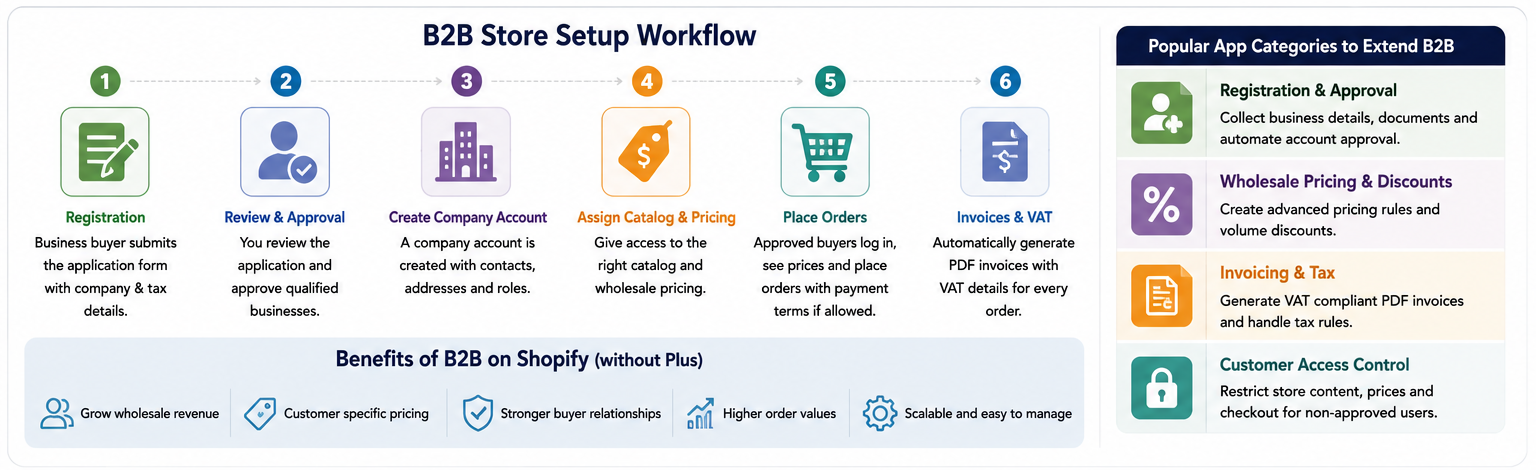
A Practical Starting Approach
A practical approach for a new B2B merchant may look like this:
- Set up a business registration form.
- Review and approve qualified applicants.
- Create company accounts.
- Assign the correct product catalog.
- Set wholesale pricing.
- Configure tax settings.
- Provide professional invoices.
- Add payment terms for trusted customers.
This approach creates a strong foundation without unnecessary complexity.
Conclusion
The discussion shows that B2B selling without Shopify Plus is now much more accessible than before. Merchants no longer need to rely entirely on customer tags, theme edits, separate wholesale stores, or complicated workarounds to create a professional wholesale experience.
Native B2B capabilities such as company accounts, catalogs, volume pricing, and payment terms provide a strong starting point for businesses selling to retailers, distributors, and professional buyers. However, merchants may still need additional support for registration forms, approval workflows, VAT invoicing, and automation.
The best approach is to begin with native B2B features, keep the setup simple, and add extra tools only where there is a clear business need. By focusing on approved customer access, clear pricing, reliable tax handling, and professional invoicing, merchants can build a B2B system that supports both current operations and future growth.