In modern eCommerce, especially in industries like hyperlocal delivery, food services, logistics, and construction supply, traditional address fields are often not enough. Customers may enter incomplete or unclear addresses, leading to failed deliveries, delays, and poor customer experiences.
To solve this problem, many businesses are now exploring map-based address selection, where customers can visually select their exact delivery location using a map, drop a pin, and allow the system to capture precise GPS coordinates (latitude and longitude).
If you’re considering implementing this in Shopify, it is absolutely possible—but it requires understanding Shopify’s architecture, limitations, and best practices.
This guide explains everything you need to know, including the best implementation methods, technical constraints, and recommended tools.
Understanding the Core Requirement
The goal is to build a system where customers can:
- Search for their address using a map
- Drop or adjust a location pin
- Capture exact latitude and longitude
- Save that data with the order or customer profile
This type of system improves delivery accuracy significantly, especially in areas where addresses are inconsistent or difficult to locate.
Can Shopify Support This Functionality?
The short answer is yes—but with limitations.
Shopify is flexible when it comes to storefront customization, but it has strict restrictions when it comes to checkout modifications.
What Shopify Allows:
- Custom UI elements on product and cart pages
- Capturing custom data using line item properties or cart attributes
- Storing additional data with orders
What Shopify Restricts:
- Direct customization of checkout (on non-Plus plans)
- Embedding custom scripts or UI elements inside checkout
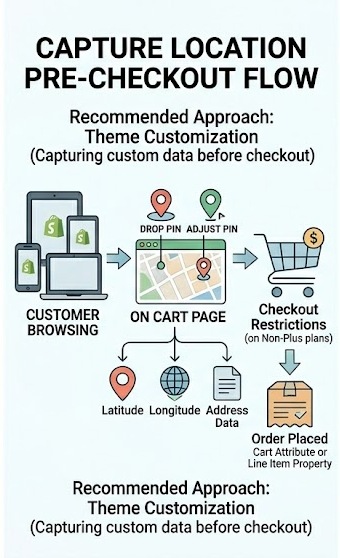
Because of this, the industry-standard approach is to capture location data before checkout, not during it.
Best Implementation Approach
1. Theme Customization (Recommended for Most Stores)
The most practical and widely used method is to implement the map interface directly within your Shopify theme.
This can be done on:
- The product page (if location is product-specific)
- The cart page (recommended for most stores)
How It Works:
- A map interface is embedded using a mapping service
- Customers interact with the map:
- Search their location
- Drop a pin
- Adjust the pin for accuracy
- The system captures:
- Latitude
- Longitude
- Optional formatted address
- The data is stored in:
- Line item properties OR
- Cart attributes
Recommended Mapping Tools
To build this functionality, you’ll need a mapping API. The two most popular options are:
Google Maps API
This is the most commonly used solution due to its:
- High accuracy
- Address autocomplete
- Reverse geocoding capabilities
- Familiar interface for users
It is ideal for businesses that want reliability and global coverage.
Mapbox
Mapbox is another powerful alternative known for:
- Custom styling
- Faster performance in some cases
- Developer flexibility
It is often preferred when you want a more customized map experience.
How Data is Stored in Shopify
Once the customer selects their location, Shopify allows you to store this information in several ways.
1. Cart Attributes
- Applies to the entire order
- Best for delivery location
- Automatically passed to the order
2. Line Item Properties
- Attached to individual products
- Useful if different items require different locations
3. Order Data
Once checkout is completed:
- The stored data becomes part of the order
- It can be viewed in the admin panel
- It can be used for fulfillment and logistics
Example of Stored Data
A typical implementation may store:
- Latitude: 26.9124
- Longitude: 75.7873
- Map link: https://maps.google.com/?q=26.9124,75.7873
This allows delivery teams to open the exact location directly in navigation apps.
Shopify Checkout Limitations
One of the most important aspects to understand is Shopify’s checkout restriction.
On Standard Plans:
- You cannot modify checkout UI
- You cannot embed maps inside checkout
- You cannot capture GPS data during checkout
On Shopify Plus:
- Checkout customization is possible
- You can add custom UI elements
- Advanced workflows can be implemented
However, Shopify Plus is expensive and not necessary for most businesses.
Why Pre-Checkout Capture is the Standard Solution
Because of these restrictions, most developers and businesses follow a pre-checkout capture strategy.
Benefits:
- Full control over UI
- No platform restrictions
- Easy integration with existing workflows
- Smooth data transfer into orders
This approach is widely accepted and used in real-world Shopify implementations.
Advanced Implementation Using Shopify API
For more complex use cases, you can build a custom solution using the Shopify API.
When to Use This:
- You need delivery zone validation
- You want to assign orders to specific warehouses
- You need backend processing of GPS data
Automation with Shopify Flow
You can further enhance your workflow using Shopify Flow.
Example Automations:
- Save GPS coordinates to customer profiles
- Tag orders based on location
- Trigger delivery workflows
- Send data to external logistics systems
This helps turn raw GPS data into actionable business logic.
Real-World Use Cases
Map-based address selection is especially useful in:
1. Food Delivery
Customers can pinpoint their exact location, avoiding confusion in apartments or complex areas.
2. Hyperlocal Stores
Businesses delivering within a fixed radius can validate whether the location falls within their service area.
3. Construction & Material Supply
Precise coordinates help in delivering heavy materials to exact sites.
4. Rural Deliveries
Where traditional addresses are unclear or unavailable, GPS becomes essential.
UI/UX Best Practices
A well-designed interface is critical for success.
Keep It Simple:
- Clear label: “Select Your Exact Location”
- Easy-to-use search bar
- Draggable pin
Improve Accuracy:
- Snap to nearest address
- Show confirmation message
- Allow users to re-adjust pin
Mobile Optimization:
- Ensure smooth dragging
- Use large buttons
- Avoid clutter
Performance & Cost Considerations
API Costs:
- Google Maps API charges per usage
- Mapbox offers flexible pricing
Optimization Tips:
- Load map only when needed
- Use lazy loading
- Minimize API calls
Data Privacy & Security
Since you are collecting location data, it is important to:
- Inform users about data usage
- Store data securely
- Follow privacy regulations
Transparency builds trust and avoids legal issues.
Future Scalability
As your business grows, GPS data can be used for:
- Route optimization
- Delivery tracking
- Automated dispatch systems
- AI-based logistics planning
This makes map-based address selection not just a feature, but a long-term investment.
Final Recommendation
For most Shopify stores, the best approach is:
- Use theme customization
- Integrate Google Maps API or Mapbox
- Capture location on cart page
- Store data in cart attributes
- Use Shopify Flow or APIs for automation
This method is:
- Scalable
- Cost-effective
- Easy to implement
- Fully compatible with Shopify
Conclusion
Map-based address selection in Shopify is not only possible but highly valuable for businesses that depend on accurate delivery locations. While Shopify does have limitations—especially around checkout customization—these can be effectively bypassed using a pre-checkout implementation strategy.
By combining the right tools, thoughtful UI design, and smart data handling, you can create a seamless experience where customers can select their exact location with confidence. This not only improves operational efficiency but also enhances customer satisfaction and reduces delivery errors.
In today’s competitive eCommerce environment, precision and convenience are key—and GPS-based address selection is a powerful step in that direction.
If you’re looking for professionally written articles, in-depth content, or eCommerce-focused writing, feel free to connect with me. I provide customized content solutions based on your requirements.
📞 Contact: +91 98285 56909