Why Retailers Are Frustrated
Shopify’s changes around inventory management have created concern among small and medium-sized retailers that previously depended on a set of purchasing and stock-control workflows. For many brick-and-mortar businesses, inventory management is not simply about knowing how many products are available. It also involves purchasing stock, receiving deliveries, matching supplier invoices, tracking payment terms, calculating product costs, recording credits, and understanding the true value of inventory.
The discussion summarized in this article focuses on what happens when those everyday workflows are no longer available in the same form retailers were accustomed to. The frustration is particularly strong among businesses using point-of-sale systems because they often expect inventory, purchasing, and store operations to work together without requiring several additional subscriptions.
The situation also highlights a broader issue in retail technology: basic inventory management means different things to different businesses. A large warehouse operation may need sophisticated forecasting, warehouse locations, barcode scanning, and automated replenishment. A small independent retailer may need something much simpler—yet equally important to its daily operations.
Why Inventory Management Is More Than Stock Counts
At first glance, inventory management seems straightforward.
A retailer receives products, sells products, and needs to know what remains.
In reality, purchasing inventory involves many additional steps.
A retailer may:
- Decide what products need to be purchased.
- Contact a supplier.
- Place an order.
- Create a purchase order.
- Receive the shipment.
- Compare delivered products against the order.
- Match the shipment with the supplier invoice.
- Record discounts or shipping charges.
- Calculate the actual cost of inventory.
- Record payment terms.
- Track when the invoice is due.
- Mark the invoice as paid.
- Record credits or adjustments.
- Update available inventory.
For a small retailer, these activities can happen every day.
Therefore, losing even a few of these capabilities can create significant administrative work.
The Role of Stocky in the Original Workflow
The main complaint in the discussion is related to the shutdown or replacement of Stocky and the resulting gaps for merchants who depended on its purchasing and inventory functions.
Retailers particularly mention features such as purchase-order exporting, stocktakes, invoice payment tracking, due dates, and weighted cost calculations.
These may not sound like advanced features.
However, for a retailer buying hundreds or thousands of products from multiple suppliers, they can form the foundation of daily operations.
The frustration comes partly from the perception that these were practical capabilities retailers had already incorporated into their workflow.
When those capabilities disappear, merchants may have to:
- Find replacement software.
- Enter information manually.
- Maintain additional spreadsheets.
- Pay for another subscription.
- Change their purchasing process.
- Train employees on another system.
That creates both financial and operational costs.
Purchase Orders Are Important
A purchase order, or PO, provides a record of what a retailer intended to purchase.
For example, a retailer might order:
- 20 shirts
- 15 jackets
- 30 pairs of shoes
- 10 bags
The purchase order provides a reference point when the shipment arrives.
The retailer can compare what was ordered against what was actually received.
Without a structured purchasing process, employees may have to rely on emails, supplier websites, spreadsheets, invoices, or memory.
This increases the possibility of errors.
Why PO Export Matters
The ability to export purchase orders can also be important for accounting and operational records.
A retailer may need to:
- Send the PO to a supplier.
- Save a copy internally.
- Compare it with an invoice.
- Share it with an accountant.
- Review historical purchases.
- Check pricing changes.
Removing a simple export function can therefore create more manual work than expected.
Stocktakes Are a Daily Reality for Retailers
Another major issue discussed is stocktaking.
Stocktaking means physically counting products and comparing the physical quantity with the recorded quantity.
Suppose the system says there are 25 units of a product.
The retailer counts the shelf and storage area and finds only 22.
There is now a difference of three units.
That discrepancy might have happened because of:
- Incorrect receiving
- Damaged products
- Theft
- Manual entry mistakes
- Unrecorded sales
- Returns
- Transfers
- Supplier shortages
Regular stocktakes help retailers identify these discrepancies.
For businesses with many products, manually recording every item can be extremely time-consuming.
Invoice Tracking Is Another Essential Workflow
Retailers do not simply buy products and immediately pay for them.
Many suppliers provide payment terms.
For example, a supplier might say:
Payment due in 30 days.
The retailer therefore needs to know:
- Which invoices are unpaid?
- When is each invoice due?
- How much is outstanding?
- Which invoices have already been paid?
- Which supplier does each invoice belong to?
This is why the discussion emphasizes paid and unpaid invoice status and invoice due dates.
These features help retailers manage cash flow.
Why Due Dates Matter
Imagine a retailer has 20 supplier invoices.
Each invoice has a different payment deadline.
Without a centralized system, employees may have to check several emails, spreadsheets, or supplier accounts to determine what needs to be paid.
A missed due date could damage the supplier relationship or potentially result in late-payment consequences.
A clear invoice workflow makes this easier.
Weighted Cost of Goods Sold
Another important topic is weighted COGS, or weighted cost of goods sold.
Product costs do not always remain constant.
Suppose a retailer purchases:
- 10 units at $10 each
- Later, 20 units at $14 each
The retailer now owns products purchased at different costs.
A weighted-cost approach can help determine a representative average cost.
The basic concept is:
Total inventory cost ÷ Total inventory quantity = Weighted average cost per unit
This becomes important when calculating profitability.
A retailer may sell a product for $30, but the actual product cost may change over time.
Accurate costing helps the business understand whether it is genuinely making money.
Shipping and Discounts Also Affect True Product Cost
The retailer in the discussion describes a workflow that considers more than the supplier’s listed product price.
For example, a supplier invoice may include:
- Product costs
- Shipping
- Discounts
- Credits
- Other adjustments
If those costs are ignored, the retailer may calculate profitability incorrectly.
Suppose a retailer buys $1,000 worth of products but pays another $100 in shipping.
The effective cost is not simply $1,000.
The business needs a method of allocating those additional costs appropriately.
This is particularly important when calculating margins.
Supplier Credits Need to Be Recorded
Retailers can also receive credits.
For example, a supplier might send:
- Damaged products
- Incorrect quantities
- Missing products
- Products at the wrong price
The supplier may then issue a credit.
If that credit is not properly recorded, the retailer’s accounts may no longer match supplier statements.
The retailer discussed in the thread reportedly handles credits as separate purchasing records, illustrating how detailed these workflows can become.
The Small Retailer Perspective
One of the most useful parts of the discussion is the clarification that the retailer does not operate a massive warehouse.
Their workflow is relatively simple.
They purchase products through supplier portals, sales representatives, B2B marketplaces, and similar channels.
They then need to bring those purchases into their retail inventory system.
This distinction is important.
A small retailer does not necessarily need an enormous warehouse-management platform.
They may simply need dependable tools for:
- Purchasing
- Receiving
- Stocktaking
- Invoice matching
- Payment tracking
- Cost calculation
These are basic needs, but they are critical.
Why Paying for Another System Creates Frustration
When a previously available workflow disappears, merchants may feel that they are being forced to pay for functionality they consider fundamental.
The issue is not necessarily that third-party solutions are bad.
The issue is the additional complexity.
A retailer may already be paying for:
- Point-of-sale software
- Online store services
- Accounting
- Payment processing
- Shipping
- Marketing
Adding another inventory subscription increases operating expenses.
For a small retailer operating on relatively thin margins, even a modest monthly fee matters.
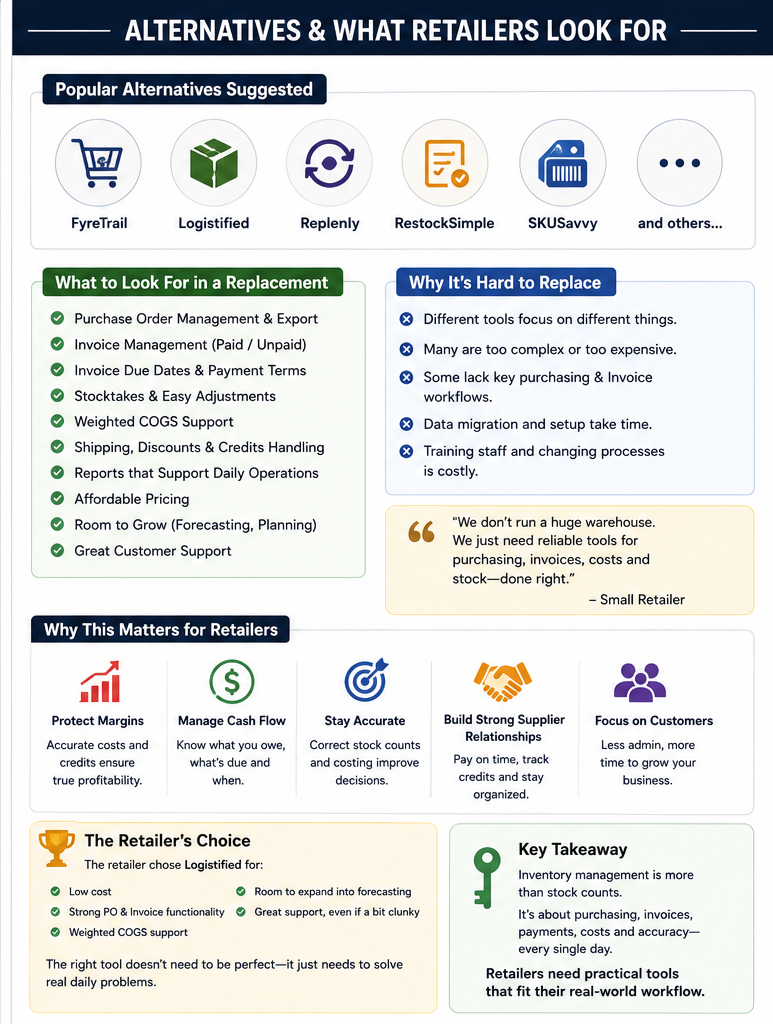
Alternative Solutions Enter the Discussion
Several alternative inventory and purchasing systems were suggested by participants.
However, the discussion demonstrates that replacing one system with another is not always straightforward.
A replacement needs to match the retailer’s actual workflow.
A tool may be excellent for warehouse management but unnecessary for a small boutique.
Another may provide forecasting but lack invoice payment tracking.
Another may support stock counts but not weighted costing.
Therefore, the best replacement is not necessarily the one with the most features.
It is the one that solves the merchant’s specific problems without creating unnecessary complexity.
Why the Retailer Chose Logistified
The original retailer ultimately chose Logistified.
The decision appears to have been based on practical requirements rather than simply looking for the most sophisticated solution.
The retailer valued:
- Affordable pricing
- Purchase-order functionality
- Invoice workflows
- Weighted COGS
- Payment tracking
- Support
- Potential room for future forecasting
The retailer also acknowledged that the system could feel somewhat clunky.
This is an important lesson.
Software does not have to be perfect to be useful.
If it solves the core operational problems at an affordable price, it may still be the better business decision.
Support Can Be More Valuable Than Extra Features
Strong customer support was another factor appreciated by the retailer.
This matters because inventory systems deal with real business records.
When a retailer encounters a problem involving purchasing, costs, or stock levels, they may need help quickly.
A system with fewer features but responsive support can sometimes be more valuable than a complicated system where merchants are left to figure everything out themselves.
The Cost of Switching Systems
Changing inventory systems also has hidden costs.
A retailer may need to:
- Import products.
- Rebuild supplier records.
- Reconfigure purchasing workflows.
- Train staff.
- Reconcile historical data.
- Learn new processes.
- Test inventory counts.
- Verify costing.
Therefore, choosing an inventory system should be treated as a long-term operational decision.
Inventory Accuracy Directly Affects Profitability
Inventory errors are not merely administrative problems.
They can affect profitability.
If the system says a product is available when it is actually out of stock, the retailer may disappoint customers.
If the system shows too much inventory, the business may believe it has more working capital than it actually does.
If product costs are incorrect, profit calculations can also become misleading.
Accurate inventory data therefore supports better business decisions.
The Difference Between Inventory and Inventory Operations
A key lesson from the discussion is that inventory tracking and inventory operations are not the same thing.
Inventory tracking answers:
“How many units do I have?”
Inventory operations answer much more:
“What did I order, what arrived, what did it cost, what do I owe the supplier, when is payment due, and what is my actual inventory value?”
For retailers, the second set of questions can be just as important as the first.
What Retailers Should Look For in a Replacement
Businesses facing similar changes should first document their existing workflow.
Instead of asking:
“What is the best inventory system?”
they should ask:
“What exact tasks must the replacement system handle?”
A useful checklist might include:
- Purchase orders
- PO export
- Receiving
- Stocktakes
- Barcode counting
- Supplier records
- Invoice matching
- Due dates
- Paid/unpaid status
- Weighted costing
- Shipping allocation
- Discount allocation
- Supplier credits
- Reporting
- Accounting integration
- Staff permissions
- Customer support
Once the requirements are documented, merchants can compare alternatives more objectively.
Avoid Paying for Unnecessary Features
Another important lesson is not to choose a system simply because it offers hundreds of features.
A small retailer may not need:
- Multiple warehouse management
- Complex robotics
- Advanced forecasting
- International distribution
- Large-scale logistics optimization
If the retailer’s actual need is purchasing and invoice management, those should remain the priority.
More features can sometimes make software harder to operate.
The Broader Shopify Inventory Question
The discussion ultimately raises a broader question about what merchants should expect from their ecommerce platform.
Retail businesses often want their online store, physical store, purchasing, inventory, and financial workflows to work together.
When one component changes, it can affect the entire operation.
That is why the removal of a tool or feature can generate stronger reactions than expected.
Merchants are not necessarily defending a particular piece of software.
They are defending a workflow that has become part of their daily business.
Conclusion
The discussion surrounding Shopify’s inventory-management changes highlights a problem that is easy to underestimate: inventory management is not simply counting products.
For many retailers, purchasing and inventory are connected to supplier invoices, payment terms, receiving, stocktakes, discounts, shipping costs, credits, and product costing.
The loss of previously available workflows can therefore create substantial inconvenience, especially for small businesses that do not want to purchase a complicated enterprise inventory system.
The retailer described in the discussion has a relatively straightforward brick-and-mortar operation, but even that operation requires reliable purchase orders, receiving, invoice matching, payment tracking, due dates, stocktakes, and weighted COGS.
The search for a replacement demonstrates that there is no universal answer. Different retailers have different requirements. A system designed for a huge warehouse may be excessive for a small store, while a simple stock-counting solution may not provide enough purchasing and invoice functionality.
The retailer ultimately selected an affordable alternative because it covered the most important requirements, supported weighted costing, offered room for future growth, and provided strong customer support.
The larger lesson is that retailers should evaluate inventory software according to their actual daily workflow, not simply according to feature lists or marketing claims.
Before choosing a replacement, merchants should document every step from placing a supplier order to receiving the products, matching the invoice, recording costs, paying the supplier, and reconciling inventory.
If a solution can handle those processes accurately and affordably, it may be far more valuable than a system filled with advanced features the business will never use.
For small retailers especially, the ideal inventory system is not necessarily the biggest or most sophisticated one. It is the one that makes everyday purchasing, receiving, counting, costing, and payment tracking simple, accurate, and dependable.