Why Retailers Are Concerned About the Loss of Basic Purchasing Features
Inventory management is one of the most important operational functions for any retail business. While customers mainly see products, prices, checkout, and delivery options, retailers must manage a much larger system behind the scenes. They need to know what has been ordered, what has arrived, how much each item actually cost, which supplier invoices have been paid, what remains outstanding, and whether the inventory recorded in the system matches what is physically in the store.
The discussion titled “Shopify kills inventory management” focuses on concerns from retailers following the sunset of Stocky and the resulting loss of several inventory and purchasing functions. For retailers who used these features as part of their daily operations, the change is not simply about losing an optional application. It can affect fundamental workflows involving purchase orders, receiving, stocktakes, supplier invoices, payment tracking, cost calculations, and audit records.
The discussion also highlights an important distinction between different types of retailers. Not every business needs a complicated warehouse management system. A small or medium-sized retailer may simply need a dependable way to create purchase orders, receive inventory, compare deliveries against supplier invoices, track invoice due dates, record payments, and conduct stocktakes. When these basic functions disappear, merchants may have to pay for additional software or develop manual workarounds.
Why Inventory Management Is So Important
Inventory management is often underestimated by people who are new to retail.
At first, the process seems straightforward: buy products, sell products, and reorder when stock becomes low.
In reality, there are many steps between purchasing and selling.
A retailer may need to:
- Research products
- Contact suppliers
- Place orders
- Create purchase records
- Receive shipments
- Count delivered products
- Compare deliveries with invoices
- Record product costs
- Track outstanding payments
- Perform stocktakes
- Process supplier credits
- Reconcile inventory differences
Every one of these steps contributes to accurate business records.
If even one part is unreliable, other areas can become inaccurate as well.
The Role of Purchase Orders
A purchase order is a record of what a retailer intends to purchase from a supplier.
For example, a store might order:
- 20 black shirts
- 15 white shirts
- 10 jackets
The purchase order provides a reference for what was expected.
When the supplier’s shipment arrives, the retailer can compare the actual delivery with the original order.
This makes it easier to identify:
- Missing products
- Extra products
- Incorrect quantities
- Wrong variants
- Damaged goods
For businesses purchasing regularly, this record becomes an important part of inventory control.
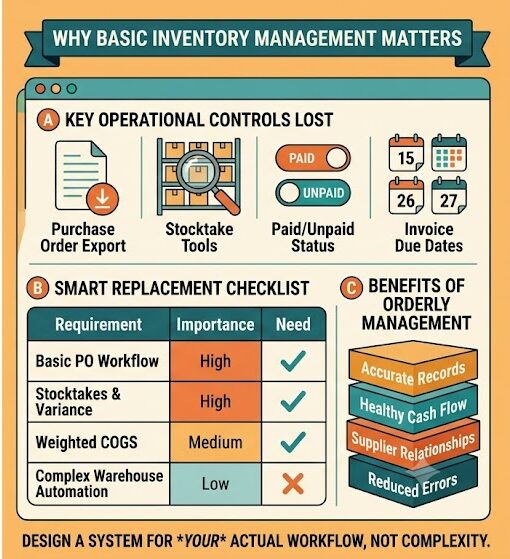
Purchase Order Export Can Be Important
One concern raised in the discussion is the loss of purchase order export functionality.
Exporting purchasing information can be useful for:
- Accounting
- Record keeping
- Supplier communication
- Internal audits
- Financial reconciliation
A retailer may want to download purchasing records for a particular period or share them with an accountant.
When a previously available export function disappears, merchants may have to manually copy information into spreadsheets or find another system capable of producing the required records.
Stocktakes and Physical Inventory
Another major requirement is stocktaking.
A stocktake is the process of physically counting the products a business has and comparing the physical quantity with its digital inventory records.
Suppose the system says that a store has 50 units of a particular product.
During a physical count, employees discover only 47.
The business now has to investigate the difference.
Possible reasons include:
- Damaged stock
- Theft
- Incorrect receiving
- Data-entry mistakes
- Unrecorded returns
- Incorrect product counts
- Inventory transfers that were not recorded
Regular stocktakes help identify these discrepancies.
Why Simple Stocktake Tools Matter
A retailer does not necessarily need a large warehouse system just to perform a stocktake.
A small store may simply need:
- A list of products
- A way to count them
- A method to record the actual quantity
- A comparison between expected and counted inventory
The discussion shows that some merchants are concerned because these basic capabilities can become difficult or expensive to replace.
Supplier Invoices Connect Purchasing and Accounting
A supplier invoice is another essential part of the workflow.
After receiving products, the retailer may receive an invoice showing:
- Products purchased
- Quantities
- Unit prices
- Discounts
- Shipping
- Taxes
- Total amount due
- Payment terms
The retailer needs to compare the invoice with the purchase record and the actual shipment.
This creates a three-way relationship:
Purchase order → Received inventory → Supplier invoice
When these three records match, the retailer has much greater confidence in the transaction.
Tracking Invoice Due Dates
Many retailers do not pay suppliers immediately.
Instead, suppliers may provide payment terms such as 15, 30, or 60 days.
Tracking due dates is therefore important.
A retailer may have dozens of invoices outstanding at the same time.
Without an organized process, it is easy to miss a payment deadline.
Tracking due dates allows the business to plan cash flow and maintain good supplier relationships.
Paid and Unpaid Invoice Status
Knowing whether an invoice has been paid is just as important.
A retailer might have:
- 10 paid invoices
- 5 invoices awaiting payment
- 3 invoices due soon
Without clear status information, the owner has to search through bank records, emails, and supplier portals.
A simple paid/unpaid field makes this process much easier.
Why Audit Trails Matter
An audit trail records what happened during an inventory transaction.
For example, it can help answer:
- When was the purchase created?
- When was stock received?
- What quantity was received?
- What cost was recorded?
- When was the invoice paid?
- Was a correction made later?
These records are useful when investigating discrepancies.
They can also help accountants and business owners understand how inventory and purchasing decisions were made.
Understanding Weighted Cost of Goods Sold
The discussion also mentions weighted COGS, or weighted cost of goods sold.
This becomes important when a retailer purchases the same product at different prices.
Imagine buying 100 units for $10 each.
Later, the supplier increases the price and the retailer buys another 100 units for $14 each.
The retailer now has 200 units purchased at two different costs.
Simply using the latest purchase price may not accurately represent the average inventory cost.
A weighted approach considers the quantities and costs of both purchases.
This provides a more realistic picture of the cost associated with inventory.
Why Shipping and Discounts Can Affect Product Cost
Product cost is not always simply the supplier’s listed unit price.
A shipment may include:
- Shipping charges
- Discounts
- Additional fees
These costs can affect the effective cost of inventory.
For example, if a supplier provides a large discount across an order, the retailer may need to allocate that discount across the products.
Similarly, shipping costs may need to be included when calculating the true cost of goods.
This is why purchasing and inventory systems can become more complicated than they initially appear.
Handling Supplier Credits
Retailers also sometimes receive credits from suppliers.
For example, a supplier may send:
- The wrong product
- Fewer units than ordered
- Damaged merchandise
Instead of issuing a normal refund, the supplier may provide a credit.
The discussion mentions handling credits as separate purchase records.
This creates a clear record of the adjustment and helps prevent the retailer from accidentally paying too much.
The Retailer’s Actual Workflow
One of the most useful parts of the discussion is the explanation of how the retailer actually operates.
The business purchases products through several types of wholesale relationships and platforms.
The retailer then:
- Creates products.
- Creates purchase orders.
- Receives supplier deliveries.
- Matches purchase orders with supplier invoices.
- Checks due dates.
- Tracks whether invoices are paid.
- Performs stocktakes.
- Records credits when necessary.
This is not an extremely complicated warehouse operation.
However, it requires reliable basic inventory functionality.
Why a Full Warehouse System May Be Unnecessary
A common misunderstanding is that retailers who need inventory management automatically need a sophisticated warehouse management system.
That is not always true.
A small retailer may not need:
- Complex warehouse robotics
- Advanced picking systems
- Automated distribution centers
- Multiple warehouse optimization algorithms
Instead, they may need basic operational controls.
The right solution should therefore match the business’s actual complexity.
The Cost Problem for Small Retailers
One of the strongest complaints in the discussion concerns cost.
When basic functionality is included in an existing retail ecosystem, merchants may expect those functions to remain available.
If they are removed, merchants may need to purchase separate applications.
For a large retailer, another monthly subscription may be insignificant.
For a small retailer, several additional subscriptions can have a noticeable impact on profitability.
This creates an important question:
Should basic inventory functions require additional paid software?
The discussion does not provide a definitive answer, but the frustration is clear.
Why Manual Spreadsheets Are Not Always Ideal
Some retailers may respond to missing features by using spreadsheets.
Spreadsheets can work for very small operations.
However, manual systems introduce additional work.
Employees may need to:
- Enter products manually
- Update quantities
- Record invoices
- Change payment status
- Calculate costs
- Reconcile differences
Manual entry also increases the risk of human error.
A single incorrect number can affect inventory and financial calculations.
The Retailer Eventually Chose an Alternative
The original poster eventually selected another inventory solution.
According to the discussion, the chosen solution was considered somewhat clunky but affordable, with strong support and the necessary purchasing and invoice workflow.
The retailer particularly valued features related to:
- Weighted COGS
- Purchase orders
- Invoice tracking
- Due dates
- Payment status
- Shipping allocation
- Discounts
- Supplier credits
This demonstrates an important point: merchants do not necessarily need the most advanced system.
They need the system that fits their workflow.
Choosing a Replacement Based on Requirements
When replacing inventory software, retailers should create a requirements list before making a decision.
For example:
| Requirement | Importance |
|---|---|
| Purchase orders | High |
| Stocktakes | High |
| Invoice tracking | High |
| Due dates | High |
| Paid/unpaid status | High |
| Weighted COGS | High |
| Supplier credits | Medium |
| Shipping allocation | Medium |
| Advanced warehouse management | Low |
This prevents merchants from paying for unnecessary features.
The Importance of Support
The discussion also shows that customer support can influence the choice of an inventory system.
Inventory problems often involve real business transactions.
If something goes wrong with:
- Receiving
- Costs
- Purchase orders
- Invoice records
the retailer may need assistance quickly.
Good support can therefore be more valuable than an impressive list of features.
Preparing for Future Changes
One broader lesson from this situation is that businesses should document their operational processes.
A retailer should know exactly how inventory is purchased, received, counted, and reconciled.
Documentation makes future transitions easier.
If a software product changes or disappears, the business can identify exactly what needs to be replaced.
What Shopify Retailers Can Learn
Retailers should not assume that every inventory requirement will remain unchanged forever.
Instead, they can periodically review their processes and ask:
- Which features are essential?
- Which records do we need?
- Which reports do we use?
- How do we track supplier payments?
- How do we handle stock discrepancies?
- How do we calculate product costs?
This creates operational independence from any one system.
Conclusion
The discussion surrounding Shopify’s inventory-management changes reflects a broader challenge faced by small and medium-sized retailers: essential operational features can become difficult or expensive to replace when an established workflow is discontinued.
For the retailer in this discussion, inventory management is not about running a huge warehouse. The business primarily needs reliable tools for purchase orders, receiving, stocktakes, supplier invoices, due dates, payment status, weighted product costs, and supplier credits.
These may sound like simple features, but together they form the foundation of an organized retail operation.
The loss of these capabilities can force merchants toward spreadsheets, manual processes, or additional paid software. For small retailers, that can increase both costs and administrative workload.
The most important lesson is that inventory management should be designed around the actual workflow of the business. Retailers should identify the functions they genuinely need rather than automatically choosing the most complex solution available. They should also maintain clear records and document their processes so that future software changes do not completely disrupt operations.
Ultimately, effective inventory management is about maintaining accurate information from the moment products are ordered until they are sold. Purchase orders establish what was expected, receiving confirms what actually arrived, invoices establish what the retailer owes, payment records show what has been settled, and stocktakes confirm what is physically available.
When these pieces work together, retailers can make better purchasing decisions, maintain healthier cash flow, understand their true product costs, and reduce inventory errors. The discussion remains unresolved from the perspective of native functionality, but it clearly demonstrates why dependable inventory and purchasing workflows remain essential for retailers of every size.