Introduction
Building an online store involves more than displaying products. Customers expect to be able to filter products according to their preferences, such as color, size, material, price, availability, or other product characteristics. These filtering options help customers quickly find the items they are looking for without having to browse through an entire collection.
In Shopify-based stores, product filtering is particularly important for stores with large product catalogs or products that have multiple variants. A single product may be available in several colors, sizes, styles, or configurations. When customers apply filters, they generally expect the store to display only the products or options that match their selections.
However, developers working with collection data through the Storefront API have encountered unexpected behavior when using variant-related filtering. In particular, the variantOption filter may not produce the expected results in certain collection queries. Instead of returning data that appears to match the selected option, the response may include all variants associated with the products.
This issue raises questions about how variant filtering works, how collection filters should be configured, and whether filtering needs to be handled separately within the storefront application.
What Is Variant Filtering in an Online Store?
Variant filtering allows shoppers to narrow down their product selections based on characteristics associated with individual product variants.
For example, a clothing store might offer a shirt in the following combinations:
- Black – Small
- Black – Medium
- Black – Large
- White – Small
- White – Medium
- White – Large
Rather than browsing every product and manually checking its available options, customers can select a filter such as Black or Medium to make their shopping experience easier.
Variant filtering is especially useful for stores selling clothing, footwear, furniture, accessories, electronics, cosmetics, and other products with multiple configurations.
A well-functioning filtering system can help customers:
- Find products that match their preferences.
- Reduce the time spent searching through collections.
- Identify products available in specific sizes or colors.
- Navigate larger catalogs more efficiently.
- Make purchasing decisions with greater confidence.
For developers, implementing these filters correctly is essential for creating a smooth shopping experience, particularly when building custom storefronts.
Understanding the Filtering Problem
The discussion focuses on unexpected behavior when developers attempt to filter product variants through collection queries.
Developers are using the variantOption filtering functionality to request products or variants that match a particular option. For instance, they may want to retrieve products associated with the Color option Black.
The expectation is that applying the filter should narrow down the relevant data so that only matching options or variants are returned.
However, the observed response does not always match this expectation. Instead of returning only the variants that correspond to the selected filter, the response may contain the complete variant list for the matching products.
This creates confusion because the filtering request appears to have been applied, but the returned variant data still includes options that the customer did not select.
For example, a developer might be interested in displaying only black products within a particular collection. The request may identify the relevant products, but the product data returned could still contain White, Blue, or other variants associated with those products.
This distinction between filtering products and filtering the variants displayed within those products is central to the problem.
Why Product Filtering and Variant Filtering May Behave Differently
Products and product variants are related but represent different levels of information.
A product is the main item listed in an online store. Variants are the individual configurations available for that product. A product can contain one or several variants depending on its options.
When a collection filter is applied, it may narrow down the products that meet a particular condition. However, the data structure returned for those products may still include their complete variant information.
This can lead to a situation where the product-level filtering appears successful, while the developer still needs to determine how to display only the relevant variants.
For example, a collection may contain ten products, each available in several colors. Applying a Black filter might identify products that have a black variant. But the developer may still receive product objects containing all color variants for those products.
The developer’s requirement may be more specific than simply identifying products that have a black option. They may want the actual variant list to contain only the black variants.
Understanding this distinction helps explain why filtering results may not appear as expected, even when the filtering request is correctly structured.
The Role of Storefront API Collection Queries
A custom storefront often relies on data retrieved from the store’s API rather than directly rendering products from the standard storefront interface.
The API provides access to product information, collections, pricing, options, availability, and other data that developers use to build custom shopping experiences.
When retrieving collection products, developers can use filtering conditions to narrow the results. These conditions may include product attributes, variant options, availability, and other supported characteristics.
The challenge discussed in this case is related to how the API response handles variant information after a filter has been applied.
Developers may assume that applying a variant filter automatically restricts the nested variant data to the matching options. However, the response may still contain the full variant collection for each returned product.
This means developers need to carefully examine the structure of the response and understand which level of the data has actually been filtered.
A filtered collection response and a filtered variant response are not necessarily the same thing. The distinction can affect how developers structure their frontend logic, manage product selection, and display product options.
Configuring Collection Filters
One of the approaches discussed by developers is configuring collection and search filters through the store’s administrative settings.
Filter configuration is important because storefront filtering depends on the available product attributes, options, and filter definitions.
Developers and store administrators have attempted several configuration steps to resolve the unexpected behavior.
These include setting up product filters for attributes such as Color, Size, and Warehouse, and reviewing the available collection and search filter settings.
The goal is to ensure that the store recognizes the relevant product attributes and allows them to be used when filtering collection results.
If filters are not configured correctly, a storefront may not display the intended filter options or may not use the expected attributes when narrowing down products.
However, in the discussion, configuring the filters did not consistently resolve the issue with variant data being returned. Even after the relevant filter settings were applied, developers continued to report that complete variant lists were being returned.
This suggests that the configuration process alone may not address the specific behavior they are encountering.
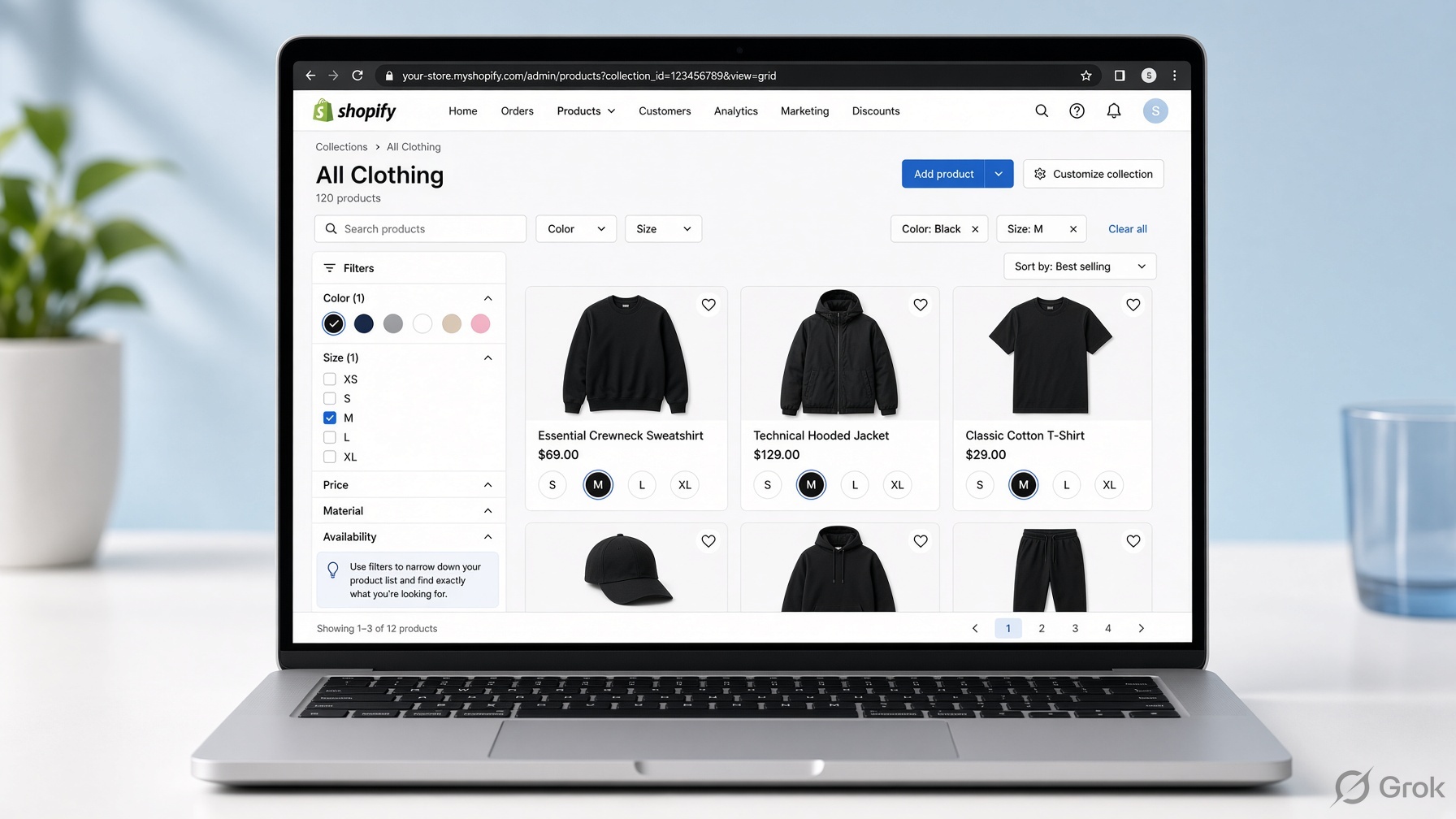
Reviewing Product Options and Filter Definitions
Another important step is reviewing how product options are defined.
Product options should be organized consistently across the catalog. For example, color values should use consistent naming conventions rather than variations such as Black, black, Jet Black, and Dark Black when these values represent the same selection.
Similarly, size options should be structured consistently so that filtering can work with predictable values.
Developers should review:
- Whether the product option names are consistent.
- Whether the relevant option values are correctly assigned.
- Whether the products contain the expected variants.
- Whether the collection contains the products being tested.
- Whether the filter definitions correspond to the actual product data.
These checks can help identify catalog inconsistencies that may affect filtering.
Although the discussion does not establish that inconsistent product data is the cause of the reported issue, reviewing the product structure is a useful diagnostic step before making more complex changes to the storefront.
Investigating the API Response
When filtering does not behave as expected, examining the actual API response can help developers understand what is happening.
Rather than relying only on the storefront display, developers can inspect the returned data and determine whether the filtering condition has affected the products, the variants, or both.
A useful debugging process involves comparing the response before and after applying a filter.
For example, a developer can examine:
- The products returned from an unfiltered collection query.
- The products returned after applying a variant option filter.
- The number of products returned in each response.
- The variant data associated with each product.
- Whether the returned variants contain the selected option value.
- Whether the filter changes the product list but leaves the variant list unchanged.
This comparison can help determine whether the API is narrowing down the products while leaving their nested variant data intact.
It can also help developers distinguish between a filtering configuration issue, an incorrect query, and a limitation or unexpected behavior in the response structure.
Is Client-Side Filtering a Possible Solution?
One of the main questions raised in the discussion is whether developers need to perform additional filtering on the client side after retrieving product data.
Client-side filtering involves processing the data received by the storefront application and selecting only the variants that match the customer’s chosen option.
For example, if the API returns a product with several color variants, the frontend application could examine each variant’s option values and retain only the variants that match Black.
This approach can provide greater control over the information displayed to shoppers.
Potential benefits include:
- Greater control over variant selection.
- Custom filtering logic for storefront interfaces.
- Ability to display only matching variants.
- Flexibility when combining multiple filter conditions.
- Control over how filtered products and options are presented.
However, client-side filtering also has considerations.
If the storefront retrieves a large number of products and variants, processing all of that data in the browser may increase memory usage and affect performance.
It may also result in unnecessary data transfer if the storefront retrieves more variant information than it actually needs.
Developers should therefore consider the size of their catalog, the number of variants, the complexity of the filters, and the performance requirements of the storefront before relying entirely on client-side processing.
Client-side filtering is one possible approach discussed in the community, but the discussion does not establish that it is the only solution or that it is necessary in every implementation.
Challenges With Multiple Filters
The situation becomes more complicated when shoppers apply several filters simultaneously.
For example, a customer may want a black shirt in Medium size that is currently available.
The storefront may need to consider multiple conditions, including color, size, and availability.
If the product-level filtering returns products that match these conditions but the nested variant data remains unchanged, the frontend may still need to identify which individual variants satisfy all the selected conditions.
This is particularly important for products with combinations of options.
A product may have a Black variant in Small size and a Medium variant in White. If the storefront incorrectly combines product-level matches without checking individual variant combinations, it could display a product that does not actually have the requested Black and Medium combination.
Proper filtering logic should therefore consider the relationship between variant option values rather than simply checking whether a product contains each option somewhere in its variant list.
This helps avoid incorrect product availability and selection behavior.
Performance and Storefront Experience
Filtering functionality can influence both the performance of an online store and the quality of the shopping experience.
Customers expect filters to respond quickly, especially when browsing large product collections. Delayed filtering, incorrect results, or options that do not correspond to available products can make a storefront difficult to use.
Developers implementing custom filtering systems should consider:
Data efficiency: Retrieve only the information required for the storefront wherever possible.
Frontend performance: Avoid unnecessarily processing large product and variant datasets.
Filter accuracy: Ensure that multiple conditions are applied to the same variant where appropriate.
Product availability: Prevent the interface from displaying options that cannot be purchased.
User experience: Make it clear which filters are active and allow customers to remove or change them easily.
These considerations are important whether filtering is handled primarily through API queries, frontend logic, or a combination of both.
What Developers Still Need to Clarify
The community discussion remains focused on understanding the exact behavior of variant filtering and the appropriate implementation approach.
Several questions remain open:
- Does the collection filtering functionality filter the product list only, or can it also restrict the nested variants returned?
- Is there a supported API query approach that returns only variants matching the selected option?
- Are additional configuration steps required beyond setting up collection and search filters?
- Is frontend filtering necessary when the API returns complete variant lists?
- How should developers efficiently handle multiple variant options without retrieving excessive data?
These questions are particularly important for developers building custom storefronts because the implementation can affect product display, performance, and the accuracy of shopping results.
The discussion does not provide a confirmed universal solution. Developers may need to investigate their query structure, filter configuration, response data, and storefront implementation to identify the most appropriate approach.
Conclusion
Variant filtering is an important feature for modern ecommerce stores, especially when products are available in multiple colors, sizes, styles, or configurations. It helps shoppers navigate product catalogs and find items that match their preferences.
However, unexpected behavior can occur when developers attempt to filter variants through collection queries. In the case discussed, applying a variant option filter does not consistently result in only the matching variants being returned. Instead, the response may continue to contain complete variant lists for the matching products.
Reviewing filter configuration, product option structure, and API responses can help developers understand where the filtering behavior differs from their expectations.
Client-side filtering may provide an alternative for restricting the displayed variants, although its suitability depends on catalog size, performance requirements, and the storefront architecture.
Ultimately, the key is to distinguish between filtering products within a collection and filtering the individual variants associated with those products. Understanding this distinction can help developers build more accurate, efficient, and user-friendly ecommerce experiences while continuing to investigate the behavior of their storefront data.
The community discussion highlights an unresolved technical question and encourages developers to explore the relationship between collection filtering, variant data, and custom storefront logic before selecting an implementation strategy.



0 Comments