Product synchronization is one of the most useful parts of running a modern ecommerce business, especially for stores that depend on external suppliers. It can automatically keep product information, pricing, inventory, and other details updated between a store and the system that manages supplier data.
However, synchronization can also create a frustrating problem: What happens when a merchant wants to make a manual change to a product, but the supplier system keeps changing it back?
This is the central issue behind a recent Shopify Community discussion. A seller reported that changes made directly inside Shopify, including product titles and prices, were not staying in place. After some time, the previous supplier-side information appeared again, effectively overwriting the merchant’s manual changes.
This situation is not necessarily a simple technical error. In many cases, it is the result of how synchronization has been designed.
Understanding which system is considered the “source of truth” is the key to understanding the problem.
What Does Product Synchronization Mean?
Product synchronization means that two systems exchange information about the same product.
For example, an ecommerce store may contain:
- Product title
- Description
- Price
- Images
- Inventory quantity
- SKU
- Variants
- Product availability
The supplier-side system may contain similar information.
When synchronization is enabled, changes in one system can be transferred to the other.
This sounds simple, but there is an important question:
Which system has authority when both systems contain different information?
If the store says a product costs ₹1,499 and the supplier system says it costs ₹1,399, the synchronization process needs to decide which value should be used.
That decision is often controlled by the system’s synchronization rules.
The Source-of-Truth Problem
The most important concept in this discussion is the source of truth.
A source of truth is the system that is considered authoritative when information conflicts.
If the supplier system is the source of truth, it may continuously send its product information to Shopify.
Imagine that the supplier system has:
Product title: Wireless Headphones
Price: ₹1,499
The merchant changes Shopify to:
Product title: Premium Wireless Headphones
Price: ₹1,799
Everything looks correct initially.
But later, the synchronization process runs again.
If the supplier system remains the source of truth, the information may return to:
Product title: Wireless Headphones
Price: ₹1,499
From the merchant’s perspective, it looks as though Shopify is randomly undoing their work.
In reality, the synchronization system may simply be doing exactly what it was configured to do.
Why Manual Shopify Edits Can Be Overwritten
A common misunderstanding is that once a merchant changes a product inside Shopify, that change should remain permanently.
That is only true if Shopify is allowed to control that particular field.
If another system is continuously monitoring and updating the product, the merchant’s manual edit may not have priority.
This can affect several fields, including:
- Product title
- Product description
- Price
- Inventory
- Product availability
- Variants
- Images
- Other product information
Not every synchronization system controls every field, so merchants need to understand exactly which fields are being synchronized.
Product Titles Are an Important Example
Product titles often need to be customized for customers.
A supplier may use a basic title such as:
Men’s Casual Shoes
A merchant may want to use:
Lightweight Men’s Casual Walking Shoes
The merchant may optimize the title for their audience, branding, or search visibility.
If the supplier system continuously pushes its original title back to Shopify, the merchant loses that customization.
This creates unnecessary work because the merchant may repeatedly have to edit the same product.
The better solution is to determine whether product-title synchronization can be controlled.
Prices Are Even More Complicated
Price synchronization is more sensitive because pricing can directly affect profitability.
Suppose the supplier’s cost or recommended price changes.
The merchant may have manually set a selling price based on their desired margin.
For example:
Supplier-side price: ₹900
Merchant selling price: ₹1,499
Later, supplier information changes to ₹950.
If automatic price monitoring is enabled, the store’s price may be recalculated or updated.
The merchant might have intentionally set ₹1,499, but the synchronization process may modify the value according to its pricing rules.
This is why merchants need to understand whether automatic price monitoring is active.
Inventory Synchronization Has a Different Purpose
Inventory synchronization is usually designed to protect merchants from selling products that the supplier no longer has available.
For example, a supplier has:
Available stock: 20 units
The store displays:
20 units available
The supplier sells five units elsewhere.
Supplier inventory becomes:
15 units
The store may automatically update to 15.
This is useful because manually maintaining inventory would be difficult.
However, the same automation that protects inventory accuracy can sometimes reduce merchant control.
A merchant may manually change stock for business reasons, but the next inventory update could replace that value with supplier data.
This is another example of the source-of-truth problem.
A Newer Two-Way Synchronization Approach
The discussion also mentions a newer synchronization capability that may allow changes made in Shopify to flow back to the supplier-side system.
This represents an important change from a one-way synchronization model.
In a basic setup:
Supplier System → Shopify
The supplier system sends information to Shopify.
In a two-way setup:
Supplier System ↔ Shopify
Changes can potentially move in both directions.
This gives merchants more flexibility.
For example, a merchant could change:
- Product title
- Price
- Description
- Inventory
in Shopify, and those changes could potentially be reflected in the connected supplier system.
However, two-way synchronization does not automatically mean that the merchant has complete control.
Other automated rules may still operate.
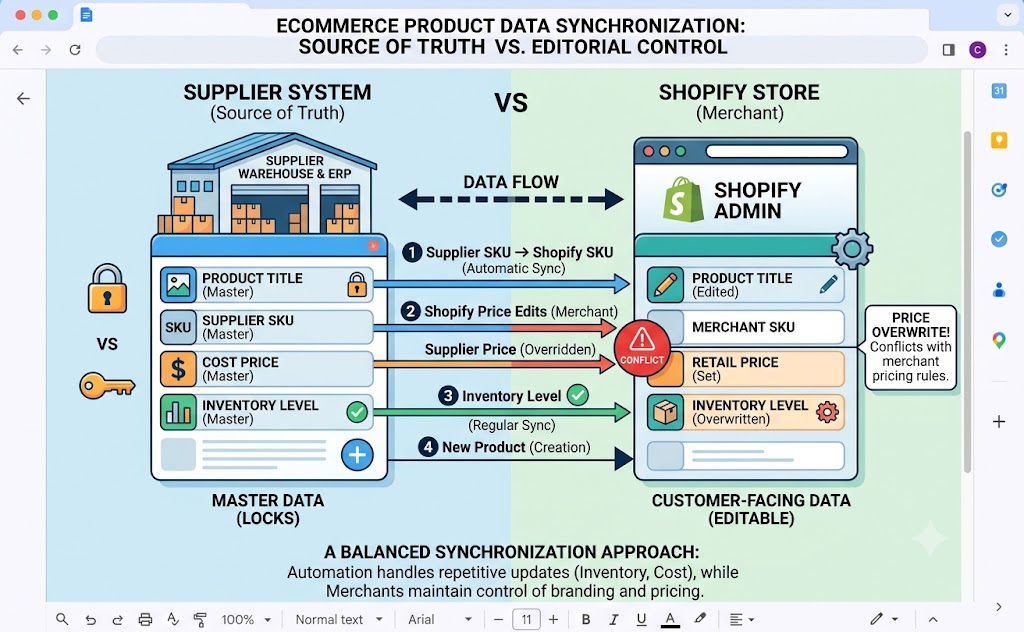
Why Two-Way Sync Does Not Solve Everything
Suppose a merchant changes a product price in Shopify.
The price change is sent back to the supplier system.
However, automatic supplier-price monitoring is still active.
The supplier later changes its price.
The system may update the product again.
The merchant could therefore experience the same problem even though two-way synchronization is enabled.
This demonstrates an important distinction:
Data synchronization and data control are not the same thing.
Synchronization determines how information moves.
Monitoring rules determine when information should be changed.
A merchant needs to understand both.
Monitoring Can Override Merchant Decisions
Automatic monitoring is useful when merchants want supplier information to remain current.
But there are situations where merchants intentionally want to control their own information.
For example, a merchant may want to:
- Keep a specific retail price
- Run a temporary promotion
- Use custom product titles
- Write original descriptions
- Maintain branded messaging
- Keep a specific inventory buffer
- Temporarily stop selling a product
If automatic monitoring continues operating, some of these decisions may be overwritten.
Therefore, merchants should identify which automated processes are active before assuming that a manual edit will remain permanent.
Editing Products in the Supplier System
One practical recommendation from the discussion is to make important product edits inside the supplier-side system rather than directly in Shopify.
This approach makes sense when the supplier system is the primary source of truth.
If product information originates there, editing it there reduces the likelihood of the next synchronization replacing the change.
For example, instead of:
Shopify → Change title → Wait → Title gets overwritten
the merchant can:
Supplier system → Change title → Sync to Shopify
The store then receives the updated information from the source system.
This can create a more predictable workflow.
But This May Not Be Ideal for Every Merchant
Editing everything in the supplier system is not always convenient.
Merchants often want Shopify to be their primary workspace because that is where they manage the customer-facing store.
They may also have branding requirements that are completely different from supplier information.
A supplier may provide a technical product description, while the merchant wants a marketing-focused description.
The supplier may use a generic title, while the merchant wants a title designed for their customers.
Therefore, forcing all merchants to edit supplier data may not be the best solution.
The ideal setup gives merchants control over which fields are supplier-managed and which fields are merchant-managed.
Field-Level Control Is Important
One of the best ways to solve synchronization conflicts is to give merchants control at the field level.
For example:
| Product Field | Preferred Source |
| Product Cost | Supplier |
| Supplier Inventory | Supplier |
| Product Title | Merchant |
| Product Description | Merchant |
| Retail Price | Merchant |
| Supplier SKU | Supplier |
| Product Availability | Shared |
| Images | Depends on workflow |
This allows automation to handle information that needs to stay connected while giving merchants control over customer-facing content.
Not every business needs the same setup.
A Practical Workflow for Merchants
Before changing products, merchants should identify what the synchronization system controls.
A practical process could be:
Step 1: Identify the Source of Truth
Determine whether supplier information or Shopify information has priority.
Step 2: Check Which Fields Are Synchronized
Do not assume that every product field behaves the same way.
Step 3: Check Automatic Monitoring
Look specifically at price and inventory monitoring.
Step 4: Decide Which Fields Need Merchant Control
Titles, descriptions, and retail prices may require manual control.
Step 5: Use the Appropriate Editing Location
If a field is supplier-controlled, edit it in the supplier system.
If merchant control is available, edit it in Shopify.
Step 6: Test With One Product
Do not change hundreds of products immediately.
Make a controlled change to one product and observe what happens during the next synchronization.
Step 7: Document the Workflow
Once the behavior is understood, create a simple internal process so that future product edits are handled correctly.
Why Testing Matters
Synchronization systems can have complex rules.
A merchant may assume that changing a price in Shopify will update everything automatically, while another merchant may experience the opposite.
Testing provides clarity.
Choose one product and change one field.
Then observe:
- What happens immediately?
- Does the supplier-side information change?
- Does Shopify change again later?
- Does automatic monitoring modify the value?
- Which system ultimately controls the field?
This small experiment can prevent major problems when managing a large catalog.
The Risk of Constant Manual Corrections
If merchants repeatedly edit products only to see those changes overwritten, the store becomes difficult to manage.
Imagine having 500 products and manually correcting titles or prices every week.
That is not a sustainable workflow.
It can also create inconsistencies.
Some products may contain the merchant’s customized information while others revert to supplier information.
Over time, the catalog becomes harder to maintain.
Automation should reduce repetitive work, not create another repetitive task.
Automation Should Support Merchant Control
The best synchronization system should balance two competing requirements.
First, merchants need reliable supplier information.
Second, merchants need control over how products are presented to customers.
Supplier data is particularly important for:
- Inventory
- Supplier costs
- Availability
- Product specifications
Merchant control is particularly important for:
- Branding
- Product titles
- Marketing descriptions
- Retail pricing
- Promotions
- Customer-facing content
A good workflow should allow these responsibilities to coexist.
What Ecommerce Merchants Should Look For
When selecting or configuring a supplier synchronization process, merchants should ask:
- Which system is the source of truth?
- Is synchronization one-way or two-way?
- Which product fields are synchronized?
- Can individual fields be excluded?
- Can price monitoring be paused?
- Can inventory monitoring be paused?
- Are manual Shopify changes preserved?
- How quickly are updates applied?
- What happens when both systems are changed?
- Can changes be tested before applying them to the entire catalog?
These questions can prevent confusion later.
The Bigger Lesson
The issue discussed by the merchant is not limited to one store.
It represents a broader challenge in ecommerce automation.
Whenever multiple systems manage the same information, conflicts can occur.
The more systems involved, the more important it becomes to define ownership of each piece of data.
Without clear ownership, merchants may experience:
- Overwritten changes
- Unexpected price changes
- Incorrect inventory
- Repeated manual work
- Confusing product information
- Inconsistent customer-facing content
The solution is not necessarily to disable synchronization completely.
In fact, doing so may create other problems.
Instead, merchants should configure synchronization around clear responsibilities.
Conclusion
Product synchronization can save ecommerce merchants a tremendous amount of time, but only when they understand how it works.
The central issue in this discussion is the conflict between manual Shopify edits and automated supplier updates.
If the supplier-side system is treated as the source of truth, changes made directly in Shopify may eventually be overwritten. This is expected behavior when automatic synchronization is working according to its rules.
A newer two-way synchronization approach can provide more flexibility by allowing certain Shopify changes to flow back to the supplier side. However, automatic price and inventory monitoring may still change values based on supplier information.
Therefore, enabling two-way synchronization alone may not completely solve the problem.
Merchants should understand which system controls each product field, whether monitoring is active, and where important edits should be made.
The most effective approach is to establish clear ownership of product data. Supplier-controlled information such as inventory and supplier costs can remain automated, while merchant-controlled information such as branding, titles, descriptions, and retail pricing can remain under the store owner’s control.
Ultimately, synchronization should make ecommerce operations easier, not create a cycle where merchants repeatedly fix the same information.
A well-designed workflow allows automation to handle repetitive supplier updates while preserving the merchant’s ability to control the customer-facing store.



0 Comments