Inventory synchronization is one of the biggest challenges for dropshipping and supplier-based ecommerce businesses.
A store may display that a product is available, while the supplier has already sold the last unit to another customer. If the store does not receive the supplier’s latest inventory information quickly enough, another customer can place an order for an item that is no longer available.
This situation is known as overselling.
A recent ecommerce community discussion focused on this exact problem. The store owner was concerned that supplier inventory could change between synchronization cycles, creating a situation where the store continues accepting orders even though the supplier has already run out of stock.
The discussion produced several practical recommendations, including safety stock buffers, more frequent synchronization, real-time inventory updates, stock verification before fulfillment, synchronization monitoring, and delayed payment capture.
The important conclusion is that inventory synchronization cannot completely eliminate the risk unless inventory is actually reserved. However, businesses can significantly reduce the risk by designing a stronger inventory-control process.
Why Supplier Inventory Can Become Out of Date
The fundamental problem is timing.
Imagine a supplier has only one unit of a product remaining.
Your store synchronizes with the supplier at 10:00 AM and receives an inventory quantity of one.
Your store now shows the product as available.
At 10:05 AM, another customer purchases that final unit directly from the supplier.
The supplier’s inventory is now zero.
However, your store may continue showing one unit until the next synchronization.
At 10:10 AM, one of your customers places an order.
Your store accepts the order because its inventory data still says the product is available.
The supplier then receives the order and informs you that the product is out of stock.
The problem is not necessarily that the synchronization system is broken. The problem is that inventory data is a snapshot of the supplier’s inventory at a particular point in time.
Between two snapshots, inventory can change.
Why Faster Synchronization Helps but Does Not Eliminate the Risk
One obvious solution is to synchronize inventory more frequently.
If inventory is updated once every hour, there may be a significant period during which the store has outdated information.
If inventory is updated every few minutes, the risk becomes smaller.
However, even very frequent synchronization cannot guarantee perfect accuracy.
There will always be a small period between updates.
For example:
- Supplier stock update: 2:00:00
- Another customer purchases the last unit: 2:00:30
- Your store receives the next update: 2:03:00
- Your customer orders at 2:01:00
The store can still accept the order.
Therefore, synchronization frequency reduces the risk but does not completely remove it.
Use a Safety Stock Buffer
One of the most practical solutions discussed is a safety stock buffer.
Instead of displaying the supplier’s complete inventory quantity to customers, the store intentionally keeps some inventory unavailable for sale.
For example, suppose the supplier reports:
Supplier inventory: 20 units
Instead of showing all 20 units as available, the store could make only 17 units available for sale.
The remaining three units act as a buffer.
If the supplier’s inventory suddenly drops before the next synchronization, the buffer provides some protection.
The exact buffer depends on the business.
A store selling high-volume products may need a different buffer from a store selling one or two units per day.
The key principle is simple:
Do not necessarily expose the supplier’s entire reported inventory to customers.
Why the Buffer Must Be Built Into the Sync Logic
A common mistake is to manually reduce inventory and assume the adjustment will remain.
Suppose the supplier reports 20 units.
You manually reduce your store quantity to 17.
During the next synchronization, the supplier again reports 20 units.
If the synchronization process simply replaces your store quantity with the supplier quantity, your manual buffer disappears.
The store goes back to showing 20 units.
Therefore, the safety buffer should be part of the inventory synchronization logic itself.
For example:
Supplier inventory − safety buffer = sellable inventory
If the supplier reports 20 units and the safety buffer is 3, the store should show 17.
If the supplier reports 10, the store should show 7.
If the supplier reports 2, the store should show zero or another appropriately restricted quantity depending on the business rules.
This makes the buffer consistent rather than temporary.
Real-Time Inventory Updates Are Even Better
Another recommendation from the discussion is to use a direct inventory connection where possible.
Instead of relying only on periodic synchronization, a supplier may provide a mechanism that sends an immediate update when inventory changes.
This can dramatically reduce the time between an inventory change and the store receiving that information.
Real-time inventory updates are especially valuable when:
- Products sell quickly
- Suppliers sell through multiple channels
- Inventory levels are low
- Products are expensive
- Stockouts are costly
- The supplier has frequent inventory changes
However, even real-time updates are not an absolute guarantee.
There can still be a short delay between a customer purchasing a product and the inventory update reaching another sales channel.
That is why additional protection is useful.
Recheck Inventory When an Order Is Placed
One of the strongest safeguards is to verify supplier inventory again when a customer actually places an order.
Instead of assuming that the last synchronization is still accurate, the fulfillment process can ask:
Is this product still available from the supplier?
If the supplier confirms availability, the order can proceed.
If the supplier reports that the product is unavailable, the store can stop or hold the fulfillment process before the order is sent to the supplier.
This creates another layer of protection.
The workflow becomes:
Customer orders → verify supplier inventory → confirm availability → send for fulfillment
rather than:
Customer orders → immediately send for fulfillment
This approach is particularly useful for products with low inventory.
Monitor the Age of Inventory Data
Another important idea is to monitor how recently inventory information was updated.
Inventory data that is five minutes old is very different from inventory data that is two days old.
A store should therefore know when its last successful inventory synchronization occurred.
If the synchronization process fails repeatedly, the business should not continue behaving as though the inventory data is accurate.
For example, if the last successful update happened 24 hours ago, the store may want to stop selling affected products or mark them as unavailable until current inventory information is restored.
This is an important concept:
Stale inventory data should be treated as a risk signal.
What Happens When Synchronization Fails?
Synchronization systems can fail for many reasons.
Possible causes include:
- Supplier connection problems
- Network failures
- Authentication issues
- Data formatting errors
- API limitations
- Temporary supplier downtime
- Product mapping problems
- Server errors
The important point is that a failed synchronization should not go unnoticed.
A reliable inventory process should monitor synchronization health.
If the system expects an update every 15 minutes but has not received one for several hours, someone should know about it.
Depending on the business, the system could:
- Send an alert
- Stop inventory updates
- Mark affected products unavailable
- Require manual verification
- Temporarily pause fulfillment
The right action depends on the risk associated with the product.
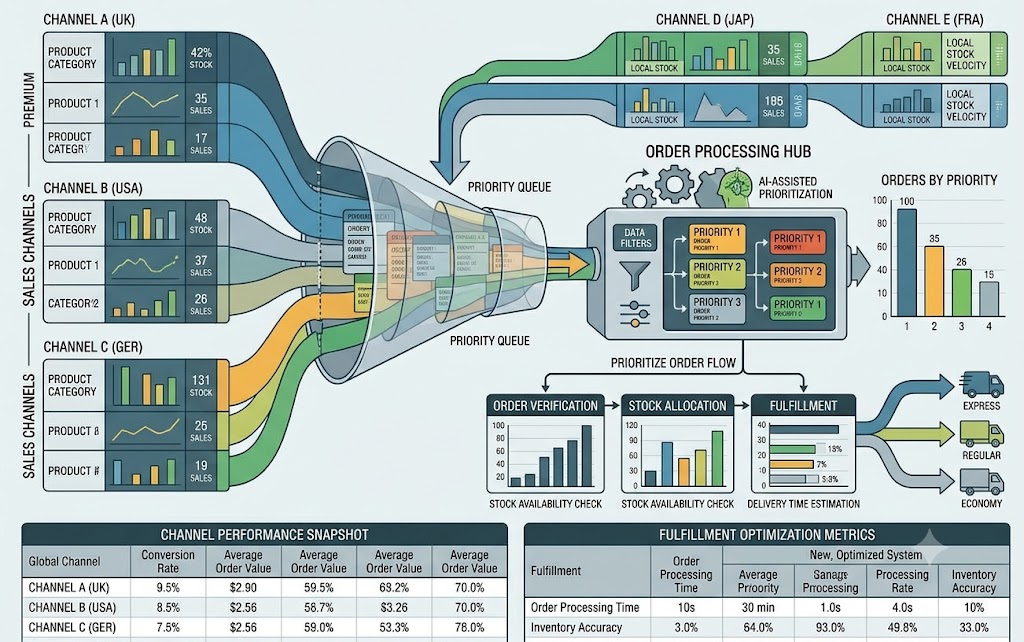
Make Sure Inventory Tracking Is Properly Configured
The store itself also needs to be configured correctly.
Inventory tracking should be enabled for products that require stock control.
If the store allows customers to continue purchasing products after inventory reaches zero, the risk of overselling increases significantly.
For dropshipping businesses, this setting should be reviewed carefully.
If the supplier is out of stock, the store should generally stop accepting new orders for that product unless there is a specific reason to continue selling it, such as confirmed replenishment or backorder support.
The goal is to make the store’s selling behavior match actual supplier availability.
The Role of Delayed Payment Capture
The discussion also introduced another interesting approach: delayed payment capture.
Normally, a customer completes checkout and payment may be captured immediately.
Instead, a business may be able to authorize the customer’s payment first and capture it later after confirming that the product is actually available.
The workflow could look like:
Customer places order → payment is authorized → supplier availability is checked → order is confirmed → payment is captured
If the supplier confirms that the product is available, the order can proceed normally.
If the supplier reports that the product is unavailable, the business may be able to cancel the order or release the authorization without creating the same refund process that would be required after an already-captured payment.
This can reduce some of the financial and customer-service problems associated with stockouts.
However, delayed capture is not available in every situation.
It can depend on:
- Payment method
- Payment provider
- Authorization duration
- Store configuration
- Checkout setup
- Technical compatibility
Therefore, merchants should verify whether their specific payment setup supports this approach.
Why Delayed Capture Is Not a Replacement for Inventory Management
Delayed payment capture can reduce the consequences of an oversell, but it does not prevent the oversell itself.
The customer can still place an order for a product that is unavailable.
The difference is that the merchant may have a safer way to handle the payment.
Therefore, delayed capture should be viewed as a secondary protection layer, not the primary inventory strategy.
The strongest approach combines several safeguards.
A Layered Inventory Protection Strategy
A reliable supplier inventory system can use multiple layers of protection.
Layer 1: Safety stock
Keep a small quantity unavailable for sale to protect against synchronization delays.
Layer 2: Frequent synchronization
Update inventory as frequently as reasonably possible.
Layer 3: Real-time updates
Use direct supplier inventory notifications where available.
Layer 4: Order-time verification
Check supplier availability again before sending the order for fulfillment.
Layer 5: Synchronization monitoring
Track whether inventory updates are happening successfully.
Layer 6: Stale-data protection
If inventory data becomes too old, stop selling affected products until fresh information is available.
Layer 7: Payment protection
Where supported, authorize payment first and capture it after inventory confirmation.
No individual layer is perfect.
Together, however, they can significantly reduce the risk and impact of overselling.
Choosing the Right Safety Buffer
The safety buffer should not be chosen randomly.
A business should consider:
- Average daily sales
- Supplier inventory volatility
- Synchronization frequency
- Number of sales channels
- Supplier fulfillment speed
- Product popularity
- Cost of stockouts
- Supplier reliability
For a slow-moving product, a small buffer may be enough.
For a product that frequently sells out, a larger buffer may be appropriate.
The merchant should also review the buffer regularly.
If the supplier becomes more reliable or inventory updates become more frequent, the buffer might be reduced.
If the supplier becomes less reliable, the buffer may need to increase.
Why Inventory Reservation Is the Only Complete Solution
The discussion ultimately reaches an important conclusion.
There is no way to completely eliminate overselling when multiple customers or sales channels are competing for the same limited inventory unless inventory is actually reserved.
Consider a supplier with one unit remaining.
Two different customers could purchase the product almost simultaneously.
Both stores may have received the same inventory quantity before either order was processed.
Without a reservation mechanism, both stores can believe that the item is available.
This is a fundamental inventory problem rather than simply a synchronization problem.
A true reservation system temporarily locks inventory for a specific order.
That is the strongest protection because the inventory is no longer available to another buyer.
However, not every supplier or dropshipping arrangement supports inventory reservation.
Therefore, merchants often need to use a combination of buffers, synchronization, verification, and payment controls.
Practical Example
Imagine a supplier has 50 units of a product.
The merchant decides to maintain a safety buffer of five units.
The store therefore makes 45 units available.
The supplier sells several units through other channels and inventory falls to 40.
The next synchronization updates the store to 35 sellable units.
Later, a customer places an order.
Before fulfillment, the system checks the supplier and confirms that 40 units remain.
The order is sent successfully.
Now imagine the synchronization system stops working.
After several hours, the store still believes 35 units are available.
A monitoring system identifies that inventory data has become stale and prevents additional orders until fresh information is received.
This layered process greatly reduces the chance of a serious overselling problem.
Final Takeaway
Supplier inventory synchronization will always involve some level of timing risk when inventory is shared across multiple sales channels.
A supplier may sell its last unit immediately after your store receives an inventory update. Even highly frequent synchronization cannot completely eliminate that gap.
The practical solution is therefore not to search for one perfect synchronization method.
Instead, merchants should build multiple safeguards.
A safety stock buffer can protect against normal synchronization delays. More frequent or near-real-time updates can reduce the size of the delay. Rechecking supplier inventory when an order is placed can catch changes that happened after the last update. Monitoring synchronization failures can prevent the store from relying on outdated inventory data.
Proper inventory settings can also ensure that customers cannot continue purchasing products once available stock reaches zero.
Finally, delayed payment capture can provide an additional layer of protection by allowing the merchant to confirm supplier availability before permanently capturing payment, where the payment setup supports it.
The strongest overall approach is therefore:
Buffer inventory + frequent synchronization + supplier verification + monitoring + correct inventory settings + payment protection.
These measures cannot guarantee that overselling will never happen, especially when inventory is shared across multiple channels. But they can significantly reduce both the frequency of stockouts and the financial impact when they occur.
For dropshipping businesses, accurate inventory management is ultimately about more than displaying the correct number on a product page. It is about creating a system that recognizes the limitations of inventory data, protects customers from unnecessary cancellations, and gives the merchant enough control to respond quickly when supplier stock changes.


0 Comments