For an ecommerce business, the customer experience does not end when an order is placed. What happens after checkout can be just as important as the purchasing experience itself.
Customers want to know whether their order has been processed, shipped, and delivered. They expect to receive a tracking link and see useful information about the shipment. For a dropshipping business, however, the tracking experience can become more complicated because the order may be fulfilled by an external supplier and shipped from another country.
A common concern among new dropshipping merchants is what customers see after clicking an order-status or tracking link.
The store owner may want the entire experience to look professional and consistent with the store’s branding. Instead, customers might be redirected to a platform-hosted order status page, an unfamiliar tracking website, or a tracking page that reveals where the package originated.
This article explains how order-status pages, tracking links, shipment information, and shipping-origin details generally work and what merchants can do to create a better customer experience.
Why the Order Status Page Matters
After placing an order, customers often receive a confirmation message containing a link to view their order.
When they click that link, they may be taken to an order-status page hosted by the ecommerce platform.
This page can contain information such as:
- Order number
- Products purchased
- Payment status
- Fulfillment status
- Shipping information
- Tracking number
- Estimated delivery information
- Shipment updates
For customers, this page becomes one of the main places where they check their order.
Because of this, merchants naturally want the page to feel like part of their own store.
A completely different-looking page or unfamiliar domain can make the customer wonder whether they have been redirected somewhere unrelated to the store.
This is particularly important for new brands that are trying to establish trust.
Understanding the “View Your Order” Link
The “View your order” link commonly included in order notifications is generally connected to the platform’s hosted order-status experience.
Merchants may be able to modify notification templates and adjust parts of the customer communication surrounding the link.
However, changing the actual destination or completely moving the order-status experience to the store’s own domain can be more limited.
This distinction is important.
There are two separate things:
The message containing the link
and
The page that opens when the customer clicks the link.
A merchant may have control over the wording, layout, and certain parts of the notification, while having less control over the underlying hosted order-status page.
Therefore, simply editing the notification message does not necessarily mean that the merchant can completely replace the platform-hosted order page.
Why Tracking Links May Look Different
Another issue arises when customers receive tracking links that lead to an external tracking website.
The ecommerce platform itself may not always generate the tracking destination.
The tracking link can come from the fulfillment process or from the system used to manage shipment tracking.
For example, a merchant may enter a tracking number and carrier information. Depending on how that information is processed, the customer may receive a link generated by another tracking service.
This can lead to an unexpected customer experience.
The store owner may expect customers to see a branded tracking page, but customers could instead be sent to a generic tracking website.
This is why merchants should check the settings of their fulfillment and tracking systems whenever the tracking destination is different from what they expected.
Why the Tracking Number Is Important
The tracking number is the key piece of information that connects the order to the carrier’s shipment record.
Once the tracking number is active, the customer can usually see updates such as:
- Shipment information received
- Package picked up
- Package in transit
- Package processed at a facility
- Package arriving at destination
- Out for delivery
- Delivered
The exact information depends on the carrier.
The tracking number itself is not necessarily controlled by the store.
It is generated and managed through the shipping process.
This means that merchants have limited control over some of the information customers eventually see.
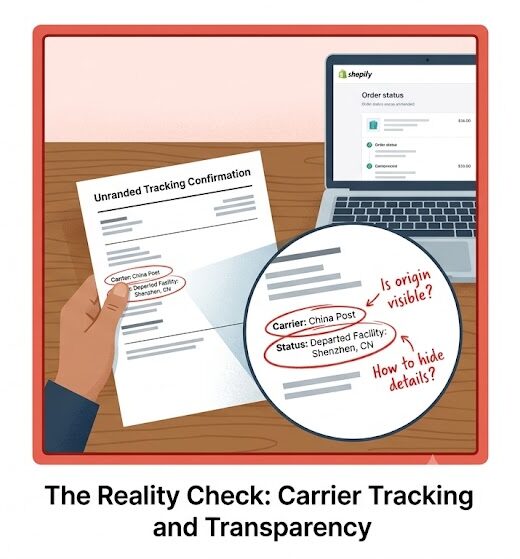
Shipment Origin Can Be Revealed Through Carrier Data
One of the biggest concerns for dropshipping merchants is the origin of the shipment.
A store may be branded as a local or international ecommerce business, while the actual product is shipped from another country.
Customers may discover the shipping origin through tracking information.
For example, a tracking page may show:
- Origin country
- Initial sorting facility
- Departure location
- Customs processing
- International transit
- Destination country
This information generally comes from carrier tracking data.
The ecommerce platform does not necessarily create or control every piece of information shown by the carrier.
As a result, simply changing the design of the store does not guarantee that the shipment origin can be hidden.
Why Merchants Care About Shipping-Origin Information
Dropshipping businesses often have concerns about customers discovering that a product is shipped internationally.
There can be several reasons.
First, customers may have expected domestic shipping.
Second, an unfamiliar origin country may make customers question delivery times.
Third, customers may become concerned about product quality or authenticity.
Fourth, the customer may feel that the store is simply reselling an item from another marketplace.
These concerns can affect trust.
However, merchants should not treat tracking transparency as something that should automatically be hidden.
The better approach is to provide accurate delivery expectations before the customer purchases.
If an item takes 7–15 business days to arrive, the store should clearly communicate that timeframe.
Transparency helps reduce disappointment and support requests.
The Difference Between Branding and Hiding Information
There is an important distinction between creating a branded tracking experience and attempting to conceal shipping information.
A branded tracking page can improve customer experience by keeping the customer within a familiar visual environment.
It can show the store’s logo, colors, order information, shipment progress, and customer-support details.
This is useful and legitimate.
However, attempting to remove or manipulate carrier information so that customers are deliberately misled about the actual origin of their products is a different issue.
Merchants should ensure that product descriptions, shipping policies, and delivery estimates accurately represent how orders are fulfilled.
The goal should be a professional and consistent experience, not misleading customers.
Creating a Branded Tracking Experience
One practical solution is to provide customers with a branded tracking page.
Instead of sending customers directly to an unfamiliar external tracking page, a merchant can use a tracking experience that matches the store’s branding.
A good tracking page can include:
- Store branding
- Customer’s order number
- Tracking number
- Current shipment status
- Estimated delivery information
- Carrier details
- Shipping updates
- Customer-support contact information
This gives customers a single place to check their order.
It can also reduce confusion caused by multiple tracking links.
Why a Custom Tracking Page Is Useful
A custom tracking page can improve the post-purchase experience in several ways.
Better Branding
Customers remain within an environment that looks familiar.
Better Communication
The merchant can provide additional information about delivery times and what customers should do if a shipment is delayed.
Reduced Support Requests
Customers can often find shipment information themselves instead of contacting support for every tracking update.
Increased Trust
A professional tracking page can make a small ecommerce business look more established.
Better Customer Retention
The period between checkout and delivery is an important part of the customer journey. A clear tracking experience can reduce anxiety and improve satisfaction.
Reviewing Notification Settings
When customers receive unexpected links, the first place merchants should investigate is their notification configuration.
Order confirmation and shipping messages may contain links that were automatically inserted into the message.
Merchants should review:
- Order confirmation notifications
- Shipping confirmation messages
- Fulfillment notifications
- Tracking links
- Customer-facing URLs
- Notification templates
- Tracking-related settings
The objective is to identify where the link is being generated.
If the link appears inside a notification, the notification template may be responsible.
If the link is generated after fulfillment, the tracking or fulfillment system may be responsible.
Finding the source is the first step toward changing the customer experience.
Reviewing Fulfillment and Tracking Settings
The next step is to examine how tracking information is added to orders.
When an order is fulfilled, the tracking number and carrier information may be added automatically.
If another service is involved in fulfillment, it may also determine the tracking link.
Merchants should check whether they can:
- Choose the tracking destination
- Replace the tracking URL
- Add a preferred tracking page
- Customize shipment notifications
- Use their own branded tracking page
- Control how tracking information is presented
Not every system provides the same level of customization.
This is why merchants should understand exactly which system is responsible for each part of the tracking process.
Testing With a Real Customer Journey
One of the best ways to identify problems is to place a test order.
The merchant should experience the process exactly as a customer would.
After placing the order, check:
- The order confirmation message.
- The “View your order” link.
- The order-status page.
- The shipping confirmation.
- The tracking link.
- The tracking page.
- The shipment-origin information.
- The delivery updates.
This process can reveal problems that are difficult to notice from the administration side.
For example, the merchant may have a beautifully designed storefront but discover that the customer is redirected to an unrelated tracking page after shipment.
Testing the entire customer journey makes these inconsistencies visible.
Why the Customer Journey Should Be Consistent
A customer’s experience should ideally feel connected from beginning to end.
The journey might look like:
Store → Checkout → Order Confirmation → Order Status → Tracking → Delivery
If each stage looks completely different, customers may become uncertain about whether they are still dealing with the same company.
Consistent branding can make the journey feel more professional.
However, consistency does not mean every page must be completely controlled by the merchant.
Some parts of the process may remain hosted by the ecommerce platform or carrier.
The goal is to control the parts that can realistically be controlled while clearly communicating the rest.
Handling Long International Delivery Times
For dropshipping stores, tracking becomes especially important when delivery takes longer than domestic shipping.
Customers may become concerned if several days pass without an update.
A good tracking experience can explain that international shipments may have periods where updates are less frequent.
The store can also provide estimated delivery windows and customer-support instructions.
This can reduce unnecessary anxiety.
Merchants should avoid promising exact delivery dates when the carrier cannot guarantee them.
A realistic delivery range is usually safer and more transparent.
What Merchants Should Avoid
There are several mistakes merchants should avoid when trying to improve their tracking experience.
Avoid Making False Shipping Claims
Do not claim that a product ships domestically if it actually ships internationally.
Avoid Unrealistic Delivery Promises
Do not promise extremely fast delivery unless the fulfillment process can consistently support it.
Avoid Ignoring Tracking Problems
If customers repeatedly complain that tracking links do not work, investigate the source.
Avoid Using Multiple Confusing Links
Customers should have a clear path to check their order.
Avoid Assuming the Ecommerce Platform Controls Carrier Information
Carrier tracking pages can contain information outside the merchant’s control.
Understanding this limitation helps merchants choose realistic solutions.
A Practical Setup for Dropshipping Stores
A good post-purchase process can be built around several simple principles.
First, make the order confirmation clear.
Second, provide a reliable order-status link.
Third, use a consistent tracking destination where possible.
Fourth, provide realistic delivery expectations.
Fifth, explain international shipping when relevant.
Sixth, provide customer-support information.
Seventh, test the complete process regularly.
This approach can create a much smoother experience without requiring complete control over every technical component.
Final Takeaway
Order tracking is an important part of ecommerce customer experience, especially for dropshipping stores where products may travel internationally.
A customer may receive a platform-hosted order-status link, an external tracking link, and shipment information that reveals the package’s country of origin. These elements may come from different parts of the fulfillment and tracking process, so merchants need to identify where each piece of information is generated.
The order-status page may be connected to the ecommerce platform’s hosted experience, while the tracking link can come from the fulfillment or tracking setup. Shipment-origin information generally comes from carrier data and may not be something the store can completely control.
Merchants can improve the experience by reviewing notification settings, checking fulfillment and tracking configurations, creating a branded tracking experience where possible, and testing the entire customer journey from checkout to delivery.
Most importantly, branding should be combined with transparency.
A professional tracking page can make a store feel more trustworthy, but customers should still receive accurate information about delivery times and fulfillment.
The ultimate goal is not simply to hide where a package comes from. It is to create a clear, consistent, and trustworthy post-purchase experience that keeps customers informed until their order arrives.

0 Comments