For ecommerce businesses, payment reconciliation is an important part of accounting and financial management. Every payment received by an online store needs to be matched with the corresponding order, transaction, customer, and payment record. When a store processes a large number of orders, doing this manually can become time-consuming and error-prone.
A common issue faced by Shopify merchants is the lack of a Payment ID or payment reference directly inside the standard transaction history export. A merchant may download the transaction history as a CSV file and expect it to contain all the information required for accounting reconciliation. However, the required payment identifier may not be included in the transaction export.
This creates an additional step. The merchant has to compare the transaction history with another export, usually the orders data, to find the corresponding Payment ID.
The Shopify Community discussion around this issue highlights an important limitation of the native export system and several practical ways merchants can work around it.
Why Payment ID Matters for Accounting
A Payment ID is useful because it provides a reference that can connect a payment to a specific transaction or payment record.
For example, an ecommerce business might have hundreds or thousands of transactions during a month. The accounting team may receive payment information from a bank, payment provider, or internal financial system. To reconcile those payments, they need reliable identifiers.
An order number alone may not always be enough.
A single order can sometimes have multiple payment-related records. For example, a payment could be attempted and fail before another payment succeeds. A transaction could also be partially refunded, fully refunded, or adjusted later.
Having a payment reference makes it easier to identify exactly which payment record is being reconciled.
Ideally, the transaction export would contain fields such as:
- Order ID
- Order name
- Transaction ID
- Payment ID
- Payment reference
- Transaction type
- Payment gateway
- Transaction status
- Amount
- Currency
- Date and time
When these details are available in one file, an accounting team can perform reconciliation without switching between multiple reports.
The Problem With the Native Transaction Export
The central issue discussed by the merchant is that the standard Shopify transaction history CSV cannot simply be customized to add an additional Payment ID column.
The merchant wants the Payment ID included directly in the transaction history export so that the entire reconciliation process can happen from one file.
However, the native transaction export does not provide a setting that allows merchants to select additional transaction fields and add them to the CSV.
This means the merchant cannot simply open the export settings and enable a Payment ID column.
That limitation becomes more noticeable for businesses with significant transaction volume.
If there are only a few transactions, manually comparing files may not be a major problem. But when hundreds or thousands of records are involved, repeatedly matching transaction data against order data creates unnecessary accounting work.
It can also introduce errors if records are copied or matched incorrectly.
Using the Orders Export as a Workaround
One of the simplest approaches discussed is using the orders export as the source for Payment ID information.
The orders data can contain payment-related information, including Payment ID and payment references. This means the merchant can download the orders information separately and use it to supplement the transaction history.
The disadvantage is that the merchant now has two files instead of one.
The transaction history contains transaction-specific information, while the orders export contains additional payment information.
The two datasets need to be connected using a shared identifier.
Usually, the order name or order ID can act as the connection point.
For example, imagine the transaction file contains:
| Order | Transaction Amount | Transaction Type |
| #1001 | $50 | Sale |
| #1002 | $75 | Sale |
| #1003 | $120 | Sale |
The orders file could contain:
| Order | Payment ID |
| #1001 | PAY-78421 |
| #1002 | PAY-78422 |
| #1003 | PAY-78423 |
The accounting team can then match the order values between the two files and bring the Payment ID into the transaction dataset.
This creates a combined reconciliation report without requiring the native transaction export itself to be changed.
Adding a Lookup to the Transaction File
For merchants who regularly work with spreadsheets, a lookup is one of the most practical solutions.
The basic concept is straightforward.
First, export the transaction history.
Next, export the orders data containing the Payment ID.
Then identify a field that exists in both datasets. This could be the order name or order ID.
The spreadsheet can use that shared value to find the matching Payment ID in the orders file.
For example:
Transaction file
| Order ID | Amount | Payment ID |
| 1001 | $50 | |
| 1002 | $75 | |
| 1003 | $120 |
Orders file
| Order ID | Payment ID |
| 1001 | PAY-78421 |
| 1002 | PAY-78422 |
| 1003 | PAY-78423 |
After applying the lookup, the transaction file becomes:
| Order ID | Amount | Payment ID |
| 1001 | $50 | PAY-78421 |
| 1002 | $75 | PAY-78422 |
| 1003 | $120 | PAY-78423 |
This approach does not change Shopify’s native export. Instead, it creates a second processing step after the export.
For businesses that reconcile payments monthly, this can be a reasonable workflow.
Why Spreadsheet Matching Can Become Complicated
Although the lookup approach is simple in principle, real ecommerce data may not always be perfectly structured.
One issue is that multiple payment IDs can sometimes appear within a single cell.
This can happen when an order has multiple payment-related transactions or payment attempts.
For example, instead of seeing:
PAY-12345
a cell might contain several values associated with the same order.
That means the accounting team may need to clean or transform the data before using it.
Another issue involves line-item rows.
Depending on how the order data is structured, certain order-level fields may appear only on the first row associated with an order while remaining blank on additional line-item rows.
For example:
| Order | Product | Payment ID |
| #1001 | Product A | PAY-123 |
| #1001 | Product B | |
| #1001 | Product C |
If someone expects every row to contain the Payment ID, the blank cells may cause confusion.
This does not necessarily mean the payment information is missing. It may simply be represented at the order level rather than repeated for every line item.
Therefore, spreadsheet-based reconciliation often requires some data cleaning before the final accounting file is prepared.
Building a Custom Transaction-Level Report
For merchants with more advanced reporting requirements, another approach is to retrieve the transaction information programmatically.
Shopify provides access to order transaction information through its administrative data interfaces.
Transaction records can expose important information such as:
- Transaction ID
- Payment gateway
- Transaction type
- Transaction status
- Payment ID
- Order information
- Transaction amount
- Currency
- Timestamps
This makes it possible to create a custom report containing the fields required by the accounting team.
Instead of downloading two separate exports and manually combining them, a custom process can retrieve the required information and produce a single CSV file.
For example, the resulting report could look like:
| Order | Transaction ID | Payment ID | Gateway | Type | Status | Amount |
| #1001 | TX-50001 | PAY-78421 | Gateway A | Sale | Success | $50 |
| #1002 | TX-50002 | PAY-78422 | Gateway A | Sale | Success | $75 |
| #1003 | TX-50003 | PAY-78423 | Gateway B | Refund | Success | -$20 |
This format is much more useful for accounting because the transaction and payment references are already connected.
Why a Custom Report Can Be More Useful
The main advantage of a custom report is control.
A merchant can decide exactly which columns are required.
For example, an accounting department may want:
- Order number
- Order ID
- Transaction ID
- Payment ID
- Payment reference
- Gateway
- Transaction type
- Status
- Gross amount
- Refund amount
- Currency
- Transaction date
A custom report can be designed around these requirements rather than forcing the accounting team to work with whatever fields happen to be present in a standard export.
It can also reduce repetitive manual work.
Instead of downloading multiple files every month and manually matching them, the business can generate the same structured report whenever reconciliation is required.
For larger stores, this can save considerable administrative time.
Using Specialized Export and Reporting Solutions
Another approach is to use a reporting or export solution that can retrieve transaction-level information and allow merchants to select the fields they want in the final report.
The important requirement is not simply that a solution can export orders.
It needs to support transaction-level information and provide access to the relevant payment identifier.
Before adopting such a solution, merchants should verify that it can actually include the required Payment ID or payment reference in the exported data.
They should also check whether the system can:
- Export transaction-level records
- Include payment identifiers
- Include refunds and adjustments
- Handle multiple transactions for one order
- Export large datasets
- Preserve order-to-transaction relationships
- Produce CSV files suitable for accounting
- Support scheduled or repeatable exports if needed
This is particularly important because an export solution may support order data without exposing all transaction-level fields.
Understanding the Difference Between Orders and Transactions
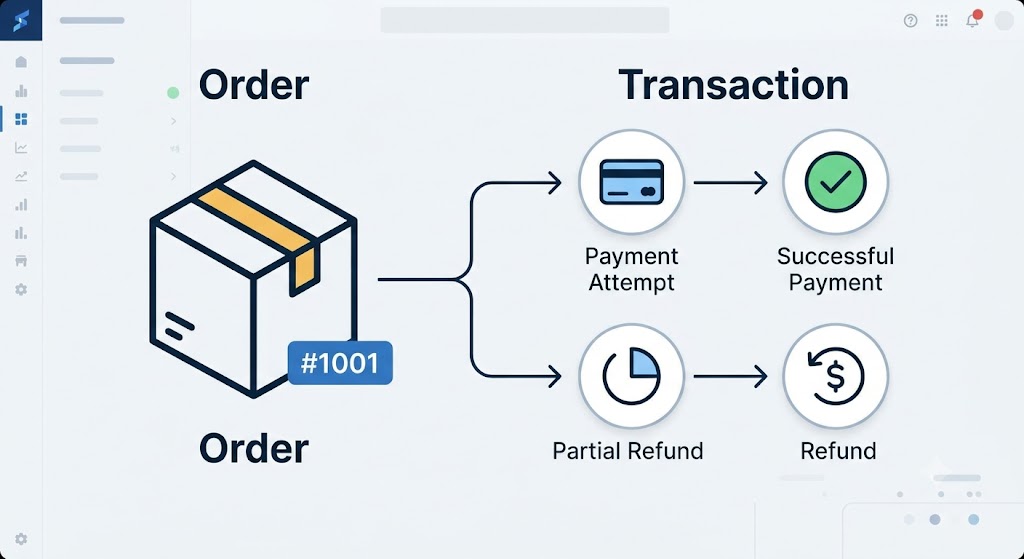
One reason this issue can be confusing is that orders and transactions are related but are not exactly the same thing.
An order represents the customer’s purchase.
A transaction represents a financial event associated with that order.
For example, one order might involve:
- An initial payment attempt.
- A successful payment.
- A partial refund.
- A later refund.
- Another adjustment.
Therefore, one order can potentially have multiple transaction records.
This is why simply adding a single Payment ID to every order does not always provide the complete financial picture.
For accounting purposes, transaction-level information can be more useful because it represents the individual financial events.
A properly designed reconciliation report should therefore consider whether the business needs one payment identifier per order or one payment identifier per transaction.
A Practical Reconciliation Workflow
For a small or medium-sized store, a simple workflow can be enough.
Step 1: Export transaction history
Download the standard transaction history CSV for the required date range.
Step 2: Export order payment information
Download the orders data containing the relevant Payment ID or payment reference.
Step 3: Identify the shared identifier
Find a field that exists in both datasets, such as the order name or order ID.
Step 4: Match the records
Use a spreadsheet lookup to connect each transaction with the corresponding payment information.
Step 5: Clean multiple values
Review cases where multiple payment IDs or references appear in one cell.
Step 6: Review blank values
Check whether blank cells represent genuinely missing information or simply fields that were not repeated across line-item rows.
Step 7: Validate the final report
Compare transaction totals against the expected payment totals before sending the report to accounting.
This process is relatively simple and does not require changing the store’s transaction system.
Which Approach Fits Different Businesses?
There is no single workflow that fits every merchant.
A business with a small transaction volume may find spreadsheet matching sufficient.
A growing store that performs reconciliation regularly may prefer a repeatable reporting workflow that combines the necessary data automatically.
A larger business with complex payment activity may benefit from a custom transaction-level report because multiple transactions, refunds, and payment events need to be handled consistently.
The important factor is the volume and complexity of the accounting process.
If reconciliation takes only a few minutes each month, manual matching may be perfectly reasonable.
If employees spend several hours repeatedly downloading, cleaning, and matching reports, a more automated solution may justify the additional setup.
The Bigger Issue: Data Accessibility
This discussion highlights a broader ecommerce reporting challenge.
Businesses often need data in a structure that is different from the platform’s default reports.
A standard report may be sufficient for basic store management but may not contain every field required by accounting, operations, finance, or analytics teams.
Payment reconciliation is a good example.
The merchant does not necessarily need more data. They need the right data to be connected in the right way.
Having transaction details in one file can make reconciliation faster and reduce the possibility of mismatched records.
This becomes increasingly important as order volume grows.
Conclusion
The Shopify transaction history export cannot natively be customized to simply add a Payment ID column. This means merchants who need Payment ID information for accounting reconciliation generally have to use an alternative workflow.
The simplest option is to combine the transaction export with the orders export using a shared order identifier. A spreadsheet lookup can then bring the Payment ID into the transaction data.
For merchants dealing with larger transaction volumes or more complicated payment activity, a custom transaction-level report can provide a more structured solution. Transaction information can be retrieved programmatically and converted into a CSV containing the exact fields required by accounting.
Another possibility is a specialized reporting or export solution that supports transaction-level Payment ID information.
Ultimately, the best workflow depends on the store’s transaction volume, accounting requirements, and level of automation needed. Until the native export provides more customization, merchants must either combine existing exports, create a custom report, or use a reporting workflow capable of connecting order and transaction information.
The key objective is the same in every case: create a reliable connection between the order, transaction, and payment reference so that accounting teams can reconcile payments accurately without unnecessary manual comparison.

0 Comments