Introduction
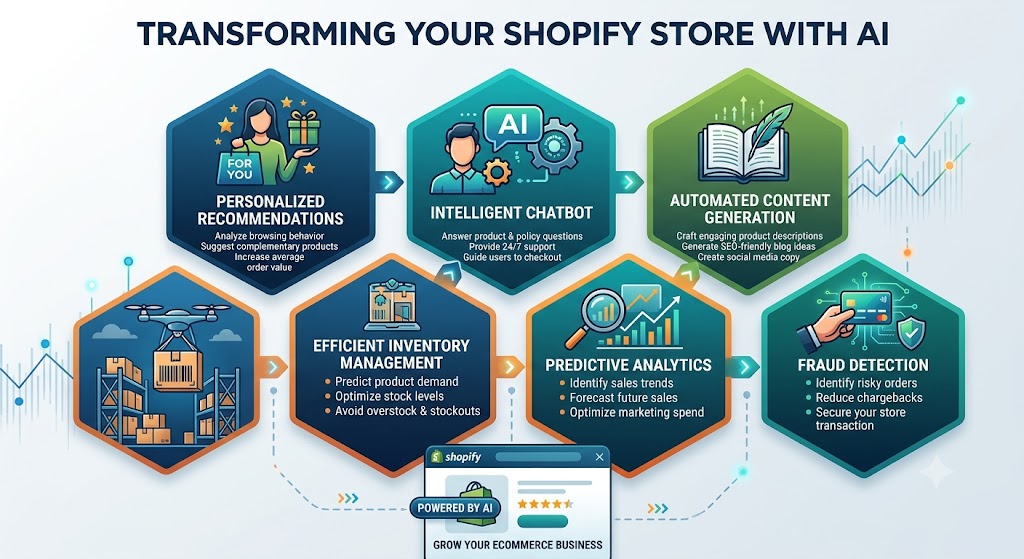
Artificial intelligence is becoming increasingly useful for ecommerce businesses. Store owners can use AI to answer customer questions, explain products, help shoppers find suitable items, summarize product information, and automate parts of customer support.
Because of this, many Shopify merchants are interested in connecting an AI service to their online stores through an API. An API allows one system to communicate with another system and exchange information. In an ecommerce environment, this can make it possible for an AI service to receive information from a store and return useful responses to customers.
A Shopify community discussion asked how an AI API could be integrated into a Shopify store. The question did not specify exactly what the AI should do. A response correctly pointed out that the implementation depends on the intended functionality. An AI chatbot, product recommendation assistant, product description generator, and customer-support assistant may all require different approaches.
Another important point from the discussion was security. The API key should not simply be placed inside storefront theme code where visitors can potentially access it. Instead, requests should normally pass through a secure backend layer.
The discussion did not reach a final implementation because the store owner did not clarify the intended use case. However, the question provides an excellent opportunity to understand how AI integrations work and what merchants should consider before starting development.
1. What Does an API Integration Actually Mean?
An API integration connects an ecommerce website with an external service.
Think of an API as a communication channel. The store sends a request containing specific information, and the external service processes that request and returns a response.
For example, imagine a customer opens a chat window and asks:
“Which product is best for a small apartment?”
The store could send the customer’s question, along with relevant product information, to an AI service. The AI could then generate a response based on that information.
The customer sees the response inside the store, but several processes may happen behind the scenes.
A simplified flow looks like this:
Customer → Storefront → Secure Backend → AI Service → Secure Backend → Storefront → Customer
The important part is that sensitive credentials remain on the secure server side rather than being exposed to the customer’s browser.
The API itself does not automatically understand what a store owner wants. Developers must determine what information should be sent, what instructions the AI should receive, what response should be returned, and how that response should appear on the website.
This is why defining the purpose of the integration is the first step.
2. Start by Defining the AI Use Case
The biggest unanswered question in the community discussion was what the merchant actually wanted the AI integration to accomplish.
This matters because different use cases require different workflows.
AI customer support assistant
A store may want an AI assistant that answers common questions about products, shipping, returns, and store policies.
In this case, the AI needs access to accurate business information. If the information provided to it is incomplete or outdated, the assistant may produce incorrect answers.
Product recommendation assistant
Another possibility is helping shoppers choose products.
For example, a customer could ask:
“Which jacket should I choose for cold weather?”
The system could consider product descriptions, specifications, categories, sizes, and other relevant information before generating a recommendation.
Product information assistant
An AI assistant could also explain complicated product specifications in simpler language.
This may be useful for products that have technical characteristics that ordinary shoppers may not immediately understand.
Content generation
A merchant may want AI to help create product descriptions, category content, FAQs, or other store material.
This is different from a customer-facing chatbot because the AI would primarily be used by the store administrator rather than shoppers.
Shopping assistant
A more advanced implementation could combine several functions. A customer might describe what they are looking for, receive product suggestions, ask follow-up questions, and then move directly toward purchasing.
Each of these examples requires a different design. Therefore, simply asking how to “integrate an AI API” is not enough to determine the correct implementation.
3. Why the API Key Should Not Be Exposed
One of the most important technical points in the discussion is API key security.
An API key is a credential used to authenticate requests to an external service. It should be treated like a password.
A common mistake is placing the key directly inside storefront JavaScript or theme code.
This is dangerous because code delivered to a customer’s browser can generally be inspected. If the secret key is included in that code, someone may be able to find it and use it.
An exposed key can potentially lead to:
- Unauthorized requests.
- Unexpected usage charges.
- Abuse of the account.
- Service interruptions.
- Loss of control over the integration.
The safer approach is to keep the API key on a secure server.
The storefront sends a request to the merchant’s backend. The backend authenticates the request, communicates with the AI service using the protected API key, receives the response, and sends an appropriate result back to the storefront.
This creates a separation between the public website and the private credentials.
4. Why a Backend Layer Is Useful
A backend does more than hide the API key.
It can also control what information is sent to the AI service and how responses are handled.
For example, suppose a customer asks about a product. The backend can identify the relevant product information, prepare the request, and send only the necessary data.
The backend can also enforce rules such as:
- Limiting the number of requests.
- Checking whether a customer request is valid.
- Filtering sensitive information.
- Controlling which store data the AI can access.
- Logging requests for troubleshooting.
- Handling errors.
- Managing response length.
- Preventing abuse.
This becomes increasingly important as an AI feature grows.
A simple prototype may require only a basic request-and-response process. A production system may need authentication, rate controls, logging, error handling, data validation, and monitoring.
The backend therefore acts as a controlled gateway between the public storefront and the AI service.
5. Connecting AI With Store Data
An AI service is only as useful as the information it receives.
If a merchant wants an AI assistant to answer product questions, the system needs access to accurate product information.
Relevant information may include:
- Product names.
- Descriptions.
- Prices.
- Variants.
- Sizes.
- Colors.
- Materials.
- Specifications.
- Availability.
- Shipping information.
- Return policies.
- Frequently asked questions.
The amount of information sent should depend on the use case.
For example, a customer asking about a product’s material does not necessarily need the entire store catalog.
Sending only relevant information can improve efficiency and help the AI focus on the actual question.
The information should also be kept updated. If an AI assistant continues using an old price or outdated product specification, customers may receive incorrect information.
For this reason, AI integration should be treated as an ongoing ecommerce system rather than a one-time connection.
6. The Difference Between AI and Store Logic
Another important consideration is that AI should not replace every part of the ecommerce system.
Some tasks require deterministic business rules rather than generated responses.
For example, calculating an exact product price, checking inventory, applying a discount, or determining shipping eligibility should generally rely on reliable store data and business logic.
AI can explain information, interpret customer questions, and help guide shoppers, but critical transactional information should come from authoritative store systems.
Consider a customer asking:
“Is this product available in blue, size large?”
The system should retrieve the actual variant availability rather than allowing the AI to guess.
Similarly, if a customer asks about the final price, the system should use the actual pricing information rather than relying on a generated response.
A strong architecture combines AI with reliable ecommerce data rather than asking AI to invent or estimate important transactional details.
7. Designing an AI Chatbot for a Shopify Store
If the goal is a customer-facing chatbot, the storefront needs an interface where customers can submit questions.
This could appear as a chat window, assistant section, or another suitable interface.
The basic process could be:
- Customer opens the assistant.
- Customer submits a question.
- The storefront sends the question to the backend.
- The backend validates the request.
- Relevant store information is collected.
- The request is sent to the AI service.
- The response is returned to the backend.
- The backend sends the approved response to the storefront.
- The customer sees the answer.
This process may look simple from the customer’s perspective, but the backend must handle security and reliability.
The assistant should also know when it cannot answer a question.
For example, if the customer asks something outside the available store information, the system should not confidently invent an answer. Instead, it can explain that the information is unavailable or direct the customer toward human support.
This is especially important for policies, delivery information, refunds, and product specifications.
8. Protecting Customer and Business Data
AI integrations can involve customer questions and store information, so data handling deserves careful consideration.
Merchants should determine what information is necessary for the AI feature and avoid sending unnecessary personal or sensitive information.
For example, a basic product recommendation assistant may not need a customer’s full address, phone number, or payment information.
Data minimization reduces unnecessary exposure and makes the system easier to manage.
The business should also understand how the external AI service handles submitted information, what retention policies apply, and what contractual or privacy obligations may exist.
Privacy requirements vary depending on the business, customers, countries served, and type of information processed. Merchants should therefore review applicable requirements before launching a customer-facing AI feature.
Security should be considered at every stage, not just when storing the API key.
9. Handling Errors and Unexpected Responses
No external service is guaranteed to work perfectly at every moment.
An AI integration may encounter network errors, service interruptions, invalid requests, timeouts, or unexpected responses.
A good implementation should have a fallback.
For example, if the AI assistant cannot respond, the store could display a message asking the customer to contact support or browse the relevant help section.
The customer should not see technical error messages or sensitive backend information.
Error handling is particularly important for customer-facing features because a broken assistant can reduce trust instead of improving it.
The system should also prevent customers from repeatedly sending requests that create unnecessary usage.
Basic request limits and validation can help protect both the service and the business.
10. Start With a Small MVP
A common mistake is trying to build a highly advanced AI shopping assistant immediately.
A better approach is to start with a focused minimum viable product.
For example, a merchant could begin with an assistant that answers questions about product information and store policies.
After observing how customers use it, the business can add additional capabilities.
A possible development sequence could be:
Phase 1: Basic assistant
Create a simple customer interface and connect it to a secure backend.
Phase 2: Store information
Provide the assistant with approved product and policy information.
Phase 3: Better product understanding
Allow the system to identify relevant products based on customer questions.
Phase 4: Personalization
Improve recommendations using information such as product preferences and shopping intent, while respecting privacy requirements.
Phase 5: Advanced ecommerce actions
If appropriate, connect the assistant to additional store functionality so it can guide customers further through the purchasing journey.
Starting small reduces development risk and makes it easier to determine whether customers actually find the feature useful.
11. What the Original Discussion Leaves Unanswered
The Shopify community discussion does not provide a final implementation because the merchant never clearly explains the desired functionality.
This is an important lesson for anyone planning an AI integration.
Before development begins, the business should answer questions such as:
- What should the AI actually do?
- Who will use it?
- Should it be customer-facing or staff-facing?
- What store information does it need?
- Should it answer product questions?
- Should it recommend products?
- Should it assist with customer support?
- What actions, if any, should it be allowed to perform?
- How should sensitive information be protected?
- What happens when the AI does not know an answer?
- How will the feature be measured?
Without these answers, it is difficult to recommend a specific architecture or development approach.
The later observation that the linked store appeared inactive also shows why the current status of a project matters. If a store is no longer active, there may be little value in designing a production integration until the business confirms that the store and its requirements are still current.
12. Measuring Whether the AI Feature Is Useful
An AI feature should have measurable goals.
For a customer support assistant, useful measures might include the number of questions answered without human intervention, customer satisfaction, support volume, and response quality.
For a product recommendation assistant, relevant measures could include product clicks, add-to-cart activity, and purchases following recommendations.
For an internal content assistant, the business might measure time saved and the quality of generated content.
Simply having an AI assistant on the website does not mean it is successful.
The business should compare the results with the original customer experience and determine whether the feature actually improves shopping or operational efficiency.
Conclusion
Integrating an AI API into a Shopify store can create valuable ecommerce features, but the correct implementation depends entirely on the intended purpose.
A chatbot, product recommendation assistant, content generator, and customer-support system are different projects even though they may all use an AI API.
The most important technical principle is security. API credentials should not be exposed in storefront code. Instead, requests should normally pass through a secure backend that controls authentication, data access, validation, usage, and error handling.
The second major principle is accuracy. AI should work with reliable store information and should not be trusted to guess critical details such as prices, inventory, delivery conditions, or policy requirements.
Finally, merchants should start with a focused use case, build a small version, test it with real customers, measure the results, and expand only when there is evidence that the feature provides value.
The original discussion remains unresolved because the merchant did not specify what they wanted the AI to accomplish. That is actually the most important lesson: before asking how to connect an AI service to a Shopify store, first define what the AI needs to do, what information it needs, what risks must be controlled, and how success will be measured.


0 Comments