Introduction
When customers visit an online store, they cannot physically touch a product, examine its quality, or speak directly with a salesperson. They must make purchasing decisions based on the information presented on the website. This creates a challenge for ecommerce businesses: how can they convince visitors that a product is worth buying?
One effective approach is social proof.
Social proof refers to evidence that other people have purchased, used, reviewed, or recommended a product or brand. It helps potential customers feel more confident by showing that others have already had an experience with the business. Common examples include customer reviews, star ratings, user-generated content, testimonials, and media mentions.
However, simply adding social proof to a product page does not guarantee better results. Its effectiveness depends on what information is displayed, where it appears, how trustworthy it looks, and whether customers can easily find it when making a purchasing decision.
A discussion in the Shopify community explored an important question: where should social proof appear on a product page to achieve the best results? Suggestions included placing reviews beneath the product title, adding customer feedback below the product description, displaying review sliders on the homepage, and showing overall store ratings in the announcement bar or footer.
Although these approaches can all be useful, the discussion did not provide before-and-after conversion data or establish which placement performs best. To make a good decision, store owners need to understand how different types of social proof influence customers throughout the buying journey.
1. Understanding Why Social Proof Matters
Online shoppers often experience uncertainty before making a purchase. They may wonder whether the product matches its description, whether the quality is satisfactory, whether delivery will be reliable, or whether the business will help if something goes wrong.
Social proof can help address these concerns.
For example, imagine a customer visiting a product page for a pair of shoes. The page contains attractive photographs and a detailed description, but there are no customer reviews. The shopper may hesitate because there is no evidence of how the shoes fit or whether previous buyers are satisfied.
Now imagine the same page displays a clear star rating, several genuine customer reviews, and photographs submitted by buyers. The customer can see that other people have purchased the shoes and learn about their experiences.
This additional information may reduce uncertainty and encourage the shopper to continue toward checkout.
Social proof can support several important ecommerce goals:
- Building trust: Genuine customer experiences help a store appear more credible.
- Reducing purchase anxiety: Reviews can answer concerns that product descriptions do not cover.
- Supporting product decisions: Ratings and detailed feedback help shoppers compare options.
- Setting expectations: Customer photographs and comments can show how products look or perform in real situations.
- Improving the shopping experience: Relevant feedback helps customers find answers without contacting support.
Social proof is not a substitute for good products, fair pricing, accurate descriptions, or reliable fulfillment. Instead, it strengthens the information customers use to decide whether a purchase feels worthwhile.
2. Placing Star Ratings Beneath the Product Title
One of the most visible placements for social proof is directly beneath the product title.
For example, a product page might display:
Classic Cotton T-Shirt
★★★★★ 4.7 out of 5 based on 128 reviews
This arrangement provides an immediate signal about customer satisfaction. Visitors can see the rating before reading the complete description or scrolling through the page.
The main advantage is visibility. Customers do not have to search for reviews to discover whether previous buyers have rated the product positively.
This placement can be particularly useful for products where shoppers compare several similar options, such as clothing, skincare, home accessories, or electronics. A visible rating gives visitors another piece of information to consider alongside price, photographs, and product features.
However, ratings should be presented accurately. A product with only two reviews should not appear to have the same level of customer validation as one with hundreds of reviews. The number of reviews provides important context.
Store owners should also ensure that the rating belongs to the specific product being viewed. Displaying an overall store rating directly beneath an individual product title may confuse shoppers if it is not clearly labelled.
A useful approach is to make the rating clickable so customers can move directly to the review section. This allows interested shoppers to investigate further without searching the entire page.
Best use: Place product-specific star ratings near the title when customers need a quick indication of customer satisfaction.
3. Adding Customer Reviews Below the Product Description
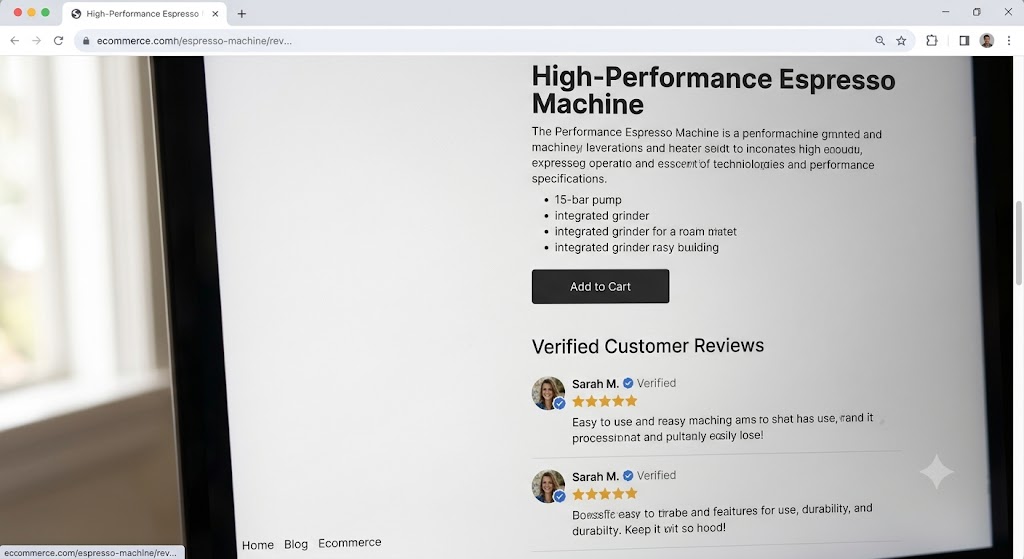
Another option is to place the main review section beneath the product description, specifications, or other important product information.
This placement allows shoppers to understand what the product offers before reading detailed feedback from previous customers.
For example, a customer buying a kitchen appliance might first review its capacity, dimensions, materials, and functions. After understanding these details, the shopper may want to know whether the appliance is easy to use, durable, and worth the price.
Customer reviews can help answer these practical questions.
A useful review section should contain more than a collection of star ratings. Where available, it can include written comments, photographs, product-specific ratings, and information about common customer experiences.
Reviews can also help address concerns that a business may not anticipate. Customers might mention that a product runs smaller than expected, requires a particular setup, or works especially well for a specific purpose.
These details can make reviews valuable during the final stages of the buying decision.
The main disadvantage is that shoppers may need to scroll down to reach this information. Some visitors may leave the page or proceed to checkout without ever seeing the review section.
For this reason, placing the complete review section below the description works best when the page also provides an easy-to-see rating near the product title.
The two placements serve different purposes: the title area offers a quick signal, while the lower section provides detailed evidence.
Best use: Keep detailed reviews below the main product information, but provide a visible link or rating near the top of the page.
4. Using Customer Photos and User-Generated Content
User-generated content includes photographs, videos, and other material created by customers who have purchased or used a product.
This type of social proof can be especially useful when shoppers want to see how a product looks or performs outside professionally produced marketing images.
For example, a fashion store might display photographs of customers wearing the same dress in different settings. A furniture store might show how a chair looks in a real living room. A beauty brand might feature customer-submitted photographs showing how a product is used.
Such content can help shoppers understand the product’s appearance, size, texture, and practical use.
Customer-generated content may also make a product page feel more relatable. Professional photographs usually present products in carefully controlled conditions, whereas customer content can show a wider variety of real-world experiences.
However, quality and relevance matter. Poorly displayed, unrelated, or outdated photographs may distract customers rather than build confidence.
Store owners should choose content that clearly relates to the product being sold. They should also obtain appropriate permission before publishing customer photographs or videos and avoid editing content in ways that misrepresent the original experience.
Where possible, customer content should appear near relevant product details or reviews. For example, photographs of customers wearing a particular item can be displayed alongside reviews about its fit.
Best use: Add relevant customer photographs and videos when seeing a product in real-world conditions helps shoppers make a more confident decision.
5. Displaying Review Sliders on the Homepage
Some stores display a rotating selection of customer reviews on their homepage.
A review slider can introduce new visitors to the experiences of existing customers before they open an individual product page. It can be particularly useful for communicating overall brand credibility.
For example, a homepage might feature reviews highlighting product quality, helpful customer service, or reliable delivery.
This placement differs from product-specific reviews. A homepage slider usually presents selected feedback that reflects the broader shopping experience, whereas reviews beneath a product title should relate to that particular item.
The distinction is important.
A customer deciding whether to trust a store may benefit from hearing about the company’s overall service. However, a customer choosing between two products needs information relevant to those specific products.
A homepage slider should therefore complement, rather than replace, reviews on individual product pages.
Store owners should also avoid making sliders unnecessarily complicated. If reviews change too quickly, visitors may not have enough time to read them. If important feedback is hidden behind multiple slides, shoppers may miss it entirely.
A small selection of meaningful, readable reviews is often more useful than a large carousel filled with repetitive comments.
Best use: Use homepage review sliders to establish general brand credibility, while keeping product-specific reviews on the corresponding product pages.
6. Showing Overall Ratings in the Announcement Bar or Footer
Another suggestion is to display an overall store rating in the announcement bar or footer.
An announcement bar is usually located near the top of a website and is often used for delivery updates, promotional messages, or important store information. The footer appears near the bottom of the page and commonly contains business details, policies, and navigation links.
An overall rating in these areas can remind customers that the business has received feedback from previous shoppers.
For example, a store might display its overall rating and the number of customer reviews near a link to its customer feedback page.
The advantage is consistency. Visitors may see the rating across multiple pages, including category pages, informational pages, and product listings.
However, these placements have limitations.
An announcement bar has limited space and competes with other important messages. Adding too much information can make it crowded. A footer rating may be useful for visitors who scroll to the bottom, but many shoppers will never see it.
More importantly, an overall store rating does not answer every product-specific question.
A store may have excellent customer service but sell a product that does not meet a particular shopper’s needs. For this reason, general store ratings should not replace product-level feedback.
Best use: Display overall ratings in the announcement bar or footer when they fit naturally into the design, but treat them as supporting trust signals rather than the main source of product validation.
7. Choosing the Right Placement for Each Type of Social Proof
There is no single placement that is guaranteed to produce the highest conversion rate for every ecommerce store. Different formats serve different purposes, and customers may need different information depending on the product and stage of their decision.
The following comparison provides a practical starting point.
| Placement | Main purpose | Potential limitation |
| Beneath the product title | Provide an immediate rating signal | Limited space for detailed feedback |
| Below the product description | Explain real customer experiences | Visitors must scroll to reach it |
| Near product images | Show real-world product appearance | Irrelevant images can distract |
| Homepage review slider | Establish overall brand credibility | May not answer product-specific questions |
| Announcement bar | Keep a trust signal visible | Limited space and competing messages |
| Footer | Provide supporting store credibility | Many visitors may never see it |
These are practical design considerations, not measured rankings. The discussion does not establish that one location will consistently outperform the others.
The best arrangement depends on the product category, page layout, customer concerns, and the quality of the available reviews.
8. How to Test Which Placement Works Best
When the goal is to improve conversions, store owners should evaluate placements using actual customer behaviour rather than assumptions.
A practical approach is to establish a baseline before making changes. Record the product page’s conversion rate, add-to-cart rate, and other relevant engagement measures over a representative period.
Next, choose one specific change to test. For example, a store might move its product rating directly beneath the title while keeping the rest of the page unchanged.
After collecting enough data, compare the results with the original performance.
If several design elements change simultaneously, it becomes difficult to determine which change influenced the outcome. Testing one major change at a time makes the results easier to interpret.
Where possible, use a controlled comparison in which different groups of visitors see different versions of the page during the same period. This helps reduce the risk of confusing seasonal demand, advertising changes, or other external factors with the effect of social proof placement.
Store owners should evaluate more than the final purchase rate. Other useful measures include:
- Add-to-cart rate.
- Engagement with the review section.
- Clicks on review links.
- Time spent examining product information.
- Checkout completion rate.
- Returns and customer complaints.
For example, a new review layout might increase add-to-cart activity but have little effect on completed purchases. This could indicate that shoppers feel more interested in the product but still encounter concerns about shipping costs, payment options, or delivery times.
Results should also be interpreted carefully. A small store may not receive enough traffic to distinguish a real improvement from ordinary fluctuations in customer behaviour.
The discussion that inspired this article provides no before-and-after figures, so it would be inaccurate to claim that any specific placement increases conversions by a particular percentage.
The correct approach is to treat each placement as a hypothesis and validate it using the store’s own data.
9. Common Mistakes to Avoid When Using Social Proof
Social proof can lose its value when it is implemented poorly. Store owners should avoid several common mistakes.
Displaying too many reviews at once: Large blocks of feedback can overwhelm shoppers. Highlight useful information and make the complete review collection accessible.
Using generic reviews for specific products: Customers need to know whether the feedback relates to the item they are considering.
Showing ratings without context: A rating should ideally include the number of reviews and a clear explanation of what it represents.
Hiding negative feedback: A mixture of honest reviews often appears more credible than a collection of uniformly positive comments. Address legitimate concerns rather than attempting to conceal every criticism.
Using unverified or misleading claims: Reviews, testimonials, customer photographs, and media mentions should be genuine and accurately represented.
Making review sections difficult to navigate: Visitors should be able to find, read, and understand customer feedback without unnecessary effort.
Ignoring mobile visitors: Review stars, photographs, and text should remain readable on smaller screens. Large sliders and crowded announcement bars can make mobile shopping harder.
Treating social proof as a substitute for product quality: Reviews may encourage a purchase, but poor quality, unclear policies, slow delivery, and weak customer service can undermine trust.
10. Building a Balanced Social Proof Strategy
For most stores, a balanced approach is more practical than relying on a single placement.
Start by displaying a product-specific rating near the product title. This gives visitors an immediate signal without requiring them to scroll.
Provide detailed customer reviews farther down the page, ideally close to the product information they help explain. Include useful written feedback and relevant customer photographs where permission has been obtained.
If the business has meaningful overall customer feedback, consider featuring selected reviews on the homepage. A general store rating can also appear in the announcement bar or footer if it does not interfere with navigation or important messages.
The next step is to review the entire buying journey. Ask what questions customers are likely to have before adding an item to their cart. For clothing, customers may want information about sizing and fit. For electronics, they may care about reliability and ease of use. For furniture, dimensions and real-world appearance may be more important.
Choose social proof that answers these concerns directly.
Finally, monitor performance and improve the page over time. Customer feedback can reveal which details matter most, while conversion and engagement data can help identify whether the current layout makes that information easy to find.
Conclusion
Social proof can help ecommerce businesses build trust, reduce uncertainty, and support better purchasing decisions. However, its effectiveness depends on more than simply adding reviews to a website.
Star ratings beneath product titles provide quick reassurance. Detailed reviews below product descriptions offer deeper insight. Customer photographs show products in real-world situations, while homepage sliders and general store ratings can establish broader brand credibility.
Each placement serves a different purpose, and none can be declared the universal winner without reliable performance data.
The most effective strategy is to match each type of social proof to the question a customer needs answered, make the information easy to access, and test important design decisions using real store data.
Rather than copying a layout because it appears popular, merchants should focus on relevance, authenticity, readability, and measurable results. When social proof supports the customer’s decision at the right moment, it becomes a meaningful part of the shopping experience rather than just another design element.


0 Comments