Business-to-business selling can be a major growth opportunity for online stores. Instead of selling only to individual customers, a merchant can sell products in larger quantities to retailers, distributors, offices, resellers, trade buyers, and other companies. This model is often called wholesale or B2B selling.
Many merchants want to offer wholesale pricing and business purchasing options without paying for an expensive enterprise-level ecommerce plan. Their main needs are usually straightforward: allow business customers to apply for access, approve the right buyers, hide wholesale prices from regular shoppers, offer special pricing, manage tax requirements, and issue professional invoices.
The discussion focuses on merchants looking for ways to run B2B or wholesale operations without upgrading to a premium enterprise plan. Earlier advice relied heavily on third-party tools, customer tags, custom store edits, and separate invoice systems. More recent replies suggest that many native B2B features are now available on standard paid plans, making it easier for smaller businesses to create a wholesale setup without relying on complicated workarounds.
However, the discussion also makes clear that there are still limitations. Some businesses need advanced approval workflows, tax identification validation, credit limits, automatic catalog assignment, or specialized invoicing. In those cases, additional tools or custom development may still be necessary.
This article explains how a business can create a practical B2B selling setup, what features matter most, where limitations may appear, and how to decide when additional tools are worth using.
Understanding B2B Selling
B2B selling means selling products or services to another business instead of directly to an individual consumer.
For example, a clothing brand may sell bulk products to boutiques. A food supplier may sell products to restaurants. A manufacturer may sell parts to distributors. A beauty brand may sell wholesale products to salons.
B2B customers often have different needs from normal retail customers.
They may expect:
- Wholesale pricing
- Bulk order discounts
- Tax handling
- Payment terms
- Purchase order support
- Company accounts
- Multiple buyers under one company
- Invoice documents
- Repeat ordering
- Restricted product catalogs
A standard retail store is designed for individual customers who usually pay immediately and purchase small quantities. A B2B store needs more control.
Why Merchants Want B2B Without an Enterprise Plan
Enterprise-level ecommerce plans can be expensive. For a small or growing wholesale business, the monthly cost may not be practical.
Many businesses only need a limited number of B2B features. They may not need complex corporate purchasing workflows, large-scale automation, or advanced integrations.
For example, a small wholesaler may simply need:
- A wholesale application form
- Manual customer approval
- Special prices for approved buyers
- Hidden prices for regular visitors
- Tax information
- PDF invoices
If those needs can be handled on a standard paid plan, there may be no reason to pay for a much more expensive option.
The goal is not to build the most advanced wholesale system possible. The goal is to create a reliable process that supports business customers and reduces manual work.
Customer Approval and Registration
One of the most important parts of B2B selling is customer approval.
Not every visitor should automatically see wholesale pricing. Many wholesalers want to review applicants before giving them access.
A business registration form may ask for:
- Company name
- Contact person
- Business email
- Phone number
- Billing address
- Shipping address
- Tax identification number
- Website or social media link
- Business type
- Expected order volume
This information helps the merchant decide whether the applicant is a genuine business buyer.
For example, a brand may only want to approve retailers, salons, distributors, or registered companies. It may not want individual customers to access wholesale pricing.
A good approval process protects margins and prevents misuse of wholesale discounts.
Creating Company Accounts
A company account allows a business to have its own purchasing profile.
This is useful because many B2B buyers are not individual shoppers. They may have multiple employees who place orders for the same company.
For example, a retail store may have an owner, purchasing manager, and finance team. All of them may need access to the same business account.
A company account can help organize:
- Business information
- Shipping addresses
- Billing details
- Purchase history
- Payment terms
- Approved buyers
- Assigned pricing
This creates a more professional experience for wholesale customers.
Wholesale Catalogs and Special Pricing
Wholesale buyers often need different prices from retail customers.
A retail customer may buy one item at the standard price. A wholesale customer may buy 20, 50, or 100 items at a lower price.
A B2B setup should allow merchants to create special product catalogs for approved buyers.
For example, a retailer may see a product priced at ₹1,000, while an approved wholesale buyer may see it priced at ₹700.
Special catalogs can also control which products are available to different buyers.
A merchant may want to offer:
- Retail products for normal customers
- Wholesale products for approved businesses
- Distributor-only products
- Region-specific products
- Bulk packaging options
This gives merchants more flexibility.
Hiding Prices and Add-to-Cart Buttons
Many wholesalers do not want regular visitors to see wholesale pricing.
Some businesses also want to hide the add-to-cart button until a customer is approved.
This can be important for protecting pricing strategy.
If wholesale prices are visible to everyone, retail customers may become confused or expect the same discount. Competitors may also see pricing details that the business prefers to keep private.
There are several ways to manage this.
One method is to require customers to log in before they can see prices.
Another method is to show a message such as “Apply for wholesale access” instead of showing product prices.
Approved buyers can then log in and view their assigned catalog.
This approach creates a more controlled B2B experience.
Customer Tags and Access Control
Before native B2B tools became more accessible, many merchants used customer tags to control wholesale access.
A customer tag is a label assigned to a customer account.
For example, approved wholesale buyers may receive a tag such as:
- Wholesale
- Trade buyer
- Distributor
- VIP business customer
- Retail partner
The store can then use this tag to decide what the customer sees.
Tagged customers may receive:
- Special discounts
- Access to hidden collections
- Wholesale prices
- Bulk order options
- Restricted product pages
This approach can still be useful for smaller businesses.
However, it may require more manual work. The merchant must approve customers, assign tags, and make sure the store rules are working correctly.
VAT and Tax Handling
Tax handling is one of the most important parts of B2B selling, especially when selling across countries.
Business customers may need different tax treatment depending on their location, tax registration status, and the type of goods being sold.
For example, a domestic business buyer may need local tax applied. A business customer in another country may need different tax handling if they provide a valid tax identification number.
Merchants should clearly understand:
- Which taxes apply to domestic sales
- Which taxes apply to international sales
- When tax exemptions are allowed
- What information must appear on invoices
- Whether tax identification numbers need validation
Tax rules can be complex. Businesses should not rely only on general advice when setting up tax processes. It may be necessary to consult an accountant or tax professional.
Why VAT ID Validation Matters
Some wholesale businesses need to validate customer tax identification numbers before offering tax-free or reverse-charge treatment.
Manual validation can be time-consuming.
A business may receive many applications, and checking each number individually can slow down the approval process.
If tax identification numbers are not validated correctly, the merchant may face accounting problems later.
This is one area where additional tools or custom workflows may be helpful.
A simple B2B setup may collect tax details through a registration form, but advanced validation may require more specialized support.
Payment Terms for Business Buyers
Retail customers usually pay immediately at checkout.
B2B buyers may expect payment terms.
For example, a buyer may place an order today but pay after 15, 30, or 60 days.
Payment terms can help business buyers manage cash flow, especially when ordering larger quantities.
However, payment terms also create risk for the merchant.
Before offering delayed payment, merchants should consider:
- Customer credit history
- Order size
- Business reputation
- Previous payment behavior
- Credit limits
- Payment deadlines
Small businesses may prefer to begin with prepaid wholesale orders before offering credit terms.
Customer Account Portals
A customer account portal gives B2B buyers a place to manage their business relationship with the seller.
Through an account portal, buyers may be able to:
- View past orders
- Reorder products
- Manage addresses
- Check invoices
- View payment terms
- Add company contacts
- Review account information
This improves the customer experience and reduces support requests.
Instead of emailing the merchant for every question, buyers can access important information themselves.
PDF Invoices for Wholesale Orders
Business customers often require professional invoices.
An invoice may need to include:
- Seller name
- Seller address
- Buyer company name
- Buyer address
- Tax identification number
- Invoice number
- Order details
- Product quantities
- Tax amount
- Total amount
- Payment terms
Retail receipts may not be enough for wholesale buyers.
PDF invoices are especially important for accounting, tax reporting, and business expense records.
Some businesses may need invoices automatically generated after each order. Others may need more advanced invoice formats based on country or tax rules.
Manual Approval Workflows
Many B2B systems allow customers to submit an application, but some parts of the process may still require manual work.
For example, a merchant may need to:
- Review the application
- Check the company website
- Validate tax information
- Approve or reject the applicant
- Assign the correct catalog
- Set payment terms
- Add internal notes
This can be manageable for a small number of applications.
However, as the business grows, manual approval may become time-consuming.
Merchants should plan for growth.
A simple manual workflow may be enough at the beginning, but automation may become valuable later.
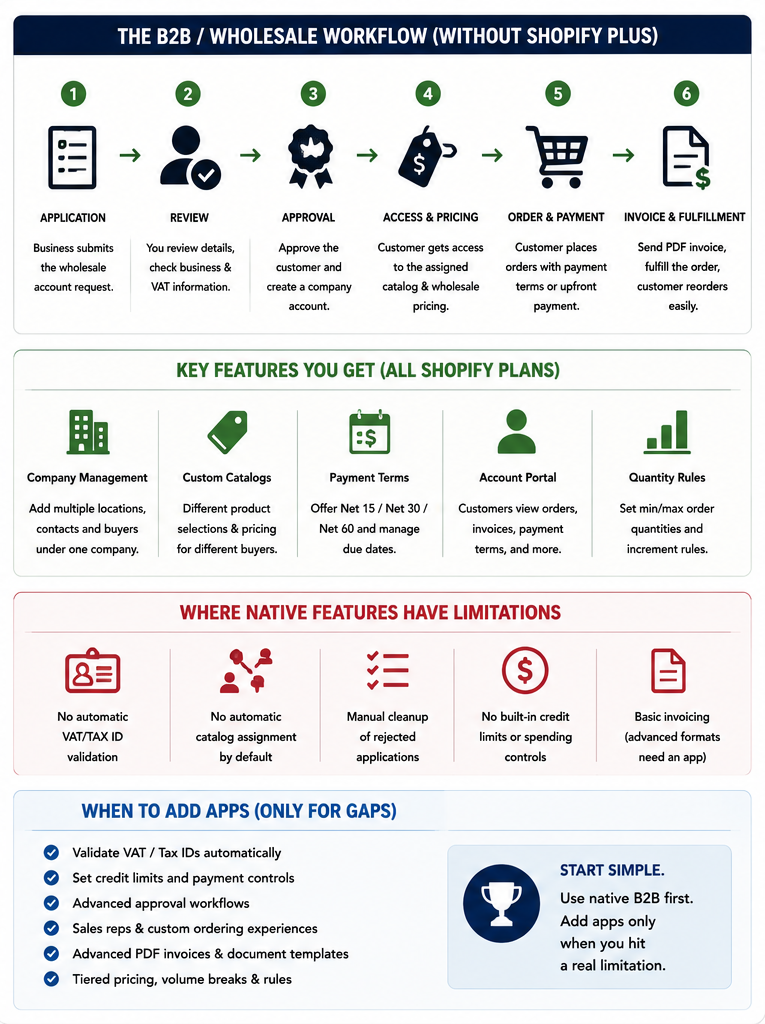
Common Limitations in Basic B2B Setups
The discussion mentions several limitations that merchants may face.
These can include:
- No automatic tax identification validation
- No automatic catalog assignment
- Manual cleanup of rejected applications
- Limited credit management
- Limited approval automation
- Basic invoice options
- Limited customer segmentation
These limitations do not mean the setup is unusable.
They simply mean merchants should understand what will still need manual attention.
For many small businesses, a simple process is better than an expensive and overly complicated system.
When Additional Tools May Be Needed
Additional tools may be useful when a business has more advanced requirements.
For example, a merchant may need extra support for:
- Tax identification validation
- Complex wholesale pricing
- Multi-level discounts
- Credit limits
- Automated approval workflows
- Custom registration forms
- Advanced invoice formats
- Sales representative ordering
- Minimum order rules
- Regional pricing
The best approach is to start with the basic native setup and identify real gaps.
Businesses should avoid paying for multiple tools before understanding what they actually need.
Building a Simple B2B Workflow
A practical B2B workflow may look like this:
- A business customer submits a wholesale application.
- The merchant reviews the application.
- The merchant checks company details and tax information.
- Approved customers receive access to a business account.
- The merchant assigns the correct pricing and catalog.
- The customer logs in and places wholesale orders.
- The customer receives an invoice and order confirmation.
- The merchant manages fulfillment and payment.
This process can work well for many small and medium-sized businesses.
Starting Small and Improving Over Time
Merchants do not need to build a perfect B2B system from the first day.
It is better to begin with the most important features:
- Business registration
- Manual approval
- Wholesale pricing
- Restricted access
- Clear invoices
- Tax settings
Once the business starts receiving more wholesale orders, the merchant can improve the workflow.
For example, the business may later add:
- Automated approval
- Tax validation
- Credit terms
- Advanced pricing
- Sales representative access
- Custom invoice templates
This gradual approach reduces costs and avoids unnecessary complexity.
Conclusion
B2B selling does not always require an expensive enterprise-level ecommerce plan. Many merchants can now build a useful wholesale setup using standard paid features, customer approval processes, company accounts, special catalogs, payment terms, and customer portals.
The most important step is to understand the business requirements. Some merchants only need simple wholesale access and special pricing. Others need advanced tax handling, invoice automation, credit limits, and approval workflows.
A practical approach is to begin with native B2B features, create a clear customer approval process, and use additional tools only when there is a genuine operational gap.
By starting with a simple but organized system, merchants can serve wholesale customers professionally while keeping costs under control.