Why Many Merchants Are Finding It More Complicated
Managing products is one of the most important tasks for any ecommerce business. Whether a merchant sells handmade crafts, fashion, electronics, groceries, furniture, or industrial equipment, product management is something they interact with almost every day. A smooth product creation and editing experience allows businesses to add new products quickly, update inventory efficiently, modify pricing, upload images, and maintain accurate product information.
Because of this, even small changes to the product editor can significantly affect daily operations. A workflow that adds only a few extra clicks may not seem like a major issue initially, but for businesses managing hundreds or thousands of products, those extra steps quickly accumulate into hours of additional work each week.
The discussion focuses on merchants expressing frustration with the latest product creation and editing workflow, particularly the decision to treat products as variant-based by default. Many participants believe the new approach introduces unnecessary complexity for businesses that primarily sell simple, single-item products. Tasks that were previously straightforward, such as adding product images, entering barcodes, or updating product details, now often require merchants to navigate into variant sections even when the product has only one version.
Although some workarounds have been suggested, including removing the default variant in certain situations or using bulk editing features for larger catalog updates, the overall discussion concludes without a final resolution. Merchants continue encouraging one another to submit feedback in hopes that future updates will improve the editing experience.
This article examines why product management efficiency matters, the concerns raised about the new workflow, its impact on different types of businesses, available workarounds, and broader lessons about designing software for merchants.
Why Product Management Is So Important
Every online store depends on accurate product information.
Each product typically contains multiple pieces of information, including:
- Product title
- Description
- Price
- Images
- Stock quantity
- Barcode
- SKU
- Weight
- Dimensions
- Categories
- Product type
- Shipping information
- Tax settings
- Inventory location
For businesses with only a few products, updating this information may take only a few minutes.
However, larger stores often manage hundreds, thousands, or even tens of thousands of products.
Small inefficiencies become much more noticeable at this scale.
Understanding Simple Products
Not every product requires multiple variations.
Many businesses sell products that exist in only one version.
Examples include:
- A single book edition
- One-size accessories
- Handmade artwork
- Gift cards
- Digital downloads
- Specialty tools
- Individual replacement parts
These products have:
- One price
- One barcode
- One image collection
- One inventory quantity
For these businesses, a simple editing workflow is ideal.
They rarely need to manage colour, size, or material variations.
Understanding Product Variants
Variants are useful when one product comes in multiple options.
Examples include:
- Clothing in different sizes
- Shoes in multiple colours
- Furniture with different finishes
- Electronics with various storage capacities
- Bottles available in several volumes
Each variation may have:
- Different inventory
- Different barcode
- Different SKU
- Different price
- Different image
- Different weight
Variant management is extremely valuable for these products.
However, not every merchant needs this level of complexity.
The Main Concern
The biggest complaint in the discussion is that every new product now behaves as though variants are expected from the beginning.
Even merchants creating a simple product may encounter variant-related sections before completing basic product information.
Participants feel this creates unnecessary work.
Instead of entering all information directly on one page, they often need to move into separate sections simply to edit details such as:
- Barcode
- Images
- Inventory information
- Variant-specific settings
For businesses creating many simple products each day, this interrupts their normal workflow.
Extra Clicks Add Up
One additional click may not seem significant.
However, imagine a business adding:
- 40 new products daily
- 200 products weekly
- 1,000 products monthly
If each product requires several additional navigation steps, the extra time quickly becomes substantial.
These repetitive actions reduce efficiency without providing additional value for merchants selling non-variant products.
Workflow Efficiency Matters
Merchants often judge software not only by its features but also by how quickly they can complete routine tasks.
An efficient workflow allows staff to:
- Add products faster
- Update inventory quickly
- Correct mistakes immediately
- Train new employees more easily
When workflows become more complicated, businesses spend more time performing administrative tasks instead of growing their stores.
Different Businesses Have Different Needs
One important lesson from the discussion is that not every merchant operates the same type of business.
Some stores sell:
- Thousands of apparel products with multiple sizes
- Furniture in dozens of colours
- Electronics with several configurations
These businesses depend heavily on variant management.
Others sell:
- Handmade crafts
- Digital products
- Artwork
- Single-version equipment
- Limited-edition items
Their priorities are completely different.
A single editing workflow may not suit every business equally well.
Increased Learning Curve
Another concern is onboarding new employees.
When the editing interface becomes more complicated, staff training also becomes more difficult.
New employees must understand:
- Product structure
- Variant hierarchy
- Inventory settings
- Barcode placement
- Image assignment
If simple products require navigating through variant sections, beginners may become confused.
Reducing unnecessary complexity makes training easier.
Barcodes Becoming Harder to Access
One frequently mentioned example involves barcode management.
Barcodes are essential for many businesses because they support:
- Inventory tracking
- Warehouse operations
- Point-of-sale systems
- Supplier management
- Shipping workflows
Merchants expect barcode fields to be easy to locate.
When barcode information moves inside variant-related pages, updating products becomes slower for businesses without variants.
Product Images
Images are another daily task.
Many merchants regularly:
- Upload new product photos
- Replace seasonal images
- Add lifestyle photography
- Update packaging pictures
If image management requires navigating into individual variants, merchants handling simple products may feel the process has become unnecessarily complicated.
Inventory Management
Inventory updates are closely connected with product editing.
Merchants regularly adjust:
- Stock levels
- Incoming inventory
- Warehouse locations
- Reserved quantities
Simple inventory updates should require minimal effort.
Complex navigation increases administrative workload.
Why Variant-First Design Exists
Although merchants express frustration, there are understandable reasons why a variant-first structure might have been introduced.
Many modern ecommerce businesses eventually expand product options.
Designing around variants allows systems to:
- Scale more easily
- Support multiple product configurations
- Improve inventory flexibility
- Reduce future migration challenges
From a technical perspective, managing every product as a potential variant structure creates consistency.
However, consistency does not always produce the best user experience for every merchant.
One Size Does Not Fit All
This discussion highlights an important software design principle.
Powerful systems should remain simple for basic tasks.
Businesses selling one-version products should not feel forced into workflows designed primarily for complex catalogues.
Ideally, software adapts to user needs rather than requiring every user to adapt to the software.
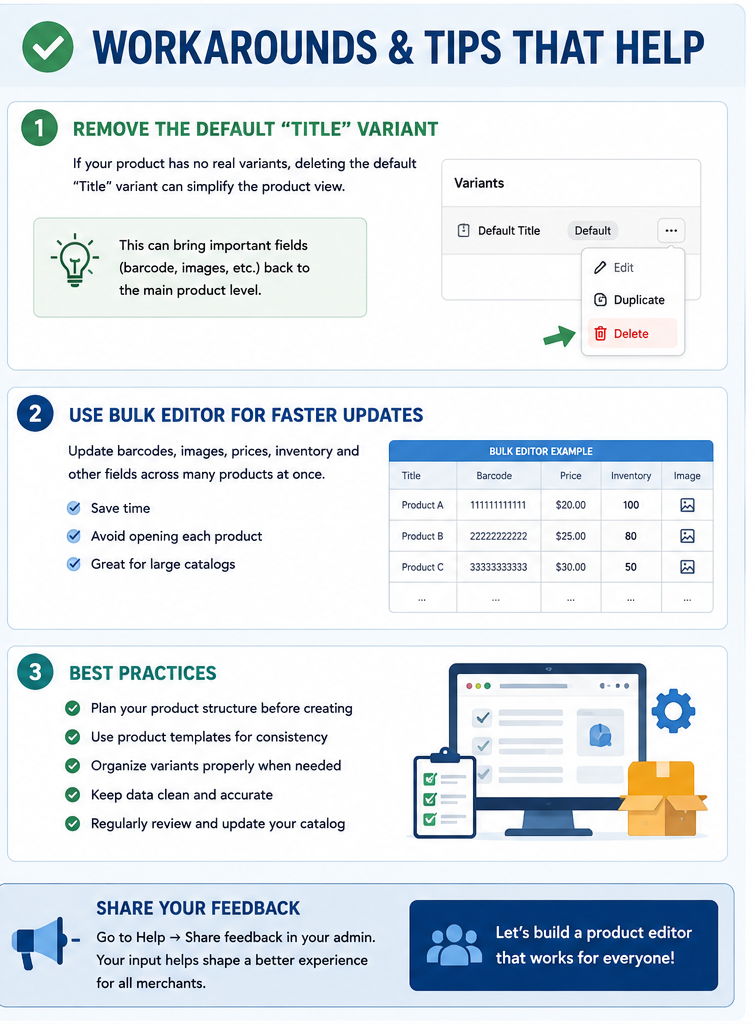
Suggested Workaround: Removing the Default Variant
Some participants suggest removing the automatically created default variant when appropriate.
Doing so may simplify the product structure for businesses that never intend to offer multiple options.
However, merchants should carefully review how this affects their product organisation before making widespread changes.
Different stores may experience different results depending on their catalogue structure.
Using Bulk Editing
Another commonly suggested approach is bulk editing.
Rather than opening each product individually, merchants can update multiple products simultaneously.
This is particularly useful when changing:
- Barcodes
- Images
- Prices
- Inventory values
- Product information
Bulk editing reduces repetitive work and improves efficiency for large catalogues.
However, it does not completely solve concerns about the standard editing workflow.
High-Volume Merchants Feel the Greatest Impact
Businesses managing only a few products each month may barely notice the changes.
High-volume merchants experience a very different situation.
Examples include:
- Fashion retailers
- Electronics distributors
- Industrial suppliers
- Wholesale businesses
- Automotive parts sellers
These merchants may process hundreds of product updates every week.
Small inefficiencies multiply rapidly across large catalogues.
Merchant Feedback Matters
One positive aspect of the discussion is the emphasis on constructive feedback.
Rather than simply expressing frustration, participants encourage merchants to share their experiences through official feedback channels.
User feedback helps developers understand:
- Common pain points
- Workflow bottlenecks
- Missing functionality
- Usability issues
- Feature priorities
Large numbers of similar reports often receive greater attention because they demonstrate that an issue affects many businesses rather than only individual users.
Balancing Innovation With Familiarity
Software platforms continuously evolve.
New features improve scalability, flexibility, and long-term functionality.
However, every major redesign also introduces challenges.
Businesses invest considerable time learning existing workflows.
When familiar processes change dramatically, productivity may temporarily decline.
The most successful software updates usually balance innovation with continuity, allowing experienced users to continue working efficiently while introducing improvements gradually.
Designing for Real-World Workflows
The discussion demonstrates that effective software design should be based on how merchants actually work.
For many businesses, daily product management includes:
- Creating products
- Updating inventory
- Editing prices
- Uploading images
- Correcting descriptions
- Printing labels
- Managing stock
These routine tasks should require as few unnecessary steps as possible.
Every additional screen, menu, or navigation layer increases the time needed to complete routine work.
Looking Ahead
The discussion remains open, with no confirmed changes announced.
Some merchants hope future updates will provide:
- A simpler workflow for single-version products
- Easier access to barcode fields
- Faster image management
- Reduced navigation between sections
- Greater flexibility in choosing editing layouts
Whether these improvements appear in future updates remains uncertain.
In the meantime, merchants continue using available workarounds while sharing feedback about their experiences.
Conclusion
The discussion surrounding the new product creation and editing workflow highlights an important challenge in ecommerce software design: balancing advanced functionality with everyday usability. While a variant-first approach offers greater flexibility for businesses selling products with multiple options, many merchants who primarily manage simple products feel the updated workflow introduces unnecessary complexity into routine tasks.
Activities such as editing barcodes, updating images, and managing inventory now often require additional navigation through variant-related sections, increasing the time required for daily product management. Although workarounds such as removing default variants in appropriate situations and using bulk editing tools can improve efficiency, many participants believe these are temporary solutions rather than permanent improvements.
Ultimately, efficient product management is essential for businesses of every size. As merchants continue providing constructive feedback, future refinements may better accommodate both complex catalogues with many variants and straightforward stores that simply need a fast, streamlined editing experience. A flexible interface that adapts to different business models would help merchants spend less time navigating administrative workflows and more time serving customers and growing their businesses.