Introduction
Adding clear and complete product information is one of the most important parts of managing an ecommerce store. Customers cannot physically examine a product when shopping online, so they depend on the information provided on the product page to understand what they are buying.
A product page may need to include a description, features, dimensions, materials, colors, technical specifications, usage instructions, compatibility information, care instructions, shipping details, and other important facts. When this information is difficult to find or poorly organized, customers may become confused or leave the store without purchasing.
A common question among store owners is where exactly this information should be entered when creating or editing a product.
The standard answer is the Description field in the product editor. This is the main area designed for adding product details, features, specifications, and other information that customers should see on the product page.
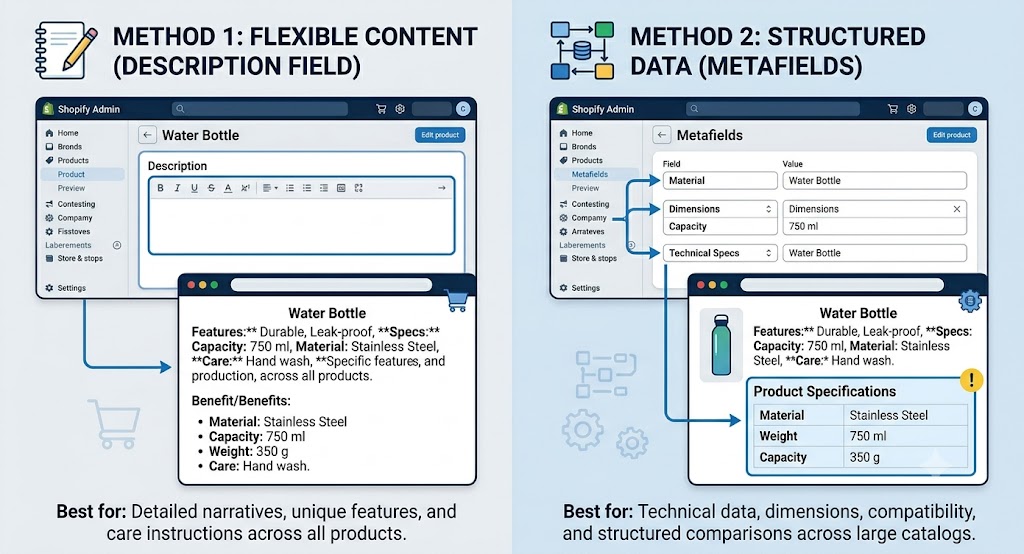
For stores that need more structured information, there is another option: Metafields. These allow merchants to store specific pieces of product information in organized fields, such as material, dimensions, weight, manufacturer, compatibility, or technical specifications.
Understanding the difference between the Description field and Metafields can help store owners create product pages that are easier to manage and easier for customers to understand.
1. Why Product Information Matters
Product information is much more than simple text on an ecommerce page. It helps customers decide whether a product is suitable for their needs.
Imagine a customer looking at a laptop bag. They may want to know:
- What material is it made from?
- What are its dimensions?
- Which laptop sizes does it support?
- How much does it weigh?
- Does it have separate compartments?
- Is it waterproof?
- How should it be cleaned?
If these answers are missing, the customer may hesitate before purchasing.
The same applies to almost every category. A clothing store needs sizing and material information. A furniture store may need dimensions and assembly details. A beauty store may need ingredients and usage instructions. An electronics store may need compatibility and technical specifications.
Good product information reduces uncertainty and helps customers make informed decisions.
It can also reduce unnecessary customer support questions. When specifications are clearly presented on the product page, shoppers do not always need to contact the business to ask basic questions.
Therefore, finding the right place to add product details is an important part of building a useful product page.
2. The Standard Location: The Description Field
The simplest and most common solution is to use the Description field when adding or editing a product.
The general process is:
- Open the store’s administration area.
- Go to Products.
- Select an existing product or create a new one.
- Locate the Description section.
- Add the product information.
- Save the product.
The description is intended for information that customers need to understand the product.
This can include an introduction to the product, its benefits, key features, specifications, instructions, and other relevant information.
For example, a product description for a water bottle could include:
Product Details
This reusable bottle is designed for everyday travel, work, and outdoor activities.
Features
- Durable construction
- Leak-resistant lid
- Easy-to-carry design
- Suitable for cold beverages
Specifications
- Capacity: 750 ml
- Material: Stainless steel
- Height: 25 cm
- Weight: 350 g
This type of information can be entered directly into the product description.
For many small and medium-sized stores, this is enough. There is no need to create complicated data structures if the business simply needs a clear area for explaining each product.
3. What Should Be Included in a Product Description?
The Description field can contain much more than a short paragraph.
A useful product description can be divided into several sections so customers can quickly find the information they need.
Product Overview
Start with a simple explanation of what the product is and who it is intended for.
Key Features
List the most important characteristics of the product. Bullet points can make this information easier to scan.
Benefits
Explain how the product helps the customer rather than simply listing technical characteristics.
For example, instead of only saying “water-resistant material,” the description could explain that the material helps protect the contents from light rain.
Specifications
Include measurable information such as:
- Dimensions
- Weight
- Capacity
- Material
- Size
- Color
- Voltage
- Compatibility
- Model information
The exact specifications depend on the product category.
Usage Instructions
If customers need to know how to use, install, assemble, clean, or maintain the product, those instructions can also be included.
Care Information
Clothing, furniture, accessories, and similar products may require washing, cleaning, storage, or maintenance instructions.
The goal is to give customers enough information to make a confident decision without making the page unnecessarily difficult to read.
4. Keeping Product Descriptions Easy to Read
Adding information is important, but presentation matters just as much.
A large block of text can be difficult to read, particularly on mobile devices. Customers often scan product pages rather than reading every sentence.
Using headings, short paragraphs, bullet points, and clearly separated sections can make specifications easier to understand.
For example, instead of writing:
“Made from stainless steel with a capacity of 750 ml and a height of 25 cm and weighing 350 grams and suitable for everyday use…”
It is easier to present the information as:
Specifications
- Material: Stainless steel
- Capacity: 750 ml
- Height: 25 cm
- Weight: 350 g
- Recommended use: Everyday travel
This structure allows customers to find specific information quickly.
The description should also prioritize the information that is most important to the buying decision. A customer should not have to read several paragraphs to find a basic measurement or compatibility detail.
5. When the Description Field Is Enough
Not every store needs a more advanced data structure.
The Description field is often sufficient when:
- The store has a relatively small product catalog.
- Products have different types of information.
- Specifications do not need to appear in a standardized format.
- The business mainly needs descriptive content.
- Product information does not need to be reused elsewhere.
- The store owner is comfortable managing details manually.
For example, a small handmade jewelry store may only need to describe the material, dimensions, care instructions, and design details for each item.
There is little benefit in creating separate structured fields for every specification if the catalog is small and the information is straightforward.
The simplest solution is often the most practical one.
6. What Are Metafields?
As a store grows, the Description field may become less convenient for certain types of information.
This is where Metafields become useful.
Metafields allow additional information to be stored as structured product data. Instead of putting every specification into one large description, individual pieces of information can be stored separately.
For example, an electronics store might have fields such as:
- Brand
- Model Number
- Material
- Weight
- Screen Size
- Battery Capacity
- Compatibility
- Warranty Period
Each piece of information can have its own dedicated field.
This creates a more consistent structure across products.
For example, if every laptop product has a dedicated “Screen Size” field, customers can see that information in the same general location on each product page.
This is particularly useful for stores with large catalogs or products that share similar specifications.
7. Why Structured Product Data Can Be Useful
Imagine a store selling hundreds of different products.
If every product description contains specifications in a different format, managing the catalog can become difficult.
One product might say:
“Material: Cotton”
Another might say:
“Made with 100% cotton fabric.”
Another might simply mention cotton somewhere in a paragraph.
The information may technically be available, but it is not standardized.
Structured fields can solve this problem by giving each product the same type of information in the same data field.
For example:
Material: Cotton
Size: Large
Weight: 500 g
Color: Blue
This consistency can improve both store management and customer experience.
It can also make it easier to create dedicated sections for specifications rather than mixing technical information into marketing copy.
8. Creating Dedicated Specification Sections
One advantage of structured product information is the ability to display it separately from the main description.
For example, a product page could contain:
Product Description
A detailed explanation of the product and its benefits.
Specifications
- Material: Aluminum
- Weight: 1.2 kg
- Width: 40 cm
- Height: 30 cm
Care Instructions
Keep the product dry and clean with a soft cloth.
Compatibility
Suitable for specific product models.
This structure gives customers different types of information in clearly separated areas.
The exact presentation depends on the store’s theme and how its product page is designed. Structured information needs to be connected to the appropriate product-page sections before customers can see it in the desired format.
This is an important distinction: creating a structured field does not automatically mean that the information will appear wherever the store owner expects it to appear.
The data needs to be properly connected to the page design.
9. Description vs. Structured Fields
Both approaches are useful, but they solve different problems.
The Description field is best for flexible, customer-facing content such as:
- Product introductions
- Benefits
- Features
- Usage instructions
- Care instructions
- Marketing copy
- Detailed explanations
Structured fields are better for repeatable information such as:
- Material
- Dimensions
- Weight
- Model number
- Compatibility
- Technical specifications
- Warranty information
- Manufacturer details
This does not mean a store has to choose only one.
In many cases, the best product page uses both.
The description can explain the product naturally, while structured fields can present important specifications in a consistent format.
10. Example of a Well-Organized Product Page
Consider a store selling a professional office chair.
The description might begin with:
“This ergonomic office chair is designed for comfortable daily use in home and professional workspaces.”
Then the product page could include a feature section:
Key Features
- Adjustable seat height
- Supportive backrest
- Comfortable cushioning
- Designed for extended sitting
A separate specification section could include:
Specifications
- Material: Fabric and metal
- Chair height: 110–120 cm
- Seat width: 50 cm
- Maximum recommended load: 120 kg
- Assembly required: Yes
The page could then include:
Care Instructions
Clean the surface regularly with a soft, dry cloth.
This arrangement is much easier for customers to scan than placing all the information into one long paragraph.
It also makes the page look more organized and professional.
11. Choosing the Right Approach for Your Store
The decision between using the Description field and structured fields should depend on the store’s needs.
For a small catalog, start with the Description field. Keep the information organized using headings and bullet points.
As the product catalog becomes larger, look for information that appears repeatedly across products. Those repeated specifications are good candidates for dedicated structured fields.
For example, if every product has a material, weight, and size, creating consistent fields for those attributes can make catalog management easier.
If products are highly different from one another, using the Description field for flexible information may remain the better choice.
The goal is not to make the store more technically complex. The goal is to make product information easier to manage and easier for customers to understand.
12. Common Mistakes When Adding Product Specifications
Several common mistakes can make product information harder to use.
Putting Everything Into One Large Paragraph
Large blocks of text are difficult to scan. Use headings, lists, and short sections instead.
Hiding Important Specifications
Important information such as dimensions, compatibility, or material should not be difficult to locate.
Using Inconsistent Formats
If one product lists dimensions in centimeters and another uses a different format without explanation, customers may become confused.
Repeating the Same Information
Avoid unnecessarily repeating identical specifications in multiple sections.
Creating Too Many Fields
Structured fields are useful, but creating a separate field for every minor detail can make product management unnecessarily complicated.
Forgetting Mobile Users
A specification section that looks good on a desktop screen should also remain easy to read on mobile devices.
Adding Information Without Checking Accuracy
Incorrect measurements, materials, compatibility details, or product specifications can lead to customer dissatisfaction and returns.
Accuracy should always be a priority.
13. Improving the Customer Experience
Product information should be written from the customer’s perspective.
Instead of asking only, “Where can I enter this information?” store owners should also ask, “Can my customer find it easily?”
A good product page answers important questions quickly.
Customers should be able to understand:
- What is the product?
- What does it do?
- What are its main features?
- What is it made from?
- What are its dimensions?
- Is it compatible with what they need?
- How should it be used?
- How should it be maintained?
The exact questions will vary by product category.
A well-organized page reduces friction and helps customers make decisions with greater confidence.
14. What the Community Discussion Teaches
The community discussion provides a straightforward answer to a common beginner question: the standard location for product details and specifications is the product’s Description field.
Several responses support this approach, making it the simplest starting point for most merchants.
At the same time, the discussion highlights a more advanced possibility for businesses that need structured information. Dedicated structured fields can be used to store specifications such as size, material, and other technical attributes.
This creates an important distinction between simply writing product information and organizing product data.
For a new store, the Description field may be all that is needed. For a growing catalog, structured product information can provide greater consistency and flexibility.
The discussion does not suggest that every merchant needs to immediately adopt the more advanced approach. Instead, the practical lesson is to start with the simplest method that meets the store’s needs and introduce more structure as the catalog becomes more complex.
Conclusion
Finding the right place to add product specifications is an important part of building a clear ecommerce product page.
For most merchants, the Description field is the standard and easiest place to add product details, features, specifications, instructions, and other customer-facing information. By organizing this content with headings, short paragraphs, and bullet points, merchants can make it much easier for shoppers to understand a product.
For stores with larger catalogs or products containing repeated technical attributes, structured product fields provide a more organized solution. They allow information such as material, size, dimensions, compatibility, and model details to be stored separately and presented consistently.
The two approaches do not need to compete. A strong product page can use descriptive content to explain the product while structured fields present important specifications in an easy-to-scan format.
Ultimately, the best approach depends on the size of the catalog, the complexity of the products, and the type of information customers need before purchasing.
The most important principle is simple: product information should be easy to add, easy to manage, and most importantly, easy for customers to find and understand.



0 Comments