Product personalisation has become an increasingly popular feature in ecommerce. Customers often want to add their names, messages, dates, initials, or other details to products before placing an order. This is particularly common with gifts, jewelry, clothing, accessories, home décor, and customized items.
For an online store owner, collecting this information sounds simple. However, the process becomes more complicated when the store uses a dropshipping model. The customer enters personalization information on the product page, the store receives the order, and the supplier needs that information to produce or prepare the customized item correctly.
The discussion focuses on a merchant looking for a free and automated way to collect personalized text from customers and pass that information to an overseas supplier. The main requirement is to avoid expensive personalization applications while still ensuring that the customer’s message is clearly connected to the order.
The suggested approach is to use a product-level custom field, commonly referred to as a line item property. This allows information entered by the customer to become part of the individual product ordered. The information can then travel with the order and appear in places such as the cart, checkout, order confirmation, and store administration area.
However, there is an important distinction between collecting personalization information and automatically entering that information into an external supplier’s ordering system. The store can collect the information very effectively, but directly filling another company’s checkout or order form is a different technical challenge.
Why Product Personalisation Requires Special Handling
A normal ecommerce product may only require customers to select options such as:
- Size
- Color
- Quantity
- Material
Personalized products require additional customer input.
For example, a customer purchasing a personalized necklace might need to enter:
“Happy Birthday Mom”
Another customer might enter:
“Sarah”
This information is not necessarily a normal product variant. It is unique to that particular order.
If 100 customers purchase the same product, each customer could provide a different message.
Therefore, the store needs a way to attach the customer’s custom text specifically to the product in their order.
The Basic Concept
The proposed solution is to add a custom text field to the product page.
The customer sees something such as:
Enter your personalized message:
[________________________]
When the customer enters a message and adds the product to the cart, the message becomes associated with that particular product line.
This is important because an order may contain multiple products.
For example, an order could contain:
- Personalized mug — “Happy Birthday John”
- Personalized shirt — “Sarah”
- Standard phone case
Each personalized product needs its own information.
A product-level property provides a structured way to distinguish these details.
What Is a Line Item Property?
A line item property is essentially additional information attached to a particular product when a customer adds that product to the cart.
It can be used for information that is unique to an individual order.
Examples include:
- Custom name
- Engraving text
- Gift message
- Special instructions
- Date
- Initials
- Custom number
- Personalization details
The important advantage is that the information becomes part of the order rather than existing separately from it.
How the Customer Experience Works
From the customer’s perspective, the process can remain very simple.
Imagine a personalized bracelet product.
The product page could contain:
Name to engrave:
[Enter your name]
The customer enters:
“Emma”
They select the required size and quantity and add the product to their cart.
The order now contains both the product and the personalization information.
This creates a much cleaner workflow than asking customers to send personalization details separately through email or messages.
Why Keeping the Information With the Product Matters
Suppose a store receives 50 orders in one day.
If personalization information is collected separately, the merchant may have to match:
- Order numbers
- Customer names
- Product names
- Personalization messages
This creates opportunities for mistakes.
A product-level property keeps the information connected to the relevant product.
For example:
Order #1052
Personalized Mug
Custom message: “Happy Anniversary”
That is significantly easier to process.
Where the Information Can Appear
Once the custom property is configured correctly, the personalization information can appear in several stages of the shopping process.
It can potentially be visible in:
- Cart
- Checkout
- Order confirmation
- Order details
- Store administration
- Order notifications
This gives the merchant a reliable record of what the customer requested.
It also provides a reference if the customer later asks about their order.
The Difference Between Collection and Fulfillment
This is the most important point in the discussion.
There are actually two separate problems.
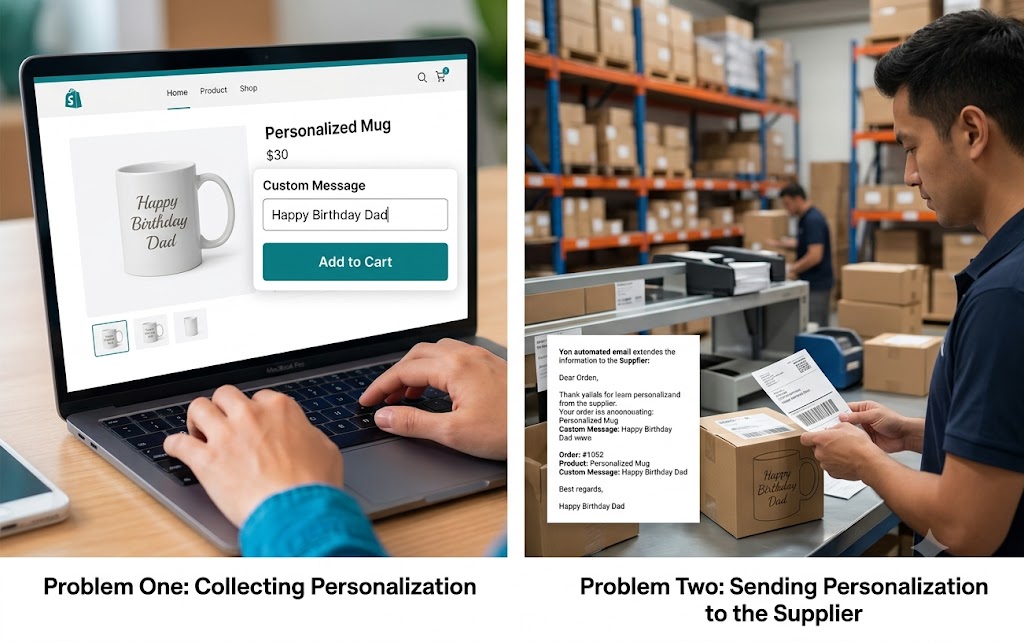
Problem One: Collecting Personalization
The store needs to give customers a place to enter their custom text.
This can be handled using a custom product field.
Problem Two: Sending Personalization to the Supplier
The supplier needs to receive that information so the customized product can be produced correctly.
These two processes are related but not identical.
A store can successfully collect the information without having a direct connection that automatically inserts it into the supplier’s checkout system.
Why Direct Supplier Checkout Automation Is Difficult
External supplier websites have their own ordering systems.
A store cannot automatically control another website simply because an order was placed in its own store.
The supplier’s system may require:
- Product selection
- Quantity
- Shipping address
- Variant selection
- Customer information
- Personalization information
Unless the supplier provides an appropriate integration or supported connection, automatically entering data into that external checkout can be difficult.
This is why the discussion distinguishes between sending information and automatically filling another checkout form.
Email as a Practical Workaround
One practical solution discussed is automatically emailing the supplier when an order is created.
The email can contain information such as:
- Order number
- Product name
- Customer information
- Selected variant
- Personalization message
- Shipping details
For example:
Order #1052
Product: Personalized Mug
Color: White
Custom message: “Happy Birthday Mom”
Quantity: 1
The supplier can then use this information while processing the order.
This does not automatically fill the supplier’s ordering form, but it eliminates much of the manual communication involved.
Why Automation Is Useful
Imagine receiving 30 personalized orders per day.
Without automation, the merchant may need to:
- Open the store order.
- Find the personalization message.
- Copy it.
- Open the supplier system.
- Find the corresponding product.
- Place the order.
- Paste the message.
- Confirm the information.
Doing this repeatedly creates a large administrative burden.
An automated notification can reduce the amount of manual work.
The Importance of Accurate Order Information
Personalization mistakes can be particularly damaging.
A customer ordering a normal product might tolerate a small delay.
A customer ordering a personalized gift may have a specific event in mind.
If the customer’s message is misspelled or omitted, the product may become unusable.
For this reason, personalization information should be treated as critical order data.
Make the Text Field Clear
The customer-facing field should be easy to understand.
Instead of simply saying:
“Text”
a better label might be:
Enter the name exactly as you want it printed.
Additional instructions can explain:
- Maximum number of characters
- Allowed symbols
- Capitalization
- Spelling responsibility
- Production limitations
For example:
“Please double-check spelling before placing your order. Your text will be produced exactly as entered.”
This can prevent many customer-service issues.
Character Limits Can Be Helpful
If the physical product can only accommodate a certain amount of text, the store should enforce a reasonable character limit.
For example, if a product can only display 20 characters, allowing customers to enter 200 characters creates a fulfillment problem.
A character limit helps protect both the customer and merchant.
Required Versus Optional Personalisation
Another important decision is whether the field should be required.
If every product must be personalized, the field should generally be required.
If personalization is optional, the field can remain optional.
For example:
Add a name?
If the customer chooses personalization, they enter the name.
This approach works well for products where customers can choose between standard and customized versions.
Multiple Personalization Fields
Some products require more than one piece of information.
A personalized gift might require:
- First name
- Date
- Short message
Each field can be collected separately.
This creates a more structured order record.
For example:
Name: Emma
Date: 12 August
Message: Forever Together
The merchant and supplier can then understand exactly what needs to be produced.
Avoid Asking Customers to Send Information Separately
One weak approach is telling customers to place an order and then send their personalization through email.
This creates unnecessary friction.
Customers may forget.
They may send the information from a different email address.
The merchant may not immediately know which order the message belongs to.
Collecting the information directly during the product purchase creates a much cleaner process.
The Role of Store Automation
Once the personalization information becomes part of the order, automation can use that information.
For example, when an order is created, an automated process can detect the order and send a notification containing the custom fields.
This creates a simple workflow:
Customer enters personalization → Order created → Personalization stored → Supplier receives order details
The merchant does not necessarily need to manually copy every message into an email.
What This Solution Does Not Do
It is important not to expect this setup to perform tasks it was not designed to perform.
The custom product field can collect and store customer information.
It does not automatically guarantee that an external supplier’s website will accept or process that information.
Direct supplier integration requires a separate connection or supported workflow.
This distinction prevents unrealistic expectations.
Why a Free Approach Can Be Valuable
Many merchants do not want to pay a monthly fee simply to collect one text field.
For stores with low order volume, a simple custom field may be sufficient.
A free or low-cost approach can be particularly useful when the business is still testing personalized products.
Once order volume increases, however, the merchant may decide that more advanced automation is worthwhile.
Testing Before Going Live
Before selling a personalized product, the merchant should place a test order.
The test should confirm that:
- The text field appears correctly.
- The customer can enter information.
- The product can be added to the cart.
- The personalization remains attached to the product.
- The information appears in the order.
- The automated notification contains the information.
- The supplier can understand the message.
Testing should be performed before advertising the product heavily.
Handling Multiple Products in One Order
This is another important test.
A customer may order several personalized products at once.
For example:
- Mug — “David”
- Shirt — “Happy Birthday”
- Necklace — “Love, Emma”
The merchant should verify that each message remains attached to the correct product.
This is one of the advantages of product-level properties: each customization can stay associated with the relevant product line.
Reducing Fulfillment Mistakes
A good personalization workflow should reduce ambiguity.
The supplier should receive information in a predictable format.
For example:
Order: #1052
Product: Personalized Mug
Color: Black
Quantity: 2
Personalization: “Happy Birthday Dad”
A standardized format makes supplier processing easier.
What Merchants Should Consider
Before implementing the workflow, merchants should answer several questions:
- Is personalization required?
- What information does the customer need to provide?
- How many characters are allowed?
- Can customers use special characters?
- Does each product need separate personalization?
- How will the supplier receive the information?
- Who checks the personalization before production?
- What happens if the customer enters incorrect information?
Answering these questions creates a more reliable fulfillment process.
Final Takeaway
The discussion provides a practical solution for merchants who want to collect personalized product information without paying for an expensive customization system.
The central idea is to add a custom text field to the product and store the customer’s response as information attached directly to the ordered product. This allows the personalization to travel with the order and remain visible throughout important stages of the purchasing process.
The key limitation is that collecting the information and automatically entering it into an external supplier’s checkout are two different tasks. The store can reliably capture the customer’s personalization, but it cannot automatically control an outside ordering system unless a suitable integration exists.
For many small dropshipping businesses, an automated notification containing the order and personalization details can be an effective middle ground. It removes much of the repetitive copying and pasting while still giving the supplier the information needed to fulfill the order.
The most important goal is accuracy. Personalized products cannot be fulfilled correctly unless the customer’s exact instructions reach the person or company producing the item. By collecting the information directly on the product page, attaching it to the appropriate order item, and establishing a clear supplier communication process, merchants can create a simple, affordable, and scalable personalization workflow.
As the business grows, the process can be expanded with additional automation, validation, and supplier integration. However, for merchants who are just starting with personalized products, a straightforward custom text field combined with automated order communication can provide a practical foundation without requiring a complicated or expensive setup.