Product management is one of the most important parts of running an ecommerce store. Merchants need to create products, add descriptions and images, manage prices, enter barcodes, organize inventory, and keep product information accurate. For stores with hundreds or thousands of products, even small changes to the product-management workflow can have a major impact on daily operations.
A recent discussion among merchants focuses on dissatisfaction with a newer product creation and editing experience. The main concern is that the updated workflow appears to treat products as variant-based by default. While variants are useful for products that genuinely have multiple options, this approach can create unnecessary steps for merchants selling simple products with only one version.
The issue is not necessarily that the new system is incapable of managing products. Instead, merchants are questioning whether the workflow is intuitive and efficient for different types of catalogs.
A store selling a T-shirt in five sizes and four colors needs variants. A store selling a single candle in one size and one color may not.
When both situations are handled through a similar workflow, merchants can feel that simple tasks have become unnecessarily complicated.
Understanding Products and Variants
Before looking at the problem, it is important to understand the difference between a product and a variant.
A product is the item being sold.
For example:
Classic Ceramic Mug
A variant is a specific version of that product.
For example:
- White / 11 oz
- White / 15 oz
- Black / 11 oz
- Black / 15 oz
Variants become useful when customers need to choose between different options.
Common variant options include:
- Size
- Color
- Material
- Style
- Capacity
- Finish
For products with genuine variations, a variant-based system makes sense.
However, many ecommerce catalogs also contain simple products that have no meaningful variations.
A merchant might sell:
- One type of notebook
- One candle
- One wall decoration
- One digital product
- One standard accessory
In these cases, the merchant may expect to create the product, add its information, and move on.
The criticism discussed in the community centers around the idea that the newer workflow can make even these simple products feel like they require variant management.
Why Merchants Find This Frustrating
The biggest frustration comes from additional navigation.
When a product does not have multiple versions, merchants generally expect product information such as the barcode, image, price, and inventory details to be accessible directly and logically.
If the workflow instead requires merchants to enter a variant-related area before they can access certain information, the process can feel unnecessarily indirect.
This may not seem like a major issue when creating one product.
But ecommerce merchants rarely manage only one product.
A store may create or update:
- Ten products
- One hundred products
- One thousand products
- Tens of thousands of products
When a task requires several extra clicks for every item, those extra steps accumulate.
What looks like a minor interface change can therefore become a significant productivity issue.
The Problem With Treating Every Product Like a Variant Product
The central criticism is not that variants exist.
Variants are an essential part of ecommerce.
The concern is that a simple product can appear to be treated as though it requires variant-level management even when no actual options exist.
Imagine a merchant creating a basic product.
They enter:
Product name: Stainless Steel Water Bottle
The product has:
- One size
- One color
- One barcode
- One image
- One price
There is no meaningful variation.
Yet the merchant may still encounter a default variant structure.
This can make the interface feel more complicated than the actual product.
From a user-experience perspective, the software should ideally adapt to the complexity of the product rather than forcing every merchant through the same level of complexity.
The Default “Title” Variant
One workaround mentioned in the discussion is related to the default variant.
When a product does not have genuine variants, the system may create a default variant with a generic title such as “Title.”
For merchants who only sell a single version of a product, this can feel unnecessary.
One suggested workaround is to remove the default variant option when no real variants exist.
The goal is to simplify the product structure so that the merchant can work with the product as a straightforward single-item listing rather than repeatedly dealing with variant terminology.
However, merchants should be careful when changing product structures.
If a store already has inventory, integrations, reports, or other processes relying on existing variant records, structural changes should be tested carefully.
A workaround that simplifies one screen should not accidentally create problems elsewhere.
Why Barcodes and Images Become Important
Barcodes and product images are two examples of information that merchants frequently need to update.
A barcode identifies a particular product or variant and can be important for inventory systems, fulfillment operations, warehouse processes, and external sales channels.
Images are equally important because they directly affect how customers understand a product.
For simple products, merchants may expect these fields to be immediately available during product editing.
If these fields are located deeper within a variant-oriented workflow, the editing process can become frustrating.
This is especially true for merchants who regularly update catalog information.
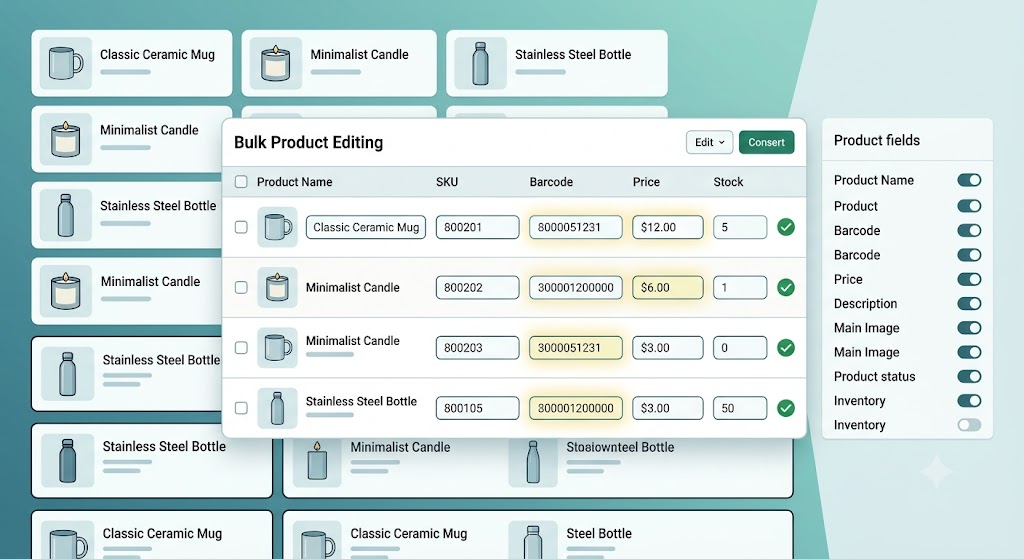
The Value of Bulk Editing
One of the more practical suggestions from the discussion is using a bulk-editing workflow for large-scale changes.
Instead of opening every individual product and navigating through its details, merchants can update multiple products from a centralized editing interface.
This can be particularly useful for fields such as:
- Barcodes
- Images
- Product information
- Inventory-related details
- Other supported product attributes
Consider a merchant who has 200 products and needs to update their barcodes.
Opening each product individually could take a significant amount of time.
A bulk editing interface allows the merchant to work with many products together.
This changes the task from:
Open product → find variant → update barcode → save → return → repeat
to a much more centralized process.
For merchants managing large catalogs, this can make a major difference.
Why Bulk Workflows Matter for Ecommerce Businesses
Efficiency becomes increasingly important as a store grows.
A small merchant might manually edit five products in a few minutes.
A growing business may have a dedicated employee managing hundreds of catalog changes.
Large stores may regularly update:
- Prices
- Product descriptions
- Images
- Barcodes
- Inventory
- Product categories
- Shipping information
- SEO information
A poorly optimized editing workflow can therefore create substantial labor costs.
This is why ecommerce interfaces need to consider not only whether a task can be completed, but also how many steps it takes to complete repeatedly.
A feature can technically work while still providing a poor user experience.
The Difference Between Functionality and Usability
This discussion highlights an important principle in software design.
There is a difference between functionality and usability.
Functionality asks:
Can the merchant update the product?
Usability asks:
Can the merchant update the product quickly and intuitively?
A system may satisfy the first question while failing the second.
For example, if a merchant can eventually update a barcode after navigating through multiple screens, the system is technically functional.
But if the same action previously required one simple step and now requires several, merchants may reasonably feel that the experience has become worse.
Good software should minimize unnecessary cognitive and physical effort.
The Impact on New Merchants
Experienced merchants may eventually learn workarounds.
They may discover:
- Where specific fields are located
- How default variants work
- How to remove unnecessary structures
- How to use bulk editing
- Which screens are best for particular tasks
New merchants do not have that knowledge.
For someone setting up their first store, encountering variant terminology when they are simply trying to create a basic product can be confusing.
They may wonder:
- Why does my simple product have a variant?
- Do I need to configure it?
- What does the default title mean?
- Where should I enter my barcode?
- Why is my product image managed somewhere else?
- Did I accidentally create multiple product versions?
Good interface design should reduce these questions.
The Challenge of Balancing Flexibility and Simplicity
There is also a legitimate reason for having a standardized product structure.
A unified architecture can make it easier to support different product types.
From a platform perspective, treating products consistently may simplify:
- Inventory management
- Product data structures
- Catalog operations
- Reporting
- Integrations
- Future functionality
The challenge is presenting that underlying complexity in a simple way.
The internal data model can be sophisticated while the merchant-facing interface remains easy to understand.
For example, a system can technically store a simple product as having one underlying variant while showing the merchant a straightforward product-editing experience.
The merchant does not necessarily need to think about the underlying structure.
Why Merchant Feedback Matters
The discussion also recommends submitting feedback through the platform’s feedback mechanism.
This is important because interface changes affect millions of potential workflows.
Developers and product teams need real-world feedback to understand:
- Which changes are confusing
- Which tasks take longer
- Which fields are difficult to locate
- Which workflows merchants use most frequently
- Which workarounds merchants have created
A complaint is more useful when it clearly explains the problem.
For example, instead of simply saying:
“The new editor is bad.”
A more useful report might explain:
“For products without real variants, entering a barcode or image now requires navigating into variant-related sections. This adds unnecessary steps when managing simple products.”
Specific feedback gives product teams something actionable.
What Merchants Can Do Right Now
While waiting for potential improvements, merchants can use practical strategies to reduce the impact of the new workflow.
Use the Simplest Product Structure
If a product genuinely has no variations, avoid creating unnecessary options.
Keeping the product structure simple can make future management easier.
Review Default Variants
If the system creates a generic default variant for a single-item product, understand how it is being used before removing or modifying it.
Do not make structural changes without considering inventory and connected systems.
Use Bulk Editing
For repeated changes, use bulk editing wherever possible.
This is particularly useful when updating many products with similar information.
Maintain Consistent Product Data
Keeping product information organized makes large catalog updates easier.
Maintain accurate records for:
- Product names
- SKUs
- Barcodes
- Images
- Prices
- Inventory
- Descriptions
Good catalog organization reduces dependence on complicated editing workflows.
Submit Specific Feedback
If a workflow is genuinely slowing down daily operations, provide detailed feedback describing the exact task and the additional steps involved.
This is more effective than simply expressing general dissatisfaction.
What an Improved Product Editor Could Look Like
An ideal product editor could distinguish between simple products and products with genuine variations.
For a simple product, the interface could show:
- Product information
- Images
- Price
- Inventory
- Barcode
- Shipping information
without requiring the merchant to think about variants.
For a product with multiple options, the interface could then introduce variant management.
This would create a more adaptive experience.
The system could essentially ask:
Does this product have multiple versions?
If the answer is no, the merchant gets a simple workflow.
If the answer is yes, the platform provides the additional controls needed to manage those versions.
Such an approach could preserve the underlying flexibility of a variant-based architecture while making the interface easier for merchants.
Why This Matters Beyond One Interface Change
This discussion represents a broader lesson about ecommerce software.
Merchants do not necessarily care about the complexity of the technology behind their store.
They care about getting work done efficiently.
If a merchant needs to add 100 barcodes, the important question is not how the platform internally stores barcode information.
The important question is:
How quickly and safely can the merchant update those 100 products?
Likewise, if a merchant needs to add images to 50 products, they want a workflow that minimizes repetitive actions.
As ecommerce businesses grow, operational efficiency becomes a competitive advantage.
A platform that saves merchants hours every week can have a significant impact on their businesses.
Final Takeaway
The criticism surrounding the newer product creation and editing experience is largely about workflow efficiency and usability, rather than the existence of variants themselves.
Variants are essential for products with different sizes, colors, materials, or other options. However, merchants selling simple single-item products may feel that they are being pushed through a variant-oriented workflow that does not match the complexity of what they are trying to accomplish.
This can make everyday tasks such as adding barcodes, managing images, and updating product information feel more complicated than necessary.
The suggested workarounds provide some practical relief. Merchants can review whether the default generic variant is necessary for products without genuine variations and can use bulk editing when managing information across multiple products.
However, these workarounds do not necessarily address the underlying user-experience concern.
The broader issue is whether the product editor should adapt to different merchant needs.
A store selling a complex product catalog with hundreds of variants needs powerful variant management. A small store selling simple products needs speed and simplicity.
Ideally, the same platform should support both without forcing every merchant through the most complicated workflow.
The discussion therefore highlights an important principle for ecommerce software development: powerful functionality should not come at the cost of unnecessary complexity.
Merchants should be able to manage simple products simply, while still having access to advanced controls when they genuinely need them.
Until the workflow changes, merchants can reduce friction through careful product organization, appropriate use of bulk editing, and clear feedback about the specific problems they encounter.
Ultimately, the best product-management experience is one that stays in the background and allows merchants to focus on what matters most—keeping their catalog accurate, presenting products effectively, and serving their customers.