Introduction
Dynamic pricing can be useful when an ecommerce store needs to charge a fee based on the value of a customer’s cart. One example is an Order Protection product that should cost a fixed percentage of the customer’s cart subtotal.
For example, a store may want to charge customers 4% of their cart subtotal for order protection. If the customer’s cart subtotal is $100, the protection fee should be $4. If the subtotal is $250, the fee should become $10.
At first glance, this sounds like a simple calculation. However, implementing percentage-based pricing on a standard ecommerce plan can become complicated because the price displayed at checkout must actually match the calculated amount.
A common approach is to create a product with a $0 price and calculate the required fee separately. The problem is that displaying the calculated amount somewhere on the page does not change the actual price of the product. The checkout can still treat the product as free.
Another tempting approach is to change the shared product variant price whenever the cart changes. This can create serious problems when multiple customers are shopping at the same time because they may all interact with the same product and its shared price.
The discussion focuses on finding a solution that calculates the correct percentage while avoiding these race conditions.
1. Understanding the Order Protection Requirement
The basic requirement is straightforward:
Charge an Order Protection item at 4% of the customer’s cart subtotal.
Suppose the cart contains products worth:
- Product A: $50
- Product B: $75
- Product C: $25
The cart subtotal is $150.
At 4%, the protection fee should be:
$150 × 4% = $6
If another customer has a $300 cart, the protection fee should be:
$300 × 4% = $12
This means the price of the protection item cannot simply be permanently set to one value.
The amount depends on the customer’s current cart.
The challenge is making that calculated amount become the actual line-item price that reaches checkout.
A calculation displayed in a custom interface is not enough. The checkout needs to receive a valid product price or quantity that results in the correct final amount.
2. Why a Zero-Priced Product Does Not Solve the Problem
A common starting point is to create an Order Protection product with a price of $0.
The store can then calculate 4% of the cart subtotal and display that amount in a custom section.
For example:
Cart subtotal: $200
Order Protection: $8
The customer sees “$8” on the page, so it may appear that the problem has been solved.
However, the actual product variant still has a price of $0.
When the product is added to the cart, the checkout sees the variant’s real price. If that variant is priced at zero, the checkout can continue to show the protection item as free.
This creates a difference between the amount displayed by the custom interface and the amount actually charged.
That distinction is extremely important.
An ecommerce checkout does not automatically treat a custom text value as a new product price. The calculated value must be represented through a pricing mechanism that the store’s plan and checkout system actually support.
3. Why Line Item Properties Do Not Change the Price
Another possible approach is to attach the calculated fee as additional information associated with the cart item.
For example, a product could contain information such as:
Protection Fee: $8
This information can be useful for identification or internal processing, but it does not necessarily change the actual selling price of the product.
Line item properties are primarily additional data associated with an item. They can communicate information about the customer’s selection, but simply adding a property containing “$8” does not turn a $0 product into an $8 product.
This leads to an important ecommerce development principle:
Data describing a price is not the same thing as the actual price charged.
The checkout must receive a pricing structure that results in the correct amount.
This is why the original zero-price approach fails to solve the actual billing problem.
4. The Race Condition Problem
One of the more serious issues appears when trying to solve the problem by changing a shared variant’s price.
Imagine the Order Protection variant has a price of $0.
Customer A has a cart worth $100.
Their protection fee should be $4.
The system changes the variant price to $4.
At nearly the same time, Customer B has a cart worth $500.
Their protection fee should be $20.
The system changes the same variant price to $20.
Now Customer A may encounter the $20 price even though their cart requires a $4 fee.
This is called a race condition: multiple customers or processes are attempting to use or modify the same shared value at nearly the same time.
The problem becomes even more complicated as the number of shoppers increases.
A shared product variant is not a customer-specific pricing container. If its price is changed globally, the change can potentially affect other customers who are using that same variant.
Therefore, dynamically changing the price of one shared variant based on individual cart totals is risky.
5. Why Shared Variant Price Changes Are Dangerous
A product variant generally represents a common product configuration with a defined price.
When that price is changed globally, the change is not necessarily isolated to one customer’s cart calculation.
This creates several potential problems:
- One customer’s calculated price may affect another customer’s checkout.
- Simultaneous cart updates can produce inconsistent results.
- Customers may see unexpected protection fees.
- The displayed price and actual checkout amount may differ.
- Debugging becomes difficult because the issue depends on timing.
- High traffic can make the problem more noticeable.
For a percentage-based fee, the correct price is different for different customers. Therefore, using a shared mutable price is fundamentally risky.
The better approach is to represent the required amount without continuously modifying a shared product price.
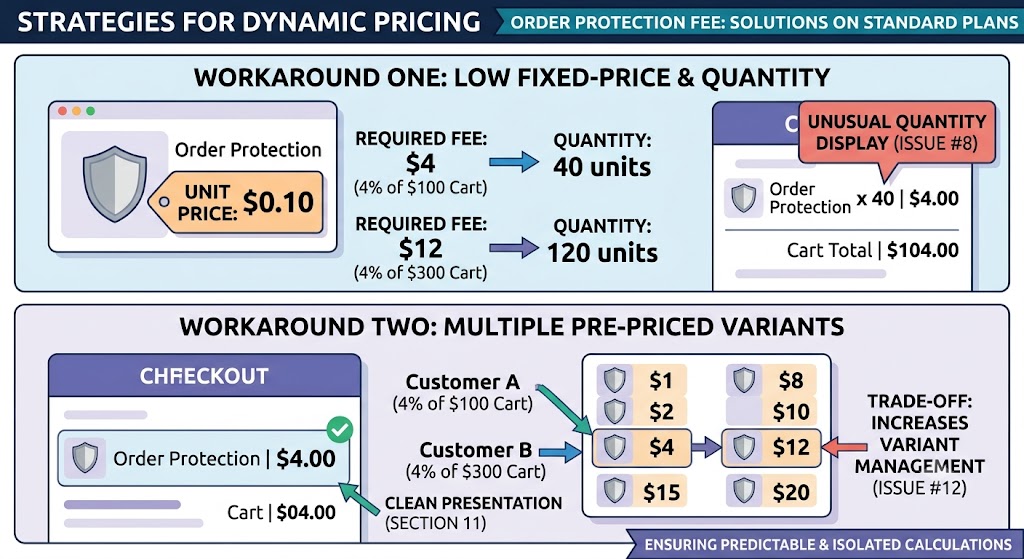
6. Workaround One: Use a Low Fixed-Price Variant and Quantity
One of the approaches discussed is to create an Order Protection variant with a very low fixed price.
For example, imagine the variant costs:
$0.10 per unit
If the required protection fee is $4, the system can add:
40 units × $0.10 = $4
If the required fee is $8, it can add:
80 units × $0.10 = $8
The actual product price remains fixed at $0.10.
The system does not need to change the shared variant price for every customer.
Instead, it changes the quantity associated with that customer’s cart item.
This avoids the major race-condition problem because the underlying product price remains constant.
7. How the Low-Price Quantity Method Works
The basic calculation is:
Required quantity = Protection fee ÷ Unit price
If the protection rate is 4% and the cart subtotal is $250:
$250 × 0.04 = $10
If the protection variant costs $0.10:
$10 ÷ $0.10 = 100 units
The cart can therefore contain:
Order Protection — 100 × $0.10 = $10
For another customer with a $500 cart:
$500 × 0.04 = $20
The required quantity becomes:
$20 ÷ $0.10 = 200 units
The variant price remains $0.10 in both cases.
Only the quantity differs.
This approach has an important advantage: the system does not need to modify a shared product price for individual customers.
The discussion confirms that this workaround works functionally for calculating the desired fee.
8. The Main Disadvantage: The Quantity Display
Although the low-price method can produce the correct financial total, it introduces a presentation problem.
The customer may see something like:
Order Protection — $0.10 × 100
instead of:
Order Protection — $10
This can look unusual.
The customer may wonder why they have purchased 100 units of an order protection product.
The cart quantity may also affect the overall item count displayed by the store.
For example, a customer may believe they have purchased one protection service, but the checkout may show a quantity of 100.
This is not necessarily incorrect from a calculation perspective, but it can create confusion.
The problem becomes more noticeable when the quantity badge or quantity selector cannot be hidden or modified during checkout on the customer’s current plan.
Therefore, while the method works technically, it may not provide the cleanest customer experience.
9. Why Hiding the Quantity May Not Be Possible
The next question is naturally:
Can the checkout simply hide the quantity and show the protection fee as one item?
On the plan discussed in the original conversation, the answer appears to be no.
Checkout presentation is subject to the capabilities and restrictions of the selected plan. A store may have significant control over its storefront and cart experience while having fewer options for changing certain checkout elements.
This creates a tradeoff.
The low-price quantity method can solve the pricing problem, but the checkout may still expose the quantity.
Therefore, merchants should not evaluate the solution only by asking whether the calculation is correct. They should also consider how the final charge appears to customers.
A technically correct solution that produces a confusing checkout can still create customer-service problems.
10. Workaround Two: Create Multiple Pre-Priced Variants
A cleaner alternative is to create multiple variants with different fixed prices.
Instead of changing one shared variant price, the store can prepare variants representing different possible protection fees.
For example, the product could have variants corresponding to:
- $1
- $2
- $3
- $4
- $5
- $6
- $7
- $8
- $10
- $12
- $15
- $20
The system calculates the required 4% fee and selects the appropriate pre-priced variant.
If the cart subtotal is $200:
$200 × 4% = $8
The $8 variant can be selected.
If the cart subtotal is $300:
$300 × 4% = $12
The $12 variant can be selected.
The important difference is that no shared variant price needs to be changed dynamically.
Each variant already has its own fixed price.
11. Advantages of Pre-Priced Variants
This method has several benefits.
No Shared Price Mutation
The system does not need to change a common variant’s price based on individual customers.
Better Checkout Presentation
The customer can see one protection item with a meaningful price rather than an unusually large quantity.
Reduced Race-Condition Risk
Because prices are fixed in advance, one customer’s calculation does not require modifying a price that another customer may be using.
Easier Conceptual Model
Each variant represents a known fee amount. The system only needs to determine which amount is appropriate.
For customer-facing ecommerce experiences, this can be cleaner than the low-price quantity approach.
12. The Disadvantage: Variant Management
The main drawback is the number of variants that may be required.
A 4% calculation can generate many possible values depending on cart totals and rounding rules.
For example, if the store needs protection fees across a wide range of cart values, a limited number of variants may not represent every possible amount exactly.
The merchant then has to decide how to handle the gaps.
Possible approaches include rounding the protection fee according to a defined rule or creating enough pre-priced variants to cover the expected range.
This creates additional product-management work.
The larger the possible price range, the more complicated the variant structure can become.
Therefore, the pre-priced approach trades some administrative complexity for a cleaner checkout experience.
13. Comparing the Two Approaches
The two main approaches solve the same fundamental problem in different ways.
| Approach | Pricing Method | Race-Condition Risk | Checkout Appearance | Management |
| Low-price + quantity | Fixed low price multiplied by quantity | Low | Quantity may look unusual | Simple |
| Pre-priced variants | Select variant matching the fee | Low | Cleaner | More variants to manage |
| Shared dynamic price | Change one variant’s price | High | Potentially clean | Risky |
The shared dynamic price approach may initially seem attractive because it can produce a clean-looking item.
However, the risk of one customer’s pricing affecting another customer’s calculation makes it unsuitable for a reliable multi-customer ecommerce environment.
The low-price quantity method is functionally effective but can create an unusual quantity display.
The pre-priced variant method is generally cleaner for the customer, although it requires more preparation and maintenance.
14. Handling Rounding Correctly
Percentage-based pricing also requires a clear rounding policy.
Suppose the cart subtotal is $137.35.
At 4%:
$137.35 × 0.04 = $5.494
The store cannot necessarily charge a fraction of a cent.
Therefore, it needs a defined rule.
For example, the fee might be rounded to:
$5.49
or:
$5.50
The important point is consistency.
The same calculation and rounding rule should be used every time so customers are not charged unpredictable amounts.
If the low-price quantity method is used, the fixed unit price must also be capable of representing the required fee accurately enough.
If the pre-priced variant method is used, the available variants need to account for the rounding strategy.
Pricing logic should always be tested with small, medium, and large cart totals.
15. Testing the Customer Journey
A pricing solution should not be considered complete simply because the mathematical calculation works.
The entire customer journey should be tested.
For example:
- Add products to the cart.
- Calculate the cart subtotal.
- Calculate the 4% protection fee.
- Add the appropriate protection item.
- Review the cart.
- Continue to checkout.
- Confirm that the protection charge is correct.
- Check the displayed quantity.
- Change the original cart contents.
- Confirm that the protection fee updates correctly.
The same process should be tested with different cart values.
It is especially important to test what happens when products are removed, quantities change, or the customer returns to the cart after making modifications.
The protection fee should always correspond to the current cart subtotal rather than an earlier value.
16. What the Discussion Ultimately Shows
The community discussion demonstrates an important lesson about dynamic ecommerce pricing.
The calculation itself is easy:
Cart subtotal × 4% = Order Protection fee
The difficult part is representing that calculated amount in a way that the checkout can actually charge without creating shared-state problems.
A zero-priced product with additional metadata does not automatically become a paid product.
Changing a shared variant price can introduce race conditions.
Using a low-priced variant multiplied by quantity can solve the pricing calculation but may create an awkward quantity display.
Using multiple pre-priced variants can provide a cleaner customer experience while avoiding shared price changes, but it requires more product and variant management.
There is therefore no perfect solution without considering the limitations of the store’s current plan and the desired checkout presentation.
Conclusion
Implementing a percentage-based Order Protection fee requires more than simply calculating a percentage and displaying the result.
The actual checkout price must be represented through a supported pricing mechanism. A product that is technically priced at zero will continue to appear free even if a custom interface displays a calculated protection amount. Additional item information can describe the fee but does not automatically change the underlying product price.
Changing a shared variant price dynamically is also risky because multiple customers may be using the same product at the same time. This can lead to race conditions and incorrect pricing.
The low-price-plus-quantity approach provides a functional workaround by keeping the unit price fixed and adjusting the quantity. However, the resulting quantity may look unusual in checkout.
Pre-priced variants provide a cleaner customer-facing experience because the customer sees a normal quantity and an appropriate price. The tradeoff is additional variant management and the need to account for different possible fee amounts.
Ultimately, the best approach depends on the store’s pricing range, checkout requirements, plan limitations, and tolerance for product-management complexity.
The most important principle is to avoid changing shared pricing data based on individual customers. Dynamic calculations should be represented in a way that remains isolated, predictable, and consistent for every shopper.

0 Comments