Introduction
Managing a consignment business through an online store requires more than simply listing products and accepting customer orders. Sellers also need to know which products belong to which consignors so they can manage payments, commissions, inventory, and product ownership accurately.
A consignment business is a retail arrangement in which one person or business provides products to another seller for sale. The seller displays and sells those products, while the original owner, known as the consignor, receives an agreed payment after a successful sale. The seller may keep a commission or service fee.
For businesses managing products from multiple consignors, identifying product ownership is extremely important. When an order arrives, the store owner needs to know which consignor supplied each item without manually checking separate records.
One common request from ecommerce sellers is to display consignor names directly on the orders page so that staff can quickly identify consignment products.
However, adding consignor information requires careful planning. Some methods are simple but may expose private business information to customers. Other methods allow sellers to store consignor details internally and organize orders without displaying those details publicly.
This article explains different ways to manage consignor information, how product data can be connected to customer orders, and why private order-tagging methods are often a better choice.
1. Understanding How Consignment Works in Ecommerce
Before choosing a method for displaying consignor names, it is important to understand how a consignment business operates.
In a traditional retail business, the seller usually purchases products from suppliers and owns the inventory. In a consignment arrangement, the seller may not own the products. Instead, the consignor provides items for the seller to display and sell.
For example, imagine an online store selling handmade jewellery from five different artists.
Each artist supplies products to the store. When a customer purchases a necklace, the store needs to know which artist owns that item so the correct payment can be calculated.
The business may need to track:
- Product name and SKU.
- Consignor name.
- Product ownership.
- Selling price.
- Agreed commission percentage.
- Quantity sold.
- Payment due to the consignor.
- Remaining inventory.
If consignor information is not organized properly, the seller may spend unnecessary time checking spreadsheets, supplier records, or individual product details.
Displaying or identifying consignor information on the internal orders page can make daily operations easier.
2. Why Consignor Names Should Be Easy to Identify
When a store receives multiple orders every day, manually identifying the owner of each product can become difficult.
Consider an order containing three products:
- Handmade silver necklace.
- Decorative ceramic vase.
- Hand-painted wooden frame.
Each product belongs to a different consignor.
The store owner needs to identify all three consignors before preparing payment records or updating sales reports.
If this information is not available alongside the order, staff may need to open individual product records and search for ownership details.
This can create several problems.
Slower Order Processing
Employees spend more time identifying which consignor supplied each product.
Payment Calculation Errors
Incorrect ownership information can lead to payments being assigned to the wrong person.
Difficult Sales Tracking
Businesses may struggle to calculate how much each consignor has earned.
Inventory Management Problems
Without clear ownership records, sellers may find it difficult to identify which products belong to which consignor.
For these reasons, consignor identification should be part of the store’s internal order management process.
However, internal visibility does not mean that the information should automatically appear to customers.
3. Method One: Add the Consignor Name to the Product Title
One simple approach is to include the consignor’s name directly in the product title.
For example:
- Silver Necklace – Consignor A.
- Ceramic Vase – Consignor B.
- Wooden Frame – Consignor C.
When a customer places an order, the product title appears in the order details. This makes it easy for the seller to identify the consignor without opening additional records.
Advantages
- Very simple to implement.
- No additional data structure is required.
- Consignor information appears alongside the product in order details.
- Staff can identify product ownership quickly.
Disadvantages
The biggest concern is privacy.
Product titles are often visible to customers on product pages, shopping carts, checkout pages, and order confirmations.
If the consignor’s name is included in the title, customers may see information that was intended only for internal business management.
For example, a customer purchasing a handmade necklace may see the name of the individual who supplied it, even if the store wants to maintain a separate relationship with that consignor.
This could also create confusion about who owns the product, who is responsible for customer service, or who should be contacted about a purchase.
Therefore, adding consignor names to product titles may be suitable only when the business intentionally wants to display the maker’s identity publicly.
For stores that need private internal identification, this is generally not the best approach.
4. Method Two: Use Line-Item Properties
Another option is to store consignor information as a line-item property.
Line-item properties are custom attributes attached to individual products in a customer’s cart or order.
They can store additional information about a specific purchased item without changing the main product title.
For example, a necklace may have the following details:
| Field | Information |
| Product | Handmade Silver Necklace |
| SKU | JW-101 |
| Consignor | Artist A |
| Quantity | 1 |
This allows the store to associate a consignor with a particular product in an order.
Advantages
- Information is connected to the individual purchased item.
- Different products in the same order can have different consignors.
- Product titles remain clean and customer-friendly.
- Useful for businesses managing several consignors.
Privacy Considerations
Although line-item properties provide flexibility, sellers must configure them carefully.
Some properties can appear in the cart, checkout, order confirmation, or other customer-facing areas depending on how they are created and displayed.
For example, if the store adds a property called “Consignor Name” and it is not configured as private, customers may see the consignor’s identity during checkout.
This creates the same privacy concern as adding the name to the product title.
Sellers should therefore understand how their store displays custom item attributes before using them for internal information.
Private line-item properties can be useful when the business needs to attach information to an individual order item without showing it to customers.
However, the implementation should be tested carefully to confirm that the information remains internal.
5. Method Three: Use Product Tags
Product tags are labels used to categorize and organize products.
They can be useful for identifying consignment products and assigning internal ownership categories.
For example, a store may use tags such as:
- CONSIGNOR_ARTIST_A
- CONSIGNOR_ARTIST_B
- CONSIGNOR_ARTIST_C
- CONSIGNMENT_JEWELLERY
- CONSIGNMENT_DECOR
When products are added to the store, staff can assign the appropriate tag.
This makes it easier to filter products, identify consignment inventory, and organize records.
Why are product tags useful?
Easy categorization: Staff can identify which products belong to the consignment collection.
Consistent naming: A standard naming structure makes it easier to search and filter products.
Automation support: Product tags can be used as conditions for automatically identifying related orders.
Internal organization: The store can maintain ownership information without adding it to customer-facing product titles.
A Practical Tagging Example
Suppose an online store works with three consignors:
- Artist A.
- Artist B.
- Artist C.
The store can assign each consignor a unique prefix.
For example:
- CONSIGNOR_A
- CONSIGNOR_B
- CONSIGNOR_C
If a customer purchases products from Artist A and Artist C, the order can be identified as containing items associated with both consignors.
However, product tags alone may not automatically display the consignor’s full name on the orders page. They are primarily useful for classification and can serve as the starting point for an automated order-management process.
6. Method Four: Use Product Metafields
Metafields are custom data fields attached to products.
They allow businesses to store information that is not included in the standard product fields.
For example, an online store can create a product metafield called “Consignor Name.”
A product record could contain:
| Product Information | Value |
| Product Name | Handmade Silver Necklace |
| SKU | JW-101 |
| Consignor Name | Artist A |
| Commission | 20% |
| Product Type | Consignment |
This creates a structured way to store ownership information.
Unlike product titles, metafields are designed to hold additional information without changing the public product name.
Benefits of Metafields
Organized information: Consignor details are stored in dedicated fields rather than mixed into product descriptions.
Better consistency: Staff can follow the same data structure for every consignment product.
Flexible management: Additional information, such as commission rates or consignor IDs, can also be stored.
Automation possibilities: Metafield values can be used as conditions in order-management workflows when the required connections are configured.
Product Tags vs. Metafields
Both methods can help organize consignor information, but they serve different purposes.
| Factor | Product Tags | Product Metafields |
| Main purpose | Categorization | Structured information |
| Data format | Labels | Custom fields |
| Best use | Identifying product groups | Storing consignor details |
| Searching | Easy filtering | Depends on field support |
| Automation | Useful for conditions | Useful for more detailed conditions |
For a small business with a few consignors, tags may be sufficient. A business managing many consignors, commission rates, and ownership records may benefit from structured metafields.
7. Why Automated Order Tagging Is a Practical Solution
One of the most useful approaches is to store consignor information privately on products and automatically add a relevant tag to orders when those products are purchased.
This creates a connection between product ownership and order management.
For example, imagine a customer purchases a necklace belonging to Artist A.
The product has the tag CONSIGNOR_A.
When the order is created, an automation checks the products included in the order. If it finds a product with that tag, it adds a corresponding tag to the order.
The order may then receive the label:
CONSIGNOR_A
If the order contains products from two consignors, the automation can add both relevant tags, provided the workflow is designed to process every line item.
This allows staff to identify consignor-related orders directly from the order list.
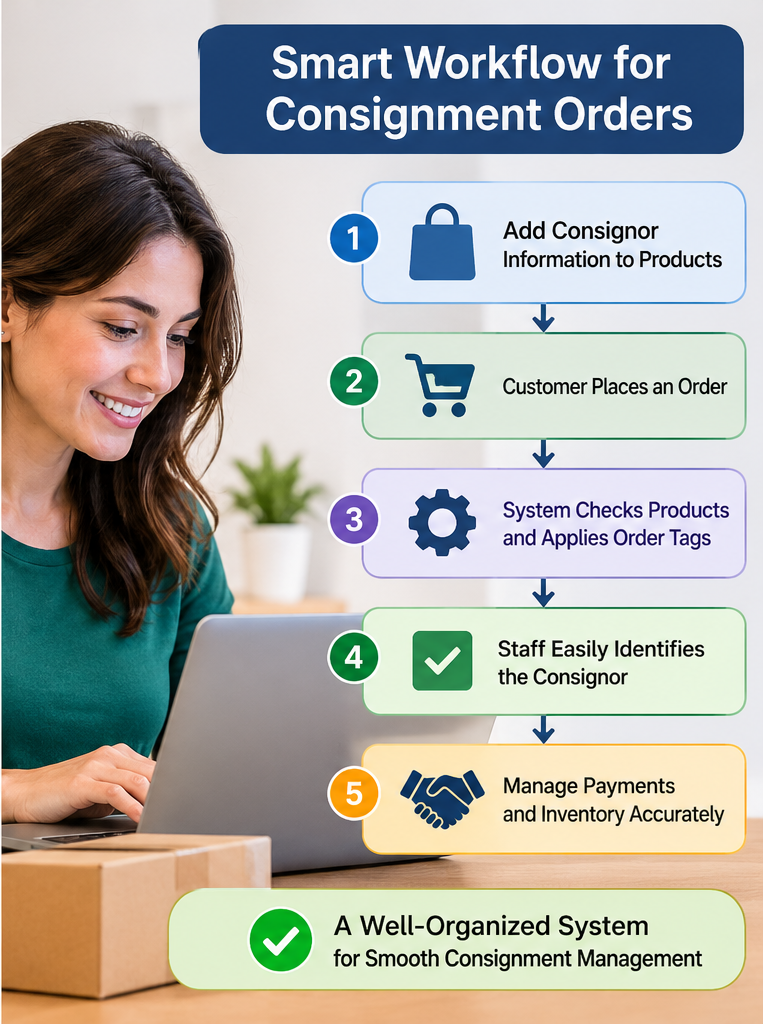
How the Process Works
Step 1: Add consignor information to products
Each consignment product receives a unique tag or an appropriate metafield value.
Step 2: Customer places an order
The customer purchases one or more products from the online store.
Step 3: Automation checks the order
The workflow examines the products included in the order.
Step 4: Matching information is identified
If a product contains a designated consignment tag or metafield value, the workflow recognizes it.
Step 5: Order receives an internal tag
The appropriate consignor label is added to the order.
Step 6: Staff review the order
Employees can identify the relevant consignor from the order details or order tags and continue with the necessary internal processes.
This approach reduces the need to manually search for consignor information every time an order arrives.
8. Why a Consistent Tagging Structure Matters
An automation system is only as reliable as the information it receives.
If employees use different naming formats for the same consignor, the system may fail to recognize certain products.
For example, the following tags may represent the same person:
- Artist_A
- ARTIST A
- Consignor-A
- A_Consignor
Although humans may understand that these labels refer to the same consignor, an automated workflow may treat them as different values.
A standardized naming structure can prevent this problem.
A business should decide on one format and use it consistently.
For example:
- CONSIGNOR_001
- CONSIGNOR_002
- CONSIGNOR_003
Each code can be linked to the consignor’s full name in an internal record.
This is especially useful when consignors have similar names or when the business works with a large number of suppliers.
9. Common Mistakes to Avoid
When setting up consignor identification, businesses should avoid several common mistakes.
Exposing Private Information
Adding consignor names to product titles or public-facing custom fields may reveal information that should remain internal.
Solution: Use private product data and internal order tags wherever possible.
Inconsistent Product Information
Missing or incorrectly entered consignor details can result in incorrect order identification.
Solution: Make consignor information a required part of the product creation process for all consignment items.
Incorrect Automation Conditions
If the workflow checks only one product in an order instead of all purchased items, some consignor information may be missed.
Solution: Test orders containing multiple products from different consignors.
Duplicate or Unclear Tags
Different naming formats can make order filtering difficult.
Solution: Establish a consistent tagging convention.
Ignoring Historical Orders
Changing product information does not necessarily update every previously created order in the way a business expects.
Solution: Test the process with new orders and decide whether older orders need to be updated separately.
Failing to Test Privacy
Information that appears internal in one part of the store may be visible elsewhere if the configuration is incorrect.
Solution: Place test orders and review the cart, checkout, confirmation messages, and order details from a customer perspective.
10. Best Practices for Managing Consignor Information
A reliable consignment management process should include the following practices:
- Assign every consignor a unique identification code.
- Store ownership information in product tags or metafields.
- Keep customer-facing product titles clean and professional.
- Use a consistent naming structure for all consignment products.
- Set up order-tagging rules based on product information.
- Make sure orders containing multiple consignors are handled correctly.
- Keep commission and payment records separately organized.
- Test the complete process before using it for live orders.
- Review order tags regularly to identify missing or incorrect information.
- Limit access to private business information to authorized staff.
These practices help businesses maintain accurate ownership records while keeping the customer shopping experience simple.
Conclusion
Displaying consignor information on an ecommerce orders page can make consignment management much easier, especially for businesses working with multiple product owners.
Adding consignor names to product titles is a quick approach, but it may expose private information to customers. Line-item properties provide more flexibility, although they must be configured carefully to prevent internal details from appearing in customer-facing areas.
Product tags and metafields offer a more organized way to store consignor information privately. When combined with automated order tagging, they can help businesses identify which consignors are connected to each order without changing public product information.
The most practical approach is to assign every consignment product a clear ownership identifier and use that information to label orders automatically.
A consistent tagging structure, accurate product records, and proper privacy testing are essential for making the process reliable.
Ultimately, the goal is to make consignor information easy for staff to find while keeping it hidden from customers unless the business intentionally chooses to display it. With a well-organized system, consignment sellers can reduce manual work, improve payment accuracy, and manage orders more efficiently as their product collections grow.


0 Comments