As an ecommerce business grows, managing orders manually can quickly become one of the most time-consuming parts of daily operations. This becomes even more complicated when a store sells products sourced from multiple wholesale suppliers who are responsible for shipping the products directly to customers.
A common challenge is simple: How can a store automatically send each customer order to the correct supplier so that the supplier can fulfill it without requiring the store owner to manually collect and forward every order?
This question is especially relevant for businesses that do not use traditional dropshipping networks. Instead, they work directly with independent wholesalers or manufacturers.
The discussion around this topic explores different fulfillment models, the limitations of warehouse-based solutions, and a more direct approach in which customer orders are automatically routed to the appropriate supplier.
Understanding the Supplier Fulfillment Model
In a traditional ecommerce model, the seller usually follows a straightforward process.
A customer places an order.
The seller receives the order, prepares the product, packages it, and ships it to the customer.
But businesses working with multiple suppliers may operate differently.
For example, imagine an online store sells:
- Home accessories from Supplier A
- Clothing from Supplier B
- Electronics from Supplier C
- Fitness products from Supplier D
The store does not hold all of these products in its own warehouse.
Instead, each supplier keeps its own inventory and ships products directly to customers.
This model can reduce the need for the store to maintain large amounts of inventory. However, it introduces another operational challenge:
Someone needs to tell each supplier which products were ordered and where they need to be shipped.
If this process is done manually for every order, the workload can become significant.
Why Manual Order Routing Becomes a Problem
Suppose a store receives 50 orders in one day.
If each order has to be reviewed manually, the seller may need to:
- Open the order.
- Identify the products.
- Determine which supplier provides each product.
- Copy the customer’s shipping information.
- Send the details to the supplier.
- Confirm that the supplier received the request.
- Wait for shipping information.
- Enter tracking information into the store.
- Inform the customer.
This may be manageable with a handful of orders.
At higher volumes, however, the process becomes repetitive and vulnerable to human error.
A single mistake in the shipping address, product quantity, or supplier selection can create a poor customer experience.
Automation is attractive because it can remove many of these repetitive steps.
Warehouse-Based Fulfillment Is a Different Model
One of the initial suggestions in the discussion was to use a third-party fulfillment provider.
In that model, the merchant sends inventory to a warehouse operated by another company.
When a customer places an order, the warehouse receives the order information, picks the product, packages it, and ships it.
This can be an effective solution for businesses that already own inventory and want someone else to handle storage and fulfillment.
However, it does not solve the specific problem discussed by the merchant.
The merchant does not want to send all inventory to a central warehouse.
Instead, the merchant wants each supplier to keep the inventory and ship the products directly.
This distinction is extremely important.
There are two different models:
Warehouse fulfillment
Supplier → Merchant/warehouse → Customer
and
Direct supplier fulfillment
Supplier → Customer
The second model requires a different type of automation.
The Goal: Automatically Route Orders to Suppliers
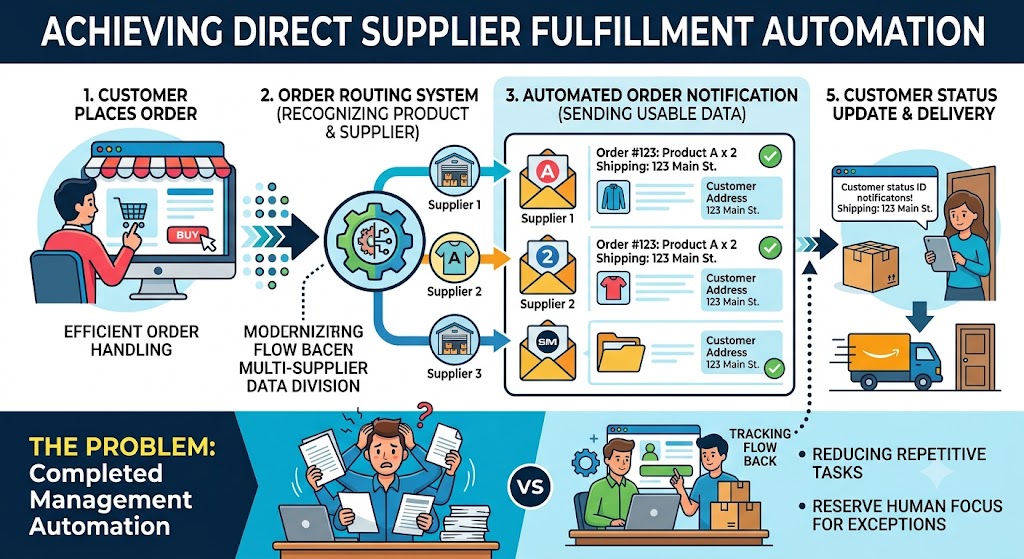
The ideal workflow for the merchant is relatively simple.
A customer places an order on the ecommerce store.
The system checks which products are included in the order.
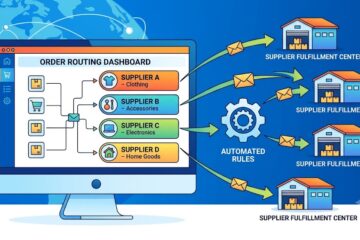
It then determines the appropriate supplier for those products.
The supplier automatically receives the order information.
The supplier prepares and ships the package.
The supplier provides tracking information.
The tracking information is then connected back to the customer’s order.
This creates a basic automated chain:
Customer Order → Supplier Identification → Order Notification → Supplier Shipment → Tracking Update → Customer
The merchant can therefore spend less time forwarding individual orders.
Supplier Rules Are the Foundation
For this system to work reliably, every product needs to be associated with the correct supplier.
For example:
| Product | Supplier |
| Product A | Supplier 1 |
| Product B | Supplier 2 |
| Product C | Supplier 3 |
| Product D | Supplier 1 |
When a customer purchases Product A, the system knows that Supplier 1 should receive the order.
When a customer purchases Product C, Supplier 3 receives the relevant information.
This requires accurate supplier data.
If products are incorrectly assigned, automation can send orders to the wrong supplier.
Therefore, before automating fulfillment, merchants should organize their product catalog carefully.
What Information Should the Supplier Receive?
A supplier needs enough information to fulfill the order correctly.
Depending on the business model, this may include:
- Order number
- Product name
- Product code
- Quantity
- Customer name
- Shipping address
- Contact information
- Special delivery instructions
- Any relevant order notes
The information should be presented clearly.
The supplier should not have to search through a complicated system to understand what needs to be shipped.
Good automation is not simply about sending information automatically.
It is about sending the right information in a usable format.
Handling Orders With Multiple Suppliers
The situation becomes more complicated when a customer buys products from multiple suppliers in the same order.
For example, a customer purchases:
- Product A from Supplier 1
- Product B from Supplier 2
The order cannot simply be forwarded to one supplier.
Each supplier needs to receive the relevant portion of the order.
Supplier 1 needs information about Product A.
Supplier 2 needs information about Product B.
This can result in multiple shipments reaching the customer separately.
The merchant therefore needs a fulfillment workflow that can divide an order according to supplier responsibility.
This is one of the areas that should be tested carefully before relying on automation at scale.
Tracking Information Is Equally Important
Sending the order to the supplier is only half of the fulfillment process.
The store also needs to know when the supplier has shipped the order.
Customers expect to receive shipment updates.
Without tracking information, the merchant may have to contact the supplier manually and then update the order.
A better workflow allows the supplier to provide:
- Shipping confirmation
- Courier information
- Tracking number
- Shipment status
The tracking information can then be connected with the customer order.
This reduces the amount of manual communication required between the merchant and supplier.
Automation Does Not Necessarily Mean Zero Manual Work
One important question raised later in the discussion is whether the proposed workflow actually removes all manual work.
This is an important distinction.
Automation can reduce repetitive tasks, but it does not necessarily eliminate every operational responsibility.
The merchant may still need to handle situations such as:
- Supplier does not respond
- Product is out of stock
- Incorrect product is shipped
- Supplier misses the expected shipping date
- Customer changes the address
- Order needs cancellation
- Tracking information is missing
- Supplier sends incorrect tracking information
- Product is returned
- Customer requests a replacement
These exceptions usually require human attention.
Therefore, the realistic goal should not be:
“No manual work at all.”
A better goal is:
“Automate the routine orders so that manual attention is reserved for exceptions.”
That is a much more practical approach.
Supplier Reliability Matters
Automation can make order routing faster, but it cannot automatically make an unreliable supplier reliable.
If a supplier regularly:
- Ships late
- Sends incorrect products
- Runs out of stock
- Provides incorrect tracking
- Ignores order notifications
- Uses poor packaging
then the customer experience can still suffer.
The merchant should therefore evaluate suppliers separately from the automation system.
Important supplier performance indicators include:
- Average fulfillment time
- Order accuracy
- Product availability
- Shipping consistency
- Communication speed
- Return handling
- Tracking accuracy
A reliable automation workflow combined with unreliable suppliers can still produce operational problems.
Start With a Small Test
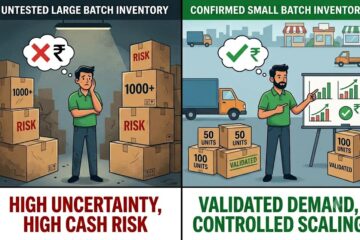
Before automating the entire store, it can be useful to start with a limited number of products or suppliers.
For example, select one supplier and a small group of products.
Test the complete process:
Order → Supplier Notification → Fulfillment → Shipment → Tracking
Check whether every step works correctly.
Then introduce another supplier.
This staged approach makes it easier to identify problems before they affect hundreds of customer orders.
Create Clear Supplier Instructions
Suppliers should know exactly what happens when they receive an automated order.
Instructions might explain:
- How to identify a new order
- How quickly it should be shipped
- What information must be checked
- How tracking information should be submitted
- What to do if inventory is unavailable
- How to report damaged products
- How to handle customer-specific requests
This reduces confusion.
Automation works best when the human process behind it is already clear.
Set Expectations for Fulfillment Time
The merchant should also establish realistic fulfillment timelines.
For example:
- Orders received before a certain time are processed the same day.
- Orders should normally ship within one business day.
- Tracking should be submitted after shipment.
- Stock shortages should be reported immediately.
These expectations help the merchant identify exceptions.
If a supplier normally ships within one day but an order remains unfulfilled for three days, the merchant can investigate before the customer complains.
What Happens When a Supplier Is Out of Stock?
Inventory availability is one of the biggest challenges in a multi-supplier model.
A product may be available when a customer places the order but become unavailable before the supplier processes it.
The store needs a plan for this situation.
Possible responses include:
- Contacting the customer
- Offering an alternative product
- Waiting for replenishment
- Cancelling the affected item
- Finding another supplier
This is another example of why automation should be designed around exceptions.
The normal process can be automated, while unusual cases can be sent for human review.
Keep Supplier Data Organized
As the number of suppliers increases, maintaining accurate product-to-supplier relationships becomes increasingly important.
A merchant should maintain clear records of:
- Supplier name
- Products supplied
- Supplier contact details
- Product codes
- Wholesale pricing
- Expected fulfillment time
- Stock availability
- Shipping methods
- Return policies
Without organized information, automation becomes difficult to maintain.
The system needs reliable data to make reliable decisions.
Measuring Whether Automation Is Working
After implementing an automated fulfillment process, merchants should measure its impact.
Useful metrics include:
Order processing time:
How long does it take for an order to reach the correct supplier?
Fulfillment time:
How quickly does the supplier ship?
Order accuracy:
How often are products shipped correctly?
Tracking availability:
How frequently is tracking information received on time?
Manual intervention:
How many orders require human attention?
Supplier response time:
How quickly do suppliers respond to fulfillment issues?
These measurements show whether the process is actually improving operations.
The Bigger Benefit: Scaling Without Adding the Same Amount of Manual Work
The main advantage of supplier fulfillment automation is scalability.
Imagine a merchant manually forwarding 20 orders per day.
As the store grows to 100 orders per day, the same process could become overwhelming.
Automation allows the routine portion of the workflow to scale without requiring the merchant to manually perform every step.
The merchant can focus more on:
- Product selection
- Marketing
- Customer relationships
- Supplier management
- Business growth
- Improving the overall customer experience
Instead of spending most of the day copying order information between systems.
Final Takeaway
Automating supplier fulfillment can be particularly useful for ecommerce businesses that work with multiple independent suppliers and want those suppliers to ship products directly to customers.
The key is to distinguish this model from warehouse-based fulfillment.
The merchant in this discussion is not looking for a company to store and ship all inventory. The goal is to automatically route each customer order to the supplier responsible for that product.
A successful workflow can look like:
Customer places order → Products are matched to suppliers → Relevant supplier receives order → Supplier ships product → Tracking is submitted → Customer receives shipment updates.
However, automation should not be expected to eliminate every manual task.
Supplier communication problems, stock shortages, returns, cancellations, incorrect shipments, and other exceptions will still require attention.
The most practical approach is therefore to automate the predictable part of the fulfillment process while creating clear procedures for exceptions.
Before scaling, merchants should test the process with a small number of suppliers and products, verify that order information is accurate, confirm that tracking flows correctly, and measure how much manual work remains.
Ultimately, the purpose of fulfillment automation is not simply to make orders move faster.
It is to create a repeatable, reliable process that allows an ecommerce business to grow without every additional order creating another manual task for the store owner.
0 Comments