For an ecommerce business that works with multiple suppliers, fulfilling customer orders manually can quickly become one of the most time-consuming parts of daily operations. When a customer places an order, the store owner may need to identify which supplier provides each product, collect the necessary order information, send it to the supplier, wait for the supplier to process the order, and then update the store once shipping information becomes available.
This process may be manageable when order volume is low. As the business grows, however, manually forwarding every order can create delays, increase administrative work, and lead to mistakes.
A Shopify Community discussion focuses on exactly this challenge. A merchant purchases products wholesale from several suppliers. These suppliers are not using a standard dropshipping platform, but they are willing to ship products directly to customers.
The merchant wants to automate the process so that when a customer places an order, the relevant supplier automatically receives the order details and can fulfill it.
The discussion also highlights an important distinction between warehouse-based fulfillment and direct supplier fulfillment. While some fulfillment solutions can automate shipping after inventory has been sent to a warehouse, the merchant in this discussion does not want to move inventory into a separate warehouse. Instead, the original suppliers should receive the orders directly and ship them to customers.
Why Manual Supplier Fulfillment Becomes Difficult
Imagine an online store works with five different suppliers.
Supplier A provides clothing.
Supplier B provides accessories.
Supplier C provides home products.
Supplier D provides electronics.
Supplier E provides specialty products.
A customer places an order containing products from Supplier A and Supplier C.
Without automation, someone at the store may need to:
- Receive the customer order.
- Identify the suppliers associated with the products.
- Separate the relevant product information.
- Send Supplier A the appropriate details.
- Send Supplier C the appropriate details.
- Confirm that both suppliers received the information.
- Wait for shipping details.
- Collect tracking information.
- Add the tracking details to the customer order.
- Notify the customer.
As order volume increases, these steps become repetitive.
The problem becomes even more complicated when different orders contain products from different suppliers.
Manual processing creates several risks.
An order could be sent to the wrong supplier. A supplier could receive incomplete information. A tracking number could be forgotten. A customer could receive a shipping notification late.
Automation attempts to reduce these repetitive tasks.
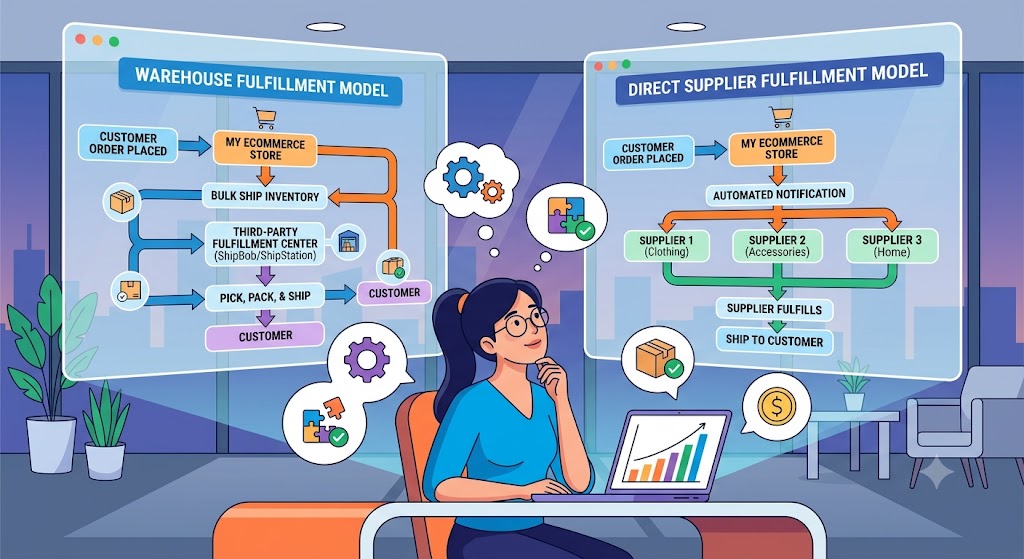
Direct Supplier Fulfillment Versus Warehouse Fulfillment
One of the most important points in the discussion is that there are different ways to automate fulfillment.
A common approach is to use a fulfillment provider.
In that model, the merchant sends inventory to a warehouse. The fulfillment provider stores the products and ships orders to customers when purchases are made.
This can automate a significant portion of the fulfillment process.
However, that is not what the merchant in this discussion wants.
The merchant’s suppliers already have the inventory.
Instead of sending products to another warehouse, the suppliers should receive the customer order directly and ship the products themselves.
This is sometimes described as a direct supplier fulfillment model.
The difference is important.
Warehouse-Based Model
The process looks like:
Merchant → Warehouse → Customer
Inventory is stored at a centralized fulfillment location.
Direct Supplier Model
The process looks like:
Supplier → Customer
The supplier keeps the inventory and ships the order after receiving the necessary information.
The merchant acts as the ecommerce storefront and order coordinator.
The second model can be attractive for businesses that do not want to purchase and store large quantities of inventory themselves.
How Automated Order Routing Can Work
The basic idea behind automated supplier fulfillment is relatively simple.
Each product needs to be associated with a supplier.
When a customer places an order, the system checks which products were purchased.
It then determines which supplier is responsible for those products.
The appropriate supplier receives the order information automatically.
For example:
| Product | Supplier |
| Product A | Supplier 1 |
| Product B | Supplier 2 |
| Product C | Supplier 3 |
If a customer purchases Product A, the order information is sent to Supplier 1.
If another customer purchases Product C, the order information is sent to Supplier 3.
The merchant does not have to manually identify the supplier every time.
This is the basic principle behind rule-based order routing.
Creating Supplier-Specific Rules
Automation becomes particularly useful when merchants can create rules based on products or supplier information.
For example:
If an order contains products from Supplier A → send order details to Supplier A.
Another rule might be:
If an order contains products from Supplier B → send order details to Supplier B.
These rules allow the order workflow to operate automatically.
The merchant establishes the relationships in advance.
After that, new orders can follow the predefined workflow.
This can reduce the amount of repetitive administrative work involved in supplier communication.
What Information Should Be Sent to the Supplier?
For direct fulfillment to work properly, the supplier needs enough information to ship the order correctly.
Depending on the business, this can include:
- Order number
- Product name
- Product variant
- Quantity
- Customer name
- Shipping address
- Postal code
- Country
- Customer contact information where appropriate
- Special delivery instructions
- Order notes
- Shipping requirements
The information sent should be limited to what the supplier actually needs.
Accuracy is particularly important because the supplier is responsible for preparing the package and sending it directly to the customer.
If an address or product variant is incorrect, the problem can affect both the customer and the merchant.
Handling Multiple Suppliers in One Order
One of the more complicated situations occurs when a customer purchases products from multiple suppliers in the same order.
For example:
Customer Order #5001
- Product A → Supplier A
- Product B → Supplier B
- Product C → Supplier A
The order cannot simply be sent as one package of information to a single supplier.
Instead, the system needs to recognize that Supplier A is responsible for Products A and C, while Supplier B is responsible for Product B.
The supplier instructions could therefore be divided into:
Supplier A
- Product A – Quantity 1
- Product C – Quantity 2
- Customer shipping details
Supplier B
- Product B – Quantity 1
- Customer shipping details
This is one reason supplier rules and product-to-supplier relationships need to be maintained accurately.
Tracking Information Is the Second Half of the Process
Sending the order to a supplier is only one part of fulfillment automation.
Once the supplier ships the product, the store also needs the tracking information.
Without tracking information, the customer may not receive an accurate shipping update.
The discussion mentions a workflow in which suppliers can provide tracking information back to the store.
This creates a two-way process:
Store → Supplier
Order information is automatically sent to the supplier.
Supplier → Store
Shipping and tracking information is returned to the store.
This is important because the merchant should not have to manually copy every tracking number from supplier messages into individual customer orders.
Why Tracking Automation Matters
Consider a store processing 100 orders per day.
If every supplier sends tracking information separately through email or messages, the store may have to manually collect those tracking numbers.
Even if each update takes only a minute or two, the total administrative workload can become significant.
There is also a risk of human error.
A tracking number could be entered against the wrong order.
A supplier could send tracking information but the store could forget to update the order.
A customer could therefore receive incomplete shipping information.
A structured tracking workflow reduces these problems.
The Importance of Accurate Supplier Data
Automation works only when the underlying data is correct.
If a product is assigned to the wrong supplier, the order could be sent to the wrong company.
This means merchants need a consistent way to identify which supplier is responsible for each product.
Supplier information might be maintained through product-level information, catalog structures, tags, or other internal data.
The exact method can vary, but the principle remains the same:
Every product that participates in automated fulfillment should have a clearly defined fulfillment source.
Without this information, an automated system cannot reliably determine where the order should go.
What Happens When a Supplier Cannot Fulfill an Order?
Real-world supplier relationships are rarely perfect.
A supplier might run out of stock.
A product might be temporarily unavailable.
A supplier might stop selling a particular item.
A customer might request a change after ordering.
An order could also contain a product that does not have a valid supplier assignment.
A robust workflow should therefore have a way to identify exceptions.
Instead of silently failing, the system should make it clear that an order requires human attention.
For example:
Order #5005 – Supplier not identified
This is much safer than automatically sending incomplete information.
Automation should reduce repetitive work without hiding problems.
Automation Does Not Eliminate Every Manual Task
One of the important questions raised later in the discussion is whether the proposed workflow actually removes all manual work.
This is an important question because automation is sometimes described as if everything happens automatically.
In reality, some tasks may still require human involvement.
For example:
- Adding a new supplier
- Assigning products to that supplier
- Resolving supplier errors
- Handling out-of-stock products
- Reviewing failed order notifications
- Managing customer changes
- Handling unusual shipping requests
- Following up with suppliers who do not respond
- Resolving missing tracking information
The objective is not necessarily to eliminate every manual action.
A better objective is to automate the predictable and repetitive parts while leaving exceptions for human review.
Supplier Communication Can Also Be Standardized
Another advantage of automation is consistency.
Different employees may send different information to suppliers when orders are processed manually.
One employee might include the order number and shipping address.
Another might forget to include the product variant.
A structured workflow can create a consistent order format.
Every supplier can receive the information they need in a predictable way.
This can reduce communication errors and make supplier relationships easier to manage.
What Merchants Should Test Before Relying on Automation
Before moving the entire fulfillment process to an automated workflow, merchants should test it carefully.
A useful testing process might include:
Test 1: Single-Supplier Order
Place an order containing products from one supplier.
Confirm that the supplier receives the correct information.
Test 2: Multiple-Product Order
Place an order containing several products from the same supplier.
Confirm that quantities and variants are correct.
Test 3: Multi-Supplier Order
Place an order containing products from two or more suppliers.
Confirm that each supplier receives only the products they are responsible for.
Test 4: Tracking Update
Ask the supplier to provide tracking information.
Confirm that the information reaches the correct order.
Test 5: Exception
Test an order containing a product with missing or incorrect supplier information.
Confirm that the system identifies the issue rather than sending incorrect information.
Testing these scenarios can reveal problems before the workflow is used for real customer orders.
Measuring Whether Automation Is Actually Helping
A merchant should also measure the results after implementing an automated fulfillment process.
Useful metrics can include:
- Time spent processing orders
- Number of manual supplier emails
- Fulfillment delays
- Number of incorrect supplier assignments
- Missing tracking numbers
- Customer support requests
- Order processing errors
- Supplier response time
The purpose of automation is not simply to create a sophisticated workflow.
It should produce a measurable improvement in daily operations.
If employees still spend almost as much time managing orders manually, the workflow may need further refinement.
Why the Community Discussion Remains Open
The original merchant planned to try the proposed approach, but the later discussion shows that the real-world outcome had not yet been confirmed.
Another participant specifically asked whether the solution worked in practice and whether any manual work remained.
That question is important because a workflow can look effective conceptually but behave differently when used with real suppliers and real orders.
Suppliers may have different processes.
Some may respond quickly.
Others may take hours or days to process an order.
Some may provide tracking information consistently.
Others may need reminders.
Therefore, practical testing is necessary before concluding that the entire fulfillment process can operate without significant manual involvement.
The Bigger Lesson for Ecommerce Businesses
The discussion highlights a broader principle about ecommerce automation.
The most useful automation is usually not about making a complicated process look sophisticated.
It is about removing repetitive actions that do not require human decision-making.
Supplier fulfillment is a strong example.
The merchant does not need to manually decide every time that Product A belongs to Supplier A.
That relationship can be established once.
After that, the system can route the order automatically.
The merchant’s time can then be reserved for exceptions, supplier relationships, customer issues, and business decisions.
This approach becomes increasingly valuable as order volume grows.
Conclusion
Automating supplier fulfillment can significantly reduce the administrative work involved in running an ecommerce store that depends on multiple wholesale suppliers.
The model discussed in the Shopify Community focuses on sending customer orders directly to the relevant suppliers instead of moving inventory into a centralized warehouse.
The basic workflow is:
Customer places order → Supplier is identified → Order details are sent to supplier → Supplier ships product → Tracking information is returned → Customer receives shipping updates.
The success of this process depends on accurate supplier-product relationships, complete order information, reliable supplier communication, and a structured way to return tracking details.
It is also important to recognize that automation does not necessarily eliminate every manual task. New products, supplier changes, stock issues, failed workflows, unusual orders, and missing tracking information may still require human attention.
The key benefit is reducing the repetitive work that occurs between receiving an order and sending it to the correct supplier.
For merchants working with several suppliers, this can turn fulfillment from a manual administrative process into a more structured workflow. However, as the open discussion suggests, the real measure of success is not whether the automation works in theory. It is whether it continues to work reliably with real suppliers and real customer orders while keeping manual intervention to a minimum.

0 Comments