Why Automatic Syncing Matters
Inventory management becomes increasingly complex as an ecommerce business grows. When a business manages multiple locations, suppliers, warehouses, and incoming shipments, even a small amount of duplicate data entry can create unnecessary work. More importantly, manual inventory updates can introduce errors that affect stock levels, purchasing decisions, fulfillment, and customer orders.
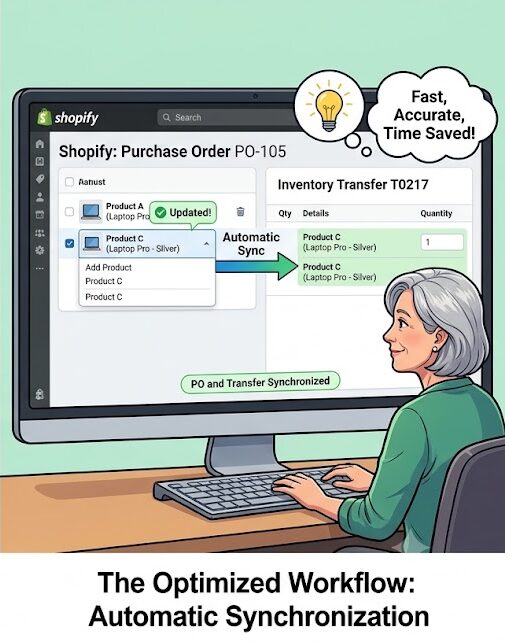
The Shopify Community discussion “Purchase Order to Sync with Transfer” highlights one such workflow problem. The user is requesting that when new products are added to an existing purchase order, the associated inventory transfer should automatically update with those products as well.
The current workflow described in the discussion requires the merchant to manually add the same products to the transfer again. This means that information already entered into the purchase order has to be entered a second time.
The issue may appear small, but for businesses processing frequent purchase orders and inventory movements, this kind of duplication can become a significant operational burden.
Understanding Purchase Orders and Inventory Transfers
Before looking at the problem, it is useful to understand the difference between a purchase order and an inventory transfer.
A purchase order represents products a business intends to purchase from a supplier. It can contain information such as:
- Products being ordered
- Quantities
- Supplier information
- Expected delivery
- Purchase details
- Costs
- Receiving information
An inventory transfer, on the other hand, represents the movement of inventory between locations.
For example, a business might purchase 100 units from a supplier and receive them at one warehouse. Later, some of those units may need to be moved to another warehouse or retail location.
These two processes are connected.
The purchase order describes what is being acquired, while the transfer describes where inventory is moving.
Because the two workflows are closely related, merchants naturally expect information entered in one place to remain synchronized where appropriate.
The Problem With Duplicate Data Entry
The main complaint in the discussion is straightforward.
When products are added to an associated purchase order, the same products must also be manually added to the inventory transfer.
Imagine a purchase order initially containing:
- Product A — 20 units
- Product B — 30 units
An inventory transfer is created based on that order.
Later, the merchant adds:
- Product C — 15 units
The expectation is that the associated transfer would recognize the new product.
Instead, according to the issue described by the user, the merchant has to manually add Product C to the transfer as well.
This creates duplicate work.
The merchant has already entered the information once. Entering it again does not add business value. It simply consumes time and creates another opportunity for a mistake.
Why Manual Re-entry Can Create Errors
Duplicate data entry is not only inconvenient.
It can also create inconsistencies.
Suppose a merchant adds 50 units of a product to a purchase order but accidentally enters 40 units in the transfer.
The two records now contain different information.
This can lead to confusion when employees later try to determine:
- How much inventory was ordered
- How much inventory is expected
- How much inventory is being transferred
- Which location should receive the products
- Whether all ordered products have been accounted for
These discrepancies become more difficult to manage as the number of products increases.
A small mistake on one product may not seem serious. But when a business processes hundreds of products across multiple orders and locations, small errors can accumulate.
The Importance of Synchronization
Synchronization is valuable because it allows connected records to stay consistent.
When two workflows depend on the same product information, automatically carrying changes from one workflow to another can reduce administrative effort.
In the situation described by the community user, the purchase order acts as an important source of information.
If a product is added to the purchase order, the associated transfer could potentially recognize that change.
This would allow the merchant to avoid entering the same information twice.
Automatic synchronization can be particularly useful when purchase orders change frequently.
A supplier may confirm additional products, quantities may be adjusted, or products may be added after the initial order is created.
Every change creates another opportunity for duplicate manual work if connected records do not update accordingly.
A Real-World Example
Consider an ecommerce business with three warehouse locations.
The business places a purchase order for 500 units across ten products.
An inventory transfer is prepared so that the incoming products can eventually be distributed between locations.
After the supplier confirms the order, the merchant adds three more products to the purchase order.
Without synchronization, the employee must remember to open the associated transfer and manually add those three products.
Now imagine that the purchase order contains 50 or 100 products.
The problem becomes much more significant.
Employees have to compare the purchase order and transfer manually to make sure that every product is represented correctly.
This can turn a simple inventory workflow into a repetitive administrative task.
Why This Matters More as Businesses Grow
Manual processes may seem manageable when an operation is small.
A business with ten products and a few purchase orders per month may not consider duplicate entry a major problem.
But ecommerce businesses often grow quickly.
As order volume increases, the number of:
- Products
- Suppliers
- Purchase orders
- Warehouses
- Transfers
- Employees
- Inventory movements
also increases.
A process that takes five minutes for one order may consume hours when repeated dozens of times.
This is why workflow design becomes increasingly important as a business scales.
Efficiency is not only about saving a few minutes.
It is about creating systems that remain manageable as transaction volume increases.
Reducing Repetitive Administrative Work
The request in the discussion reflects a broader principle in ecommerce operations:
Information should ideally be entered once and reused wherever appropriate.
If a merchant has already provided the product and quantity information in a purchase order, requiring the same information to be entered again creates unnecessary friction.
A better workflow would allow connected processes to share information automatically.
This could reduce:
- Manual entry
- Reconciliation work
- Human error
- Training requirements
- Processing time
- Administrative overhead
Employees could spend more time handling exceptions and operational decisions instead of copying information between records.
The Importance of Change Tracking
There is another important aspect to synchronization: what happens when the original purchase order changes?
A useful synchronization system would need to distinguish between different types of changes.
For example:
Product Added
A new product is added to the purchase order.
The associated transfer should recognize the new item.
Quantity Changed
The quantity of an existing product is increased or reduced.
The transfer may need to reflect the updated quantity.
Product Removed
A product is removed from the purchase order.
The transfer may need to determine whether that product should also be removed or whether it has already entered another stage of the workflow.
Transfer Already Processed
This creates a more complicated situation.
If inventory has already been transferred or partially received, automatically changing historical records could create problems.
Therefore, synchronization needs to be designed carefully.
The goal is not simply to copy every change automatically.
The goal is to keep related workflows aligned without compromising inventory accuracy or historical records.
Previous Workflow and User Expectations
The user in the discussion also mentions that the previous system handled this process better.
This is important because changes to business workflows can create frustration when an existing process was simpler.
Merchants build routines around the way their inventory systems work.
When a workflow changes, employees may suddenly need to perform additional steps that did not previously exist.
Even if the new system has other improvements, losing an important efficiency can negatively affect daily operations.
This is why feedback from merchants who use inventory features regularly can be valuable.
They can identify workflow problems that may not be obvious during initial product design.
The Example of Transfer T0217
The discussion references transfer T0217 as a specific example of the issue.
Using a real transfer makes the problem easier to understand because it demonstrates that the request is not purely theoretical.
The user is pointing to an actual workflow where products added to the purchase order are not automatically reflected in the related transfer.
This type of example can help product teams understand:
- What the merchant expected
- What actually happened
- Where the workflow breaks
- Which manual step is unnecessary
- How the previous experience differed
Concrete examples are particularly useful when investigating workflow issues because they provide a specific case that can be reproduced and examined.
Automation Can Improve Inventory Accuracy
Automatic synchronization is not only about convenience.
It can also improve accuracy.
Every time an employee manually copies product information, there is a possibility of entering the wrong:
- Product
- Quantity
- Variant
- Location
- Reference
- Status
Removing unnecessary manual steps can reduce those opportunities.
However, automation should always be designed with safeguards.
Inventory systems deal with real quantities and real financial consequences. An incorrect automated update can sometimes be more damaging than a manual mistake.
For that reason, synchronization should be predictable and transparent.
Users should understand which records are connected and what happens when information changes.
What an Improved Workflow Could Look Like
A more efficient workflow could work like this:
Step 1: Create the Purchase Order
The merchant adds the required products and quantities.
Step 2: Create the Associated Transfer
The transfer is connected to the purchase order.
Step 3: Add or Modify Products
If new products are added to the purchase order before the relevant transfer is finalized, the associated transfer automatically recognizes those changes.
Step 4: Review
The merchant can review the synchronized information before completing the movement.
Step 5: Process the Transfer
Once everything is confirmed, the transfer can proceed without requiring the employee to manually recreate the product list.
This would preserve human oversight while eliminating repetitive entry.
Synchronization Should Still Allow Manual Control
Automatic synchronization does not necessarily mean that merchants should lose control.
There may be situations where a transfer intentionally contains only some of the products from a purchase order.
For example, a supplier might send products in multiple shipments.
The merchant may want:
- Part of the order sent to one location
- Another portion sent elsewhere
- Different quantities assigned to different transfers
Therefore, an improved system should ideally support both automation and flexibility.
Automatic updates can handle the normal workflow, while merchants should still be able to make intentional adjustments when necessary.
Why This Is a Product Experience Issue
The discussion is ultimately about more than one missing feature.
It reflects a broader question about how ecommerce systems should handle connected workflows.
When two records are clearly related, users naturally expect them to work together.
If they do not, users have to create their own manual processes.
These workarounds can include spreadsheets, notes, checklists, or repeated data entry.
Over time, these workarounds increase complexity.
Good product design should reduce unnecessary operational complexity rather than forcing merchants to build manual systems around it.
A Small Feature With a Large Operational Impact
Automatic purchase-order and transfer synchronization may sound like a small improvement.
But small workflow improvements can have a significant impact when they are repeated every day.
If an employee saves five minutes on each purchase order and processes 100 purchase orders per month, that becomes several hours of saved administrative work.
More importantly, fewer manual steps mean fewer opportunities for mistakes.
For larger operations, the impact can be even greater.
Inventory management is made up of many small processes. Improving several of these processes can significantly improve overall operational efficiency.
What Merchants Should Consider
Until a workflow like this is improved, merchants dealing with purchase orders and transfers should be careful about maintaining consistency between the two records.
A practical process may include:
- Reviewing the purchase order before creating the transfer.
- Checking for product additions or quantity changes afterward.
- Comparing the transfer against the latest purchase order.
- Confirming that product quantities match.
- Reviewing changes before inventory is moved.
- Keeping a record of intentional differences between the two workflows.
These steps do not eliminate the underlying duplication, but they can help reduce inventory discrepancies.
Final Thoughts
The “Purchase Order to Sync with Transfer” discussion highlights a common challenge in modern ecommerce operations: connected workflows should ideally work together instead of requiring merchants to repeat the same information.
When a product is added to a purchase order, manually adding that same product to an associated inventory transfer creates unnecessary work. It also increases the possibility of differences between the two records.
Automatic synchronization could make the workflow faster, simpler, and potentially more accurate, while still allowing merchants to make intentional adjustments when inventory is divided between locations or shipments.
The most important consideration is that synchronization should be carefully designed around real inventory scenarios. Product additions, quantity changes, removals, partial shipments, and completed transfers all need to be handled appropriately.
For merchants, the larger lesson is clear: efficient inventory management depends not only on tracking stock but also on connecting the processes that control that stock.
When related records remain synchronized, employees spend less time copying information and more time managing the business.
The request described in the discussion is therefore a practical example of how a seemingly small workflow improvement can make everyday inventory management considerably more efficient.